<?xml version="1.0" encoding="utf-8"?>
<feed xmlns="http://www.w3.org/2005/Atom">

  <title><![CDATA[Ashwani's Tech World - Giving back to community]]></title>
  <link href="http://blog.ashwani.co.in/atom.xml" rel="self"/>
  <link href="http://blog.ashwani.co.in/"/>
  <updated>2023-02-26T20:58:09+00:00</updated>
  <id>http://blog.ashwani.co.in/</id>
  <author>
    <name><![CDATA[Ashwani Kumar]]></name>
    <email><![CDATA[aryan.ashwani@gmail.com]]></email>
  </author>
  <generator uri="http://octopress.org/">Octopress</generator>

  
  <entry>
    <title type="html"><![CDATA[SPIFFE Implementation with SPIRE And OIDC Setup]]></title>
    <link href="http://blog.ashwani.co.in/blog/2023-02-26/spiffe-implementation-with-spire-and-oidc-setup/"/>
    <updated>2023-02-26T18:32:22+00:00</updated>
    <id>http://blog.ashwani.co.in/blog/2023-02-26/spiffe-implementation-with-spire-and-oidc-setup</id>
    <content type="html"><![CDATA[<p>As a solution architect, I'm excited to share my thoughts on two important frameworks in the world of technology - SPIFFE and SPIRE. These frameworks have been gaining popularity in last few years, and they play a crucial role in zero trust and ensuring the security and privacy of data in various industries.</p>


<!-- more -->


<p>In this blog, I'll not explore the concepts behind SPIFFE and SPIRE and their benefits for businesses. I'll also not discuss how these frameworks work together to provide a comprehensive security solution.
Please Read more about SPIFFE and SPIRE seperately.
This article is a note to myself how to quickstart a demo for SPIRE and implementation of SPIFFE.</p>


<h2>Configure SPIRE Server on Kubernetes</h2>


<p>Clone <a href="https://github.com/spiffe/spire-tutorials">https://github.com/spiffe/spire-tutorials</a> and obtain the .yaml files from the spire-tutorials/k8s/quickstart subdirectory.</p>


<p>Remember to run all kubectl commands in the directory in which those files reside.</p>


<h2>Configure Kubernetes Namespace for SPIRE Components</h2>


<p>Follow these steps to configure the spire namespace in which SPIRE Server and SPIRE Agent are deployed.</p>


<p>Change to the directory containing the .yaml files.</p>


<h4>Create the namespace:</h4>


<pre><code>$ kubectl apply -f spire-namespace.yaml
</code></pre>


<p>Run the following command and verify that spire is listed in the output:
<code>
$ kubectl get namespaces
</code></p>


<h4>Create Server Bundle Configmap, Role &amp; ClusterRoleBinding</h4>


<p>For the server to function, it is necessary for it to provide agents with certificates that they can use to verify the identity of the server when establishing a connection.</p>


<p>In a deployment such as this, where the agent and server share the same cluster, SPIRE can be configured to automatically generate these certificates on a periodic basis and update a configmap with contents of the certificate. To do that, the server needs the ability to get and patch a configmap object in the spire namespace.</p>


<p>To allow the server to read and write to this configmap, a ClusterRole must be created that confers the appropriate entitlements to Kubernetes RBAC, and that ClusterRoleBinding must be associated with the service account created in the previous step.</p>


<p>Create the server's  service account, configmap and associated role bindings as follows:</p>


<pre><code>$ kubectl apply \
    -f server-account.yaml \
    -f spire-bundle-configmap.yaml \
    -f server-cluster-role.yaml
</code></pre>


<h2>Create Server Configmap</h2>


<p>The server is configured in the Kubernetes configmap specified in server-configmap.yaml, which specifies a number of important directories, notably /run/spire/data and /run/spire/config. These volumes are bound in when the server container is deployed.</p>


<p>Change service type to LoadBalancer instead of NodePort in the server-service.yaml
Add NodeAttestor join_token in server-configmap.yaml</p>


<pre><code>    NodeAttestor "join_token" {
        plugin_data {}
      } 
</code></pre>


<p>Deploy the server configmap and statefulset by applying the following files via kubectl:</p>


<pre><code>$ kubectl apply \
    -f server-configmap.yaml \
    -f server-statefulset.yaml \
    -f server-service.yaml
</code></pre>


<p>This creates a statefulset called spire-server in the spire namespace and starts up a spire-server pod, as demonstrated in the output of the following commands:</p>


<pre><code>$ kubectl get statefulset --namespace spire

NAME           READY   AGE
spire-server   1/1     86m

$ kubectl get pods --namespace spire

NAME                           READY   STATUS    RESTARTS   AGE
spire-server-0                 1/1     Running   0          86m

$ kubectl get services --namespace spire

NAME           TYPE       CLUSTER-IP      EXTERNAL-IP   PORT(S)          AGE
spire-server   NodePort   10.107.205.29   &lt;none&gt;        8081:30337/TCP   88m
</code></pre>


<h2>Create Join Token</h2>


<h4>Generate a one-time-use token to use to attest the agent:</h4>


<h4>On Server</h4>


<p>Creating a join token to attest the agent to the server
A join token is one of the many available agent attestor methods. It is a one-time-use, pre-shared key that attests (authenticates) the SPIRE agent to the SPIRE server. Other agent attestation methods include AWS/GCP instance identity tokens and X.509 certificates. To see a complete list of available attestors, click <a href="https://deploy-preview-272--spiffe.netlify.app/docs/latest/spire/using/registering/#1-defining-the-spiffe-id-of-the-agent.">https://deploy-preview-272--spiffe.netlify.app/docs/latest/spire/using/registering/#1-defining-the-spiffe-id-of-the-agent.</a></p>


<pre><code>kubectl -n spire exec -it $(kubectl -n spire get pods -o=jsonpath='{.items[0].metadata.name}' -l app=spire-server) -- /opt/spire/bin/spire-server token generate  -spiffeID spiffe://example.org/myagent

Token: db2exxxxx-61d6-428e-8297-1efc0xxxxxx
</code></pre>


<p>Make a note of the token, you will need it in the next step to attest the agent on initial startup.</p>


<blockquote><p>A Join Token is just one of the many available agent attestation methods. To see a complete list of available attestors, click <a href="https://deploy-preview-272--spiffe.netlify.app/docs/latest/spire/using/registering/#1-defining-the-spiffe-id-of-the-agent.">https://deploy-preview-272--spiffe.netlify.app/docs/latest/spire/using/registering/#1-defining-the-spiffe-id-of-the-agent.</a></p></blockquote>


<h2>Configure Agent on client side (on-prem)</h2>


<h4>Install agent</h4>


<p>Read this: <a href="https://deploy-preview-272--spiffe.netlify.app/docs/latest/try/getting-started-linux-macos-x/#downloading-spire-for-linux">https://deploy-preview-272--spiffe.netlify.app/docs/latest/try/getting-started-linux-macos-x/#downloading-spire-for-linux</a>
<code>
$ curl -s -N -L https://github.com/spiffe/spire/releases/download/v1.4.7/spire-1.4.7-linux-x86_64-glibc.tar.gz | tar xz
</code>
Create, and move the SPIRE executables into, a bin directory as expected by the rest of this document:
<code>
$ mkdir bin
$ mv spire-server spire-agent bin
</code></p>


<h4>Starting the SPIRE Agent</h4>


<p>SPIRE agents query the SPIRE server to attest (authenticate) nodes and workloads.</p>


<p>Use the token created in the previous step to start and attest the agent:</p>


<pre><code>$ spire-agent run -config /opt/spire/conf/agent/agent.conf -joinToken xxxxxc5-4336-456f-8140-05850xxxxxxxx

WARN[0000] Current umask 0022 is too permissive; setting umask 0027
INFO[0000] Starting agent with data directory: "./data/agent"
INFO[0000] Plugin loaded                                 external=false plugin_name=disk plugin_type=KeyManager subsystem_name=catalog
INFO[0000] Plugin loaded                                 external=false plugin_name=join_token plugin_type=NodeAttestor subsystem_name=catalog
INFO[0000] Plugin loaded                                 external=false plugin_name=unix plugin_type=WorkloadAttestor subsystem_name=catalog
INFO[0000] Bundle is not found                           subsystem_name=attestor
DEBU[0000] No pre-existing agent SVID found. Will perform node attestation  subsystem_name=attestor
WARN[0000] Keys recovered, but no SVID found. Generating new keypair  subsystem_name=attestor
INFO[0000] SVID is not found. Starting node attestation  subsystem_name=attestor
WARN[0000] Insecure bootstrap enabled; skipping server certificate verification  subsystem_name=attestor
INFO[0000] Node attestation was successful               rettestable=false spiffe_id="spiffe://example.org/spire/agent/join_token/b4ef1fc5-4336-456f-8140-05xxxxxxx335e" subsystem_name=attestor
DEBU[0001] Entry created                                 entry=9638xxxx-a983-499a-89ea-a6cxxxxxx385b selectors_added=1 spiffe_id="spiffe://example.org/myagent" subsystem_name=cache_manager
DEBU[0001] Renewing stale entries                        cache_type=workload count=1 limit=500 subsystem_name=manager
INFO[0001] Renewing X509-SVID                            spiffe_id="spiffe://example.org/myagent" subsystem_name=manager
DEBU[0001] SVID updated                                  entry=963846e0-a983-499a-89ea-a6c78f3f385b spiffe_id="spiffe://example.org/myagent" subsystem_name=cache_manager
DEBU[0001] Bundle added                                  subsystem_name=svid_store_cache trust_domain_id=example.org
INFO[0001] Starting Workload and SDS APIs                address=/tmp/spire-agent/public/api.sock network=unix subsystem_name=endpoints
DEBU[0002] Starting checker                              name=agent subsystem_name=health
</code></pre>


<h4>Check logs on server</h4>


<pre><code>kubectl logs -n spire $(kubectl -n spire get pods -o=jsonpath='{.items[0].metadata.name}' -l app=spire-server) -f 
....
....
time="2023-02-26T14:48:10Z" level=debug msg="Initializing health checkers" subsystem_name=health
time="2023-02-26T14:48:10Z" level=info msg="Serving health checks" address="0.0.0.0:8080" subsystem_name=health
time="2023-02-26T15:08:16Z" level=error msg="Invalid argument: join token expired" authorized_as=nobody authorized_via= caller_addr="10.56.1.1:27045" method=AttestAgent node_attestor_type=join_token request_id=3c3c4446-89aa-41f5-9f2b-77e86faeceba service=agent.v1.Agent subsystem_name=api
time="2023-02-26T15:08:56Z" level=info msg="Agent attestation request completed" address="10.128.0.5:41034" agent_id="spiffe://example.org/spire/agent/join_token/b4xxxxx5-4336-456f-8140-xxxxe9335e" authorized_as=nobody authorized_via= caller_addr="10.128.0.5:41034" method=AttestAgent node_attestor_type=join_token request_id=2f2e41bb-1f9d-4ddc-95c5-xxxxxxdd95 service=agent.v1.Agent subsystem_name=api
time="2023-02-26T15:08:57Z" level=debug msg="Signed X509 SVID" authorized_as=agent authorized_via=datastore caller_addr="10.56.1.1:49076" caller_id="spiffe://example.org/spire/agent/join_token/b4ef1fc5-4336-456f-8140-05xxxxxx9335e" entry_id=9638xxxx-a983-499a-89ea-a6c78xxxxx85b expiration="2023-02-26T16:08:57Z" method=BatchNewX509SVID request_id=bec5f734-70b3-4e1a-8562-c5ffefce7c1a service=svid.v1.SVID spiffe_id="spiffe://example.org/myagent" subsystem_name=api
</code></pre>


<h2>Register Workload</h2>


<h4>On Server</h4>


<p>Create a registration policy for your workload
In order for SPIRE to identify a workload, you must register the workload with the SPIRE Server, via registration entries. Workload registration tells SPIRE how to identify the workload and which SPIFFE ID to give it.</p>


<blockquote><p>This command is creating a registration entry based on the current user’s UID ($(id -u)) - feel free to adjust this as necessary</p></blockquote>


<pre><code>$ kubectl -n spire exec -it $(kubectl -n spire get pods -o=jsonpath='{.items[0].metadata.name}' -l app=spire-server) -- bin/spire-server entry create -parentID spiffe://example.org/myagent  -spiffeID spiffe://example.org/myservice -selector unix:uid:$(id -u)

Entry ID      : ac5e2354-596a-4059-85f7-5b7xxxxxxxxx
SPIFFE ID     : spiffe://example.org/myservice
Parent ID     : spiffe://example.org/myagent
TTL           : 3600
Selector      : unix:uid:501
</code></pre>


<h4>On Agent</h4>


<p>Retrieve and view a x509-SVID
This command replicates the process that a workload would take to get an x509-SVID from the agent. The x509-SVID could be used to authenticate the workload to another workload. To fetch and write an x509-SVID to /tmp/:</p>


<pre><code>$ spire-agent api fetch x509 -write /tmp/

Received 1 svid after 2.2703ms

SPIFFE ID:              spiffe://example.org/myservice
SVID Valid After:       2023-02-26 15:18:53 +0000 UTC
SVID Valid Until:       2023-02-26 16:19:03 +0000 UTC
CA #1 Valid After:      2023-02-26 14:47:58 +0000 UTC
CA #1 Valid Until:      2023-02-27 14:48:08 +0000 UTC

Writing SVID #0 to file /tmp/svid.0.pem.
Writing key #0 to file /tmp/svid.0.key.
Writing bundle #0 to file /tmp/bundle.0.pem.
</code></pre>


<h4>Check logs on Server</h4>


<p>Logs:
kubectl logs -n spire $(kubectl -n spire get pods -o=jsonpath='{.items[0].metadata.name}' -l app=spire-server) -f</p>


<p>time="2023-02-26T15:19:03Z" level=debug msg="Signed X509 SVID" authorized_as=agent authorized_via=datastore caller_addr="10.56.1.1:28674" caller_id="spiffe://example.org/spire/agent/join_token/xxxx336-456f-8140-05850ae9335e" entry_id=e1d7a74d-56b9-4fc2-b5de-0ff48xxx629 expiration="2023-02-26T16:19:03Z" method=BatchNewX509SVID request_id=d36dxxx4bb-466b-afe7-b0f047156317 service=svid.v1.SVID spiffe_id="spiffe://example.org/myservice" subsystem_name=api</p>


<p>You can use the openssl command to view the contents of the SVID:</p>


<pre><code class="">openssl x509 -in /tmp/svid.0.pem -text -noout
Certificate:
    Data:
        Version: 3 (0x2)
        Serial Number:
            92:23:22:2c:6b:15:84:f7:30:xx:xx:xx:xx:3e:b9:08
        Signature Algorithm: sha256WithRSAEncryption
        Issuer: C = US, O = SPIFFE
        Validity
            Not Before: Feb 26 15:18:53 2023 GMT
            Not After : Feb 26 16:19:03 2023 GMT
        Subject: C = US, O = SPIRE, x500UniqueIdentifier = f7fa051b660xxxx34e54056a8c4e281a
        Subject Public Key Info:
            Public Key Algorithm: id-ecPublicKey
                Public-Key: (256 bit)
                pub:
                    04:44:33:2a:c1:af:c0:5c:77:58:7f:a9:fb:3b:41:
                    d0:bc:xy:xx:21:4e:d8:13:65:25:30:24:48:6f:b6:
                    0b:84:73:5a:xx:xx:72:52:c0:6a:48:11:a1:72:94:
                    f4:31:87:cf:6d:9f:xx:91:83:0b:e3:d1:0f:88:1b:
                    46:e4:49:1c:b7
                ASN1 OID: prime256v1
                NIST CURVE: P-256
        X509v3 extensions:
            X509v3 Key Usage: critical
                Digital Signature, Key Encipherment, Key Agreement
            X509v3 Extended Key Usage:
                TLS Web Server Authentication, TLS Web Client Authentication
            X509v3 Basic Constraints: critical
                CA:FALSE
            X509v3 Subject Key Identifier:
                51:FD:A9:DA:35:51:10:65:xx:xx:xx:01:F6:28:C9:34:CF:07:C5:11
            X509v3 Authority Key Identifier:
                keyid:E1:61:D6:62:08:54:xx:xx:xx:C9:D9:50:2D:0F:13:EA:72:95:C1:34

            X509v3 Subject Alternative Name:
                URI:spiffe://example.org/myservice
    Signature Algorithm: sha256WithRSAEncryption
         1a:35:d6:47:ce:64:d0:85:2b:e4:76:b3:4e:0d:c5:db:f7:6b:
         32:fd:ac:a2:b4:f0:e7:77:bf:9c:3b:f8:b6:06:77:c3:9b:68:
         55:0b:5b:0b:72:55:ef:8c:dc:84:e0:b4:5a:78:79:7d:a3:db:
         b4:05:b3:c3:b6:c4:0c:46:f0:e0:eb:c9:64:df:75:2a:0c:9d:
         4c:dc:4c:25:58:ab:84:75:a9:49:cc:52:2f:04:72:46:8c:a1:
         e9:84:3c:7a:f4:a8:cd:4c:76:52:5f:34:13:28:xx:xx:xx:xx:
         18:f0:3a:b1:de:27:7c:7f:3a:97:9c:64:d8:6b:cf:ea:e6:d9:
         67:b6:1f:9c:54:7e:28:31:0b:bf:6c:e3:5d:3f:xx:xx:xx:xx:
         a4:a4:36:60:c1:87:60:39:3e:79:3a:5b:40:54:3c:12:48:fb:
         7a:5e:e1:9d:5a:c6:34:b4:e4:d0:1a:32:bc:10:7c:27:xx:xx:
         4d:8e:ae:b1:ee:de:3d:d3:bd:4c:ad:5d:cd:90:e9:be:c3:60:
         68:56:91:50:e4:ee:dd:8d:4e:e6:b8:cc:f3:2c:b5:c9:a7:7a:
         25:d3:9b:3e:ce:43:5f:93:57:3c:9a:59:d0:61:87:5e:1d:9d:
         c5:4c:42:c6:a2:7c:28:3a:a8:99:85:3c:84:05:c2:c9:1e:e3:
         22:b5:85:17
</code></pre>


<h3>SETUP OIDC</h3>


<p><a href="https://deploy-preview-272--spiffe.netlify.app/docs/latest/keyless/vault/readme/">https://deploy-preview-272--spiffe.netlify.app/docs/latest/keyless/vault/readme/</a></p>


<p>Make changes to files mentioned below under directory spire-tutorials/k8s/oidc-vault/k8s</p>


<h4>oidc-dp-configmap.yaml</h4>


<pre><code>apiVersion: v1
kind: ConfigMap
metadata:
  name: oidc-discovery-provider
  namespace: spire
data:
  oidc-discovery-provider.conf: |
    log_level = "INFO"
    # TODO: Replace MY_DISCOVERY_DOMAIN with the FQDN of the Discovery Provider that you will configure in DNS
    domains = ["spire-oidc.myddns.me"] 
    acme {
        directory_url = "https://acme-v02.api.letsencrypt.org/directory"
        cache_dir = "/run/spire"
        tos_accepted = true
        # TODO: Change MY_EMAIL_ADDRESS with your email
        email = "xxxx@gmail.com"
    }
    server_api {
      address = "unix:///tmp/spire-server/private/api.sock"
    }
    health_checks {}
</code></pre>


<h4>ingress.yaml</h4>


<pre><code>apiVersion: networking.k8s.io/v1
kind: Ingress
metadata:
  name: spire-ingress
  namespace: spire
spec:
  tls:
    - hosts:
        # TODO: Replace MY_DISCOVERY_DOMAIN with the FQDN of the Discovery Provider that you will configure in DNS
        - spire-oidc.myddns.me
      secretName: oidc-secret
  rules:
    # TODO: Replace MY_DISCOVERY_DOMAIN with the FQDN of the Discovery Provider that you will configure in DNS
    - host: spire-oidc.myddns.me
      http:
        paths:
          - path: /.well-known/openid-configuration
            pathType: Prefix
            backend:
              service:
                name: spire-oidc
                port:
                  number: 443
          - path: /keys
            pathType: Prefix
            backend:
              service:
                name: spire-oidc
                port:
                  number: 443
</code></pre>


<h4>server-configmap.yaml</h4>


<pre><code>apiVersion: v1
kind: ConfigMap
metadata:
  name: spire-server
  namespace: spire
data:
  server.conf: |
    server {
      bind_address = "0.0.0.0"
      bind_port = "8081"
      socket_path = "/tmp/spire-server/private/api.sock"
      trust_domain = "example.org"
      data_dir = "/run/spire/data"
      log_level = "DEBUG"
      federation {
        bundle_endpoint {
          address = "0.0.0.0"
          port = 8443
        }
      }
      ca_key_type = "rsa-2048"

      # Creates the iss claim in JWT-SVIDs.
      # TODO: Replace MY_DISCOVERY_DOMAIN with the FQDN of the Discovery Provider that you will configure in DNS
      jwt_issuer = "spire-oidc.myddns.me"

      ca_subject = {
        country = ["US"],
        organization = ["SPIFFE"],
        common_name = "",
      }
    }

    plugins {
      DataStore "sql" {
        plugin_data {
          database_type = "sqlite3"
          connection_string = "/run/spire/data/datastore.sqlite3"
        }
      }

      NodeAttestor "k8s_sat" {
        plugin_data {
          clusters = {
            # TODO: Change this to your cluster name
            "spire-server" = {
              use_token_review_api_validation = true
              service_account_allow_list = ["spire:spire-agent"]
              service_account_allow_list = ["spire:spire-oidc"]
            }
          }
        }
      }

      KeyManager "disk" {
        plugin_data {
          keys_path = "/run/spire/data/keys.json"
        }
      }

      Notifier "k8sbundle" {
        plugin_data {
        }
      }
    }

    health_checks {
      listener_enabled = true
      bind_address = "0.0.0.0"
      bind_port = "8080"
      live_path = "/live"
      ready_path = "/ready"
    }
</code></pre>


<h4>server-statefulset.yaml</h4>


<p>Change image version to 1.5.4 and readinessProbe to /ready in server-statefulset.yaml</p>


<pre><code> - name: spire-oidc
          image: ghcr.io/spiffe/oidc-discovery-provider:1.5.4
          args:
          .
          .
          .
          readinessProbe:
            httpGet:
              path: /ready # TODO: Change this to /ready when using 1.5.2+
              port: 8008
</code></pre>


<h4>Deploy the OIDC Discovery Provider Configmap</h4>


<p>The SPIRE OIDC Discovery Provider provides a URL to the location of the Discovery Document specified by the OIDC protocol. The oidc-dp-configmap.yaml file specifies the URL to the OIDC Discovery Provider.</p>


<p>Before running the command below, ensure that you have replaced the MY_DISCOVERY_DOMAIN placeholder with the FQDN of the Discovery Provider as described in Replace Placeholder Strings in YAML Files.</p>


<p>Change to the directory k8s/oidc-vault/k8s containing the YAML files that describe the Kubernetes deployment and use the following command to apply the updated server ConfigMap, the ConfigMap for the OIDC Discovery Provider, and deploy the updated spire-server StatefulSet:</p>


<pre><code>$ kubectl apply \
    -f server-configmap.yaml \
    -f oidc-dp-configmap.yaml \
    -f server-statefulset.yaml

To verify that the spire-server pod has spire-server and spire-oidc containers, run:

$ kubectl get pods -n spire -l app=spire-server -o \
    jsonpath='{.items[*].spec.containers[*].name}{"\n"}'


This should output:

spire-server spire-oidc
</code></pre>


<h4>Configure the OIDC Discovery Provider Service and Ingress</h4>


<p>Use the following command to set up a Service definition for the OIDC Discovery Provider and to configure an Ingress for that Service:
```
$ kubectl apply \
    -f server-oidc-service.yaml \
    -f ingress.yaml</p>


<pre><code class="">

### Part 2: Configure DNS for the OIDC Discovery IP Address

https://deploy-preview-272--spiffe.netlify.app/docs/latest/keyless/vault/readme/#part-2-configure-dns-for-the-oidc-discovery-ip-address

you will need to register a public DNS record that will resolve to the public IP address of your Kubernetes cluster.

#### Retrieve the IP Address of the SPIRE OIDC Discovery Provider
Run the following command to retrieve the external IP address of the spire-oidc service. The spire-oidc Discovery Provider service must provide an external IP address for Vault to access the OIDC Discovery document provided by spire-oidc.
</code></pre>


<p>$ kubectl get service -n spire spire-oidc</p>


<p>NAME           TYPE           CLUSTER-IP    EXTERNAL-IP    PORT(S)          AGE
spire-oidc     LoadBalancer   10.12.0.18    34.82.139.13   443:30198/TCP    108s
```</p>


<p>Create a hostname A record in <a href="https://my.noip.com/dynamic-dns">https://my.noip.com/dynamic-dns</a>  , point it to public IP address of service in previous step</p>


<h4>Verify the DNS A Record</h4>


<pre><code>$ nslookup oidc-discovery.example.org
Server:        203.0.113.0
Address:          203.0.113.0#53

Non-authoritative answer:
Name:   oidc-discovery.example.org
Address: 93.184.216.34

The Address: field at the bottom should correspond to the IP address in the A record.
</code></pre>


<p>In your browser, navigate to <a href="https://MY_DISCOVERY_DOMAIN/.well-known/openid-configuration.">https://MY_DISCOVERY_DOMAIN/.well-known/openid-configuration.</a> You should see JSON output similar to the following:</p>


<pre><code>{
  "issuer": "https://oidc-discovery.example.org",
  "jwks_uri": "https://oidc-discovery.example.org/keys",
  "authorization_endpoint": "",
  "response_types_supported": [
    "id_token"
  ],
  "subject_types_supported": [],
  "id_token_signing_alg_values_supported": [
    "RS256",
    "ES256",
    "ES384"
  ]
}
</code></pre>


<h4>References:</h4>


<ul>
<li><a href="https://deploy-preview-272--spiffe.netlify.app/docs/latest/try/getting-started-linux-macos-x/#downloading-spire-for-linux">https://deploy-preview-272--spiffe.netlify.app/docs/latest/try/getting-started-linux-macos-x/#downloading-spire-for-linux</a></li>
<li><a href="https://github.com/spiffe/spire-tutorials">https://github.com/spiffe/spire-tutorials</a></li>
<li><a href="https://deploy-preview-272--spiffe.netlify.app/docs/latest/try/getting-started-k8s/">https://deploy-preview-272--spiffe.netlify.app/docs/latest/try/getting-started-k8s/</a></li>
<li><p><a href="https://deploy-preview-272--spiffe.netlify.app/docs/latest/keyless/vault/readme/">https://deploy-preview-272--spiffe.netlify.app/docs/latest/keyless/vault/readme/</a></p></li>
<li><p><a href="https://spiffe.io/pdf/Solving-the-bottom-turtle-SPIFFE-SPIRE-Book.pdf">https://spiffe.io/pdf/Solving-the-bottom-turtle-SPIFFE-SPIRE-Book.pdf</a></p></li>
<li><p><a href="https://www.zerotohero.dev/spire-rocks/">https://www.zerotohero.dev/spire-rocks/</a></p></li>
<li><a href="https://johnharris.io/2020/03/aws-iam-with-spiffe-spire/">https://johnharris.io/2020/03/aws-iam-with-spiffe-spire/</a></li>
<li><a href="https://medium.com/google-cloud/workload-identity-federation-for-on-premise-workloads-with-spiffe-24a861b3cf6c">https://medium.com/google-cloud/workload-identity-federation-for-on-premise-workloads-with-spiffe-24a861b3cf6c</a></li>
<li><a href="https://github.com/GoogleCloudPlatform/professional-services/tree/main/tools/spiffe-gcp-proxy">https://github.com/GoogleCloudPlatform/professional-services/tree/main/tools/spiffe-gcp-proxy</a></li>
<li><p><a href="https://medium.com/google-cloud/workload-identity-federation-for-on-premise-workloads-with-spiffe-24a861b3cf6c">https://medium.com/google-cloud/workload-identity-federation-for-on-premise-workloads-with-spiffe-24a861b3cf6c</a></p></li>
<li><p><a href="https://github.com/kubernetes/dashboard">https://github.com/kubernetes/dashboard</a></p></li>
</ul>


]]></content>
  </entry>
  
  <entry>
    <title type="html"><![CDATA[Azure Design tools]]></title>
    <link href="http://blog.ashwani.co.in/blog/2021-04-04/azure-design-tools/"/>
    <updated>2021-04-04T12:03:38+01:00</updated>
    <id>http://blog.ashwani.co.in/blog/2021-04-04/azure-design-tools</id>
    <content type="html"><![CDATA[<p><em>In this article I like to give you an overview about resources that helps you to visualize and document your Azure cloud solutions and environments.</em></p>


<h1>Shapes and icon sets</h1>


<h2>Azure Design Visio VSSX</h2>


<p>David Summers started an "Azure Icon Design project" to collect icons in Visio format (VSSX). <!-- more --> You'll find the icon set from his GitHub repo:<br/>
<a href="https://github.com/David-Summers/Azure-Design">https://github.com/David-Summers/Azure-Design</a></p>


<h2>Azure-Stencils (VSSX und SVG)</h2>


<p>There is just another GitHub repository by "azurekid" with many (categorized) icons in Visio format (VSSX) and SVG:<br/>
<a href="https://github.com/azurekid/Azure-Stencils">https://github.com/azurekid/Azure-Stencils</a></p>


<h2>Microsoft Azure UX Patterns</h2>


<p>Few hundreds icons in SVG format are also available from the "official" Microsoft Azure site:<br/>
<a href="https://azure.microsoft.com/en-us/patterns/styles/glyphs-icons/">https://azure.microsoft.com/en-us/patterns/styles/glyphs-icons/</a></p>


<h2>Microsoft Integration Stencils Pack for Visio</h2>


<p>Microsoft updates regular this Visio stencils package with many symbols of on-premises, hybrid and cloud services/products:
<a href="https://gallery.technet.microsoft.com/Collection-of-Integration-e6a3f4d0">https://gallery.technet.microsoft.com/Collection-of-Integration-e6a3f4d0#content</a></p>


<h2>Microsoft Azure, Cloud and Enterprise   Symbol / Icon Set</h2>


<p>The most updated collection of cloud related icons by Microsoft is the following one. It includes (categorized) symbols  in SVG format:
<a href="https://www.microsoft.com/en-us/download/details.aspx?id=41937">https://www.microsoft.com/en-us/download/details.aspx?id=41937</a></p>


<h1>Drawing your architecture (Samples)</h1>


<h2>Azure Solutions Architectures</h2>


<p>Microsoft's Azure solution architecture page shows some well-designed samples of reference architectures. This could be an inspiration to design your own architecture draws:<br/>
<a href="https://azure.microsoft.com/en-us/solutions/architecture/">https://azure.microsoft.com/en-us/solutions/architecture/</a></p>


<h2>Microsoft 3D Visio Templates</h2>


<p>You have probably already seen some beautiful Azure 3D blueprints from Microsoft (in the recent years). In this video you will get an introduction of using a Visio template that allows to create such isometric blueprints:<br/>
<a href="https://www.youtube.com/watch?v=Tag2HNAJh4Y">Microsoft 3D Blueprint Visio Training Video</a></p>


<p>Microsoft has moved to a flatter style in the current architecture draws.
The development of this template has stopped in 2017 but it's still available from the Microsoft Download-Center:<br/>
<a href="https://www.microsoft.com/en-us/download/48243">Microsoft 3D Blueprint Visio Template Download</a></p>


<h1>Online Diagram Tools</h1>


<h2>Visual Paradigm Online Diagram</h2>


<p>This cross-platform diagram solution includes standard Azure icons and samples to start drawing your own Azure diagram:<br/>
<a href="https://online.visual-paradigm.com/">https://online.visual-paradigm.com</a></p>


<h2>Draw.io</h2>


<p>The following diagram solution is a very popular free-to-license web app with integration in Atlassian products and other features (e.g. VSSX import, OneDrive-support).
Check out the various "Cloud" templates (including AWS, Azure and GCP) by clicking on "create new diagrams".<br/>
I can strongly recommended to give them a try.<br/>
<a href="https://about.draw.io/">https://about.draw.io/</a></p>


<h2>Represent Azure architectures accurately in Visio Online</h2>


<p>You are using Vision Online? Take a look on the library which includes already Azure symbols, templates, and sample diagrams:
<a href="https://techcommunity.microsoft.com/t5/Visio-Blog/Represent-Azure-architectures-accurately-in-Visio-Online/ba-p/274650">https://techcommunity.microsoft.com/t5/Visio-Blog/Represent-Azure-architectures-accurately-in-Visio-Online/ba-p/274650</a></p>


<h1>Visualizer and Automated Documentation</h1>


<h2>Azure Resource Visualizer</h2>


<p>Using ARM parameter and template files are parts of Azure's native "Infrastructure as Code" approach but are also one of the best ways to document your deployment.
Visualizing your Azure resources based on your ARM files is (in my opinion) also a great option. Even in your draft phase this helps to visualize and review your planned solution.</p>


<p>That's why ARMViz was my first choice over the past years - available as online tool or install package (to run it in your own environment):
<a href="https://github.com/ytechie/AzureResourceVisualizer">https://github.com/ytechie/AzureResourceVisualizer</a>
<a href="http://armviz.io/designer">http://armviz.io/designer</a></p>


<p>Unfortunately it seems that ARMViz is outdated and have been abandoned.
Ben Coleman started a project ("ARM Template Viewer") and released a first version of a VSCode extension to displays a graphical view of an opened ARM template file. Great user experience and value for ARM authors! Strongly recommended to check out the extension:
<a href="https://marketplace.visualstudio.com/items?itemName=bencoleman.armview">https://marketplace.visualstudio.com/items?itemName=bencoleman.armview</a></p>


<h2>Cloudockit</h2>


<p>This tool allows you to generate documentation and diagrams for your Azure and other cloud service platforms (AWS, GCP, ...) environment as well. Exportable as document type for Excel, Word, Visio and Draw.io.<br/>
Product details (subscription price) and trial version are available here:<br/>
<a href="https://www.cloudockit.com/">https://www.cloudockit.com</a></p>


<h2>CloudCraft.co</h2>


<p>Easy to use and popular architecture diagram generator.
Unfortunately (full) support only for AWS environment (status: 09/30/2019).
Advanced collaboration and editing/export features (e.g. Draw.io support) included.<br/>
Free version and pricing details are available:<br/>
<a href="http://cloudcraft.co/">http://cloudcraft.co</a></p>


<h1>General advice on writing design documentations</h1>


<ol>
<li><strong>Define an efficient documentation structure:</strong> Start with a short introduction of your key points such as scope, business/compliance requirements or technical background (initial situation).
All your design documentations should follow a common schema.</li>
<li><strong>Describe the relation of your designed solution to the general (cloud) architecture:</strong> This is very important if your solution has dependency or strong references to other design decisions or guidelines.</li>
<li><strong>Start with a picture instead of using thousand words:</strong> Describe your solution based on a well-designed architecture draw (in formats that can be easily modified by design changes)</li>
<li><strong>Capture the decisions (including pros and cons):</strong> What were the reasons for the planned solutions? Review your design decision and the reasons to having cut off other variants?</li>
<li><strong>Design vs. implementation/operation guide</strong>: Move details about implementation or specification to the appendix or splitting the documentation between architecture (design) document and implementation guide.</li>
</ol>


<p><br/>
<br/>`</p>


<p><em>If you want to learn more about architecture and design patterns in Azure this study collection might be interesting for you.</em></p>


<h1>Architecture &amp; Patterns</h1>


<h2>Azure for Architects (Free Edition)</h2>


<p>You are looking for a book to start with the foundation of designing solutions in Azure? General guidance of core topics e.g. Azure Resource Manager (Templates), architectural considerations and overview of some Azure services are included in the following book.  You'll receive a free copy (e-book) from Microsoft:<br/>
 <a href="https://azure.microsoft.com/en-us/resources/azure-for-architects/">https://azure.microsoft.com/en-us/resources/azure-for-architects/</a></p>


<h2>AzureCAT Guidance</h2>


<p>Microsoft's CAT stands for "Customer Advisory Team" and actively assists with customers in complex projects and take the learning backs to the product teams.
You'll find the white papers and resources of CAT here:<br/>
<a href="http://aka.ms/CAT">http://aka.ms/CAT</a></p>


<h2>Azure Architecture Center</h2>


<p>This is one of the most valuable sources for cloud architects. Including reference architecture of the most common solutions in Azure. Microsoft's cloud adoption framework and design patterns are also part of this library.<br/>
<a href="https://docs.microsoft.com/en-us/azure/architecture/">https://docs.microsoft.com/en-us/azure/architecture/</a></p>


<h3>Azure Security Architecture</h3>


<p>"Shared responsibility" and "modern perimeter" ("Zero Trust") are just few aspects of cloud transformation and IT modernization in mostly every organization. This section of the "Azure Architecture center" describes many best practices, reference architectures and recommendations that are related for architects or security administrators.<br/>
<a href="https://docs.microsoft.com/en-us/azure/architecture/security/overview">https://docs.microsoft.com/en-us/azure/architecture/security/overview</a></p>


<h3>Azure Application Architecture Guide</h3>


<p>This guide gives you an overview and introduction on how to design and implement software architecture and applications in Azure. Great resource if you are interested to compare traditional on-premises and modernized cloud approaches.<br/>
<a href="https://docs.microsoft.com/azure/architecture/guide/">https://docs.microsoft.com/azure/architecture/guide/</a></p>


<h2>Microsoft 365 Enterprise foundation infrastructure</h2>


<p>First you should build a strong foundation before you're starting the deployment of Microsoft 365 in your organization. The following deployment guide (divided up into several phases) is a great way for planning the most foundational subjects (from Network, Identity until Mobile Devices) on your journey to introduce Microsoft 365 services:<br/>
<a href="https://docs.microsoft.com/en-us/microsoft-365/enterprise/deploy-foundation-infrastructure">https://docs.microsoft.com/en-us/microsoft-365/enterprise/deploy-foundation-infrastructure</a></p>


<h2>Microsoft Cloud IT architecture resources</h2>


<p>If you like to learn more about core cloud architecture concepts for Microsoft identity, security and network this resource is very helpful:<br/>
 <a href="https://docs.microsoft.com/en-us/office365/enterprise/microsoft-cloud-it-architecture-resources">https://docs.microsoft.com/en-us/office365/enterprise/microsoft-cloud-it-architecture-resources)</a></p>


<h2>Serverless apps: Architecture, patterns and Azure implementations</h2>


<p>The following e-book is a perfect (starter) guide to get an overview of "Serverless apps" in Azure. This includes benefits, potential solutions and different design patterns in developing cloud native development using serverless computing.<br/>
<a href="https://aka.ms/serverless-ebook">https://aka.ms/serverless-ebook</a></p>


<h1>Cloud Computing Services</h1>


<h2>Enterprise Cloud Strategy</h2>


<p>Definition of cloud strategy and roadmap are a key point before starting the transformation of an organization.
You can get a free copy of the e-book "Enterprise Cloud Strategy" by Microsoft which includes general aspects of moving to cloud computing (costs, cloud models, etc.):<br/>
<a href="https://azure.microsoft.com/en-us/resources/enterprise-cloud-strategy/">https://azure.microsoft.com/en-us/resources/enterprise-cloud-strategy/</a></p>


<h2>Compare Cloud solutions</h2>


<p>In a world of various cloud services and provides it is hard to compare and keep the different product names in mind.
This page helps to compare the name of several offerings between Azure, AWS, IBM and other major providers:<br/>
 <a href="http://comparecloud.in/">http://comparecloud.in/</a></p>


<h2>How I choose which services to use in Azure?</h2>


<p>This is one of the most common question if you are designing or migrating services. The following articles shows a good approach to find the right answer:<br/>
* <a href="https://azure.microsoft.com/en-us/blog/how-i-choose-which-services-to-use-in-azure/">How I choose which services to use in Azure?</a><br/>
* <a href="https://docs.microsoft.com/en-us/azure/architecture/guide/technology-choices/compute-decision-tree">Decision tree for Azure compute services</a><br/>
* <a href="https://docs.microsoft.com/en-us/azure/architecture/guide/technology-choices/compute-comparison">Criteria for choosing an Azure compute service</a><br/>
<br></p>


<p>Original content here: <a href="https://www.cloud-architekt.net/">https://www.cloud-architekt.net/</a></p>

]]></content>
  </entry>
  
  <entry>
    <title type="html"><![CDATA[Run IBM Datapower Gateway IDG-10.0.0 on Docker]]></title>
    <link href="http://blog.ashwani.co.in/blog/2020-10-30/run-ibm-datapower-gateway-idg10-on-docker/"/>
    <updated>2020-10-30T00:00:00+00:00</updated>
    <id>http://blog.ashwani.co.in/blog/2020-10-30/run-ibm-datapower-gateway-idg10-on-docker</id>
    <content type="html"><![CDATA[<p>To build your IBM DataPower Docker image, you must develop the application's configuration. The easiest method is in the Docker containers on your workstation.</p>


<h3>Before you begin</h3>


<p>Before you can build and deploy a DataPower Docker application you must create an export package that <!--more--> contains the DataPower configuration for the DataPower Docker image. You create and export the DataPower configuration on a DataPower appliance or virtual DataPower offering.</p>


<p>You can create the DataPower configuration using the DataPower GUI, CLI, or other management interface, which can be importing an existing export package from a secure server and using a deployment policy with deployment policy variables to modify the configuration in the export package during import. The resultant and exported configuration should be the explicit configuration for your DataPower Docker application.</p>


<p>The defined and imported configuration is restricted to features supported by DataPower for Docker. If you create an export package from another DataPower offering with features not supported by DataPower Gateway for Docker, these feature will be unavailable. For more information, see Managing add-on features for a DataPower Docker image.</p>


<p>The easiest way to export and import packages is through the DataPower GUI, but you can use the DataPower backup command to do an export.</p>


<h3>Procedure</h3>


<p>Download the version-specific DataPower firmware image from the read-only IBM Entitled Registry.  <br/>
Create a clean working directory with the config, local, and certs subdirectories. These subdirectories will be mounted inside the container to extract the application's configuration. For more information, see Directories in a DataPower Docker image.  <br/>
Grant full permission to ensure that everyone can access these subdirectories.</p>


<p>chmod -R 777 config local certsCopy code</p>


<p>Start the container. The following snippet is the minimum required set of parameters. For more information, see Environment variables and drouter arguments and a DataPower Docker image.</p>


<p>docker run -it --name name \
-v $(pwd)/config:/opt/ibm/datapower/drouter/config \
-v $(pwd)/local:/opt/ibm/datapower/drouter/local \
-v $(pwd)/certs:/opt/ibm/datapower/root/secure/usrcerts \
-e DATAPOWER_ACCEPT_LICENSE="true" \
-e DATAPOWER_INTERACTIVE="true" \
-p 9090:9090 \
tag</p>


<p>Where name is the name of the container, and tag is generally in the registry-path:version.build-edition format.</p>


<h3>Configure access to the DataPower GUI.</h3>


<p>$$ configure terminal
$$ web-mgmt
$$ admin-state "enabled"
$$ exit</p>


<p>Access the DataPower Gateway to import the export package that contains your DataPower configuration. <br/>
- To start a GUI session, enter <a href="https://localhost:9090">https://localhost:9090</a> as the URL in your browser.  <br/>
- To start a CLI session, use the docker attach command.</p>


<p>After you write and test your configuration, save everything to your mounted volumes. <br/>
In the GUI, click Save Configuration.   <br/>
In the CLI, issue the write memory command.</p>


<p>Stop the DataPower container, where name is the name of the container.</p>


<p>docker stop -t 300 name</p>


<p>Change ownership of files owned by root.</p>


<p>chown -R $USER:$USER config local certs</p>


<p>Create the Dockerfile for the DataPower Docker image. The following snippet is the most basic Dockerfile that you should require.</p>


<p>FROM tag
COPY config /opt/ibm/datapower/drouter/config
COPY local /opt/ibm/datapower/drouter/local
COPY certs /opt/ibm/datapower/root/secure/usrcerts
USER root
RUN chown -R drouter:drouter /opt/ibm/datapower/drouter/config \
                             /opt/ibm/datapower/drouter/local \
                             /opt/ibm/datapower/root/secure/usrcerts
RUN set-user drouter
USER drouter</p>


<p>With your Dockerfile, build your DataPower Docker image, where my-image is the name that differentiates various DataPower Docker images in your repository.</p>


<p>docker build . -f Dockerfile -t my-imageCopy code</p>


<p>Use the docker push command to upload the DataPower Docker image to your repository.</p>


<h3>References:</h3>


<p><a href="https://docs.docker.com/docker-for-windows/">https://docs.docker.com/docker-for-windows/</a>  <br/>
<a href="https://linuxconfig.org/docker-container-backup-and-recovery">https://linuxconfig.org/docker-container-backup-and-recovery</a>  <br/>
<a href="https://hub.docker.com/r/ibmcom/datapower/">https://hub.docker.com/r/ibmcom/datapower/</a>   <br/>
<a href="https://logixbubble.wordpress.com/2017/10/30/virtual-datapower-setup/">https://logixbubble.wordpress.com/2017/10/30/virtual-datapower-setup/</a>   <br/>
<a href="https://docs.docker.com/engine/reference/commandline/port/">https://docs.docker.com/engine/reference/commandline/port/</a>  <br/>
<a href="https://hub.docker.com/r/middlewareaman/datapower_av">https://hub.docker.com/r/middlewareaman/datapower_av</a>   <br/>
<a href="https://www.ibm.com/support/knowledgecenter/en/SS9H2Y_7.7.0/com.ibm.dp.doc/request-header_metadatafunction.html">https://www.ibm.com/support/knowledgecenter/en/SS9H2Y_7.7.0/com.ibm.dp.doc/request-header_metadatafunction.html</a>   <br/>
<a href="http://index-of.co.uk/Tutorials/XML%20for%20Dummies%204th%20Ed.pdf">http://index-of.co.uk/Tutorials/XML%20for%20Dummies%204th%20Ed.pdf</a>   <br/>
DataPower MPGW Simple Exercise - <a href="https://www.youtube.com/watch?v=mz7VBIbyjnI">https://www.youtube.com/watch?v=mz7VBIbyjnI</a>  <br/>
<a href="https://www.ibm.com/support/knowledgecenter/en/SS9H2Y_10.0/com.ibm.dp.doc/welcome.html">https://www.ibm.com/support/knowledgecenter/en/SS9H2Y_10.0/com.ibm.dp.doc/welcome.html</a>   <br/>
<a href="https://github.com/amanverma-18/datapower_publiccerts">https://github.com/amanverma-18/datapower_publiccerts</a>   <br/>
<a href="https://github.com/dan-orangespecs/practical-datapower">https://github.com/dan-orangespecs/practical-datapower</a>
<a href="http://www.orangespecs.com/category/datapower/">http://www.orangespecs.com/category/datapower/</a>  <br/>
<a href="https://www.ibm.com/support/pages/migration-ssl-proxy-profile">https://www.ibm.com/support/pages/migration-ssl-proxy-profile</a>   <br/>
<a href="https://www.youtube.com/watch?v=i0xaZ-iaEbU&amp;list=PLw_7CPUqcdrFMnBmRVQENC_AlcaCCmVtd&amp;index=3">https://www.youtube.com/watch?v=i0xaZ-iaEbU&amp;list=PLw_7CPUqcdrFMnBmRVQENC_AlcaCCmVtd&amp;index=3</a>   <br/>
<a href="https://www.ibm.com/support/knowledgecenter/SS9H2Y_10.0/com.ibm.dp.doc/apigw_overview.html">https://www.ibm.com/support/knowledgecenter/SS9H2Y_10.0/com.ibm.dp.doc/apigw_overview.html</a>    <br/>
<a href="https://integrationtechies.wordpress.com/topics/">https://integrationtechies.wordpress.com/topics/</a>     <br/>
<a href="https://www.ibm.com/support/knowledgecenter/SS9H2Y_10.0/com.ibm.dp.doc/docker_dpapp.html">https://www.ibm.com/support/knowledgecenter/SS9H2Y_10.0/com.ibm.dp.doc/docker_dpapp.html</a></p>


<h3>Commands:</h3>


<p>docker run -it --name dpcontainer02  -v /e/development_work/datapower/datapowerconfig:/drouter/config -v /e/development_work/datapower/datapowerlocal:/drouter/local -e DATAPOWER_ACCEPT_LICENSE=true -e DATAPOWER_INTERACTIVE=true -e DATAPOWER_WORKER_THREADS=4 -p 9090:9090 -p 9022:22  -p 5554:5554  -p 8000-8100:8000-8100 middlewareaman/datapower_av:version10.0</p>

]]></content>
  </entry>
  
  <entry>
    <title type="html"><![CDATA[Convert Swagger or OpenAPI Specs to Spring Boot REST API]]></title>
    <link href="http://blog.ashwani.co.in/blog/2020-08-06/convert-swagger-or-openapi-specs-to-spring-boot-rest-api/"/>
    <updated>2020-08-06T00:00:00+01:00</updated>
    <id>http://blog.ashwani.co.in/blog/2020-08-06/convert-swagger-or-openapi-specs-to-spring-boot-rest-api</id>
    <content type="html"><![CDATA[<p>What is Swagger?
Swagger allows you to describe the structure of your APIs so that machines can read them. The ability of APIs to describe their own structure is the root of all awesomeness in Swagger.</p>


<ol>
<li>Open <a href="https://editor.swagger.io/">https://editor.swagger.io/</a></li>
<li>Select File -> Import URL</li>
<li>Enter any of these URL and you would be able to see compelete spec in a clearly understandable format.<!--more-->  <br/>
<a href="https://raw.githubusercontent.com/tmforum-apis/TMF641_ServiceOrder/master/TMF641-Service_Ordering-v4.0.0.swagger.json">API ServiceOrdering 4.0.0</a>  [ Base URL: serverRoot/tmf-api/serviceOrdering/v4 ]  <br/>
<a href="https://raw.githubusercontent.com/tmforum-apis/TMF691_FederatedIdentity/master/TMF691-FederatedIdentity-v4.0.0.swagger.json">Federated ID 4.0</a> [ Base URL: serverRoot/tmf-api/openid/v4 ]   <br/>
<a href="https://raw.githubusercontent.com/tmforum-apis/TMF681_Communication/master/TMF681-Communication-v4.0.0.swagger.json">Communication Management API 4.0.0</a> [ Base URL: serverRoot/tmf-api/communicationManagement/v4/ ]</li>
</ol>


<p>You would notice how OpenAPI/Swagger Specification helps understand the API and agree on its attributes.
In this post I am going to show how we can generate code and documentation from the specification file.</p>


<p>Let's generate the code create an empty maven project named "TMF-ApiSpec"</p>


<p>There are several ways to generate the code from a swagger json/yaml spec.  <br/>
For e.g. You can download <a href="https://openapi-generator.tech/docs/installation/#jar">openapi-generator-cli-4.2.3.jar</a> and use the generate command.</p>


<div class='bogus-wrapper'><notextile><figure class='code'><div class="highlight"><table><tr><td class="gutter"><pre class="line-numbers"><span class='line-number'>1</span>
</pre></td><td class='code'><pre><code class=''><span class='line'>java -cp . -jar openapi-generator-cli-4.2.3.jar generate -i TMF641-ServiceOrdering-3.0.0.swagger.json --api-package com.cts.serviceorder.client.api --model-package com.cts.serviceorder.client.model --invoker-package com.cts.serviceorder.client.invoker --group-id com.cts --artifact-id spring-openapi-generator-api-client --artifact-version 0.0.1-SNAPSHOT -g java -p java8=true --library resttemplate -o openapi-serviceorder</span></code></pre></td></tr></table></div></figure></notextile></div>


<p>See more about <a href="https://openapi-generator.tech/docs/usage#generate">generate</a> and  <a href="https://openapi-generator.tech/docs/usage#help">help</a></p>


<p>You can also use online service to generate the code:</p>


<div class='bogus-wrapper'><notextile><figure class='code'><div class="highlight"><table><tr><td class="gutter"><pre class="line-numbers"><span class='line-number'>1</span>
</pre></td><td class='code'><pre><code class=''><span class='line'>curl -X POST -H "content-type:application/json" -d '{"openAPIUrl":"https://github.com/tmforum-apis/TMF641_ServiceOrder/releases/download/v3.0.0/TMF641-ServiceOrdering-3.0.0.swagger.json"}' http://api.openapi-generator.tech/api/gen/clients/java</span></code></pre></td></tr></table></div></figure></notextile></div>


<p>I am using the <a href="https://openapi-generator.tech/docs/plugins">plugin</a></p>


<p>For the API spec I am using TMForum's ServiceOrderingManagement OpenAPI specification.
You can choose one of <a href="https://raw.githubusercontent.com/tmforum-rand/RI-TMF641-ServiceOrderingManagement-R18-5/master/api/swagger.yaml">Yaml</a> or <a href="https://raw.githubusercontent.com/tmforum-apis/TMF641_ServiceOrder/master/TMF641-Service_Ordering-v4.0.0.swagger.json">Json format</a></p>


<h4>Update the pom.xml File:</h4>


<div class='bogus-wrapper'><notextile><figure class='code'><div class="highlight"><table><tr><td class="gutter"><pre class="line-numbers"><span class='line-number'>1</span>
<span class='line-number'>2</span>
<span class='line-number'>3</span>
<span class='line-number'>4</span>
<span class='line-number'>5</span>
<span class='line-number'>6</span>
<span class='line-number'>7</span>
<span class='line-number'>8</span>
<span class='line-number'>9</span>
<span class='line-number'>10</span>
<span class='line-number'>11</span>
<span class='line-number'>12</span>
<span class='line-number'>13</span>
<span class='line-number'>14</span>
<span class='line-number'>15</span>
<span class='line-number'>16</span>
<span class='line-number'>17</span>
<span class='line-number'>18</span>
<span class='line-number'>19</span>
<span class='line-number'>20</span>
<span class='line-number'>21</span>
<span class='line-number'>22</span>
<span class='line-number'>23</span>
<span class='line-number'>24</span>
<span class='line-number'>25</span>
<span class='line-number'>26</span>
<span class='line-number'>27</span>
<span class='line-number'>28</span>
<span class='line-number'>29</span>
<span class='line-number'>30</span>
<span class='line-number'>31</span>
<span class='line-number'>32</span>
<span class='line-number'>33</span>
<span class='line-number'>34</span>
<span class='line-number'>35</span>
<span class='line-number'>36</span>
<span class='line-number'>37</span>
<span class='line-number'>38</span>
<span class='line-number'>39</span>
<span class='line-number'>40</span>
<span class='line-number'>41</span>
<span class='line-number'>42</span>
<span class='line-number'>43</span>
<span class='line-number'>44</span>
<span class='line-number'>45</span>
<span class='line-number'>46</span>
<span class='line-number'>47</span>
<span class='line-number'>48</span>
<span class='line-number'>49</span>
<span class='line-number'>50</span>
<span class='line-number'>51</span>
<span class='line-number'>52</span>
<span class='line-number'>53</span>
<span class='line-number'>54</span>
<span class='line-number'>55</span>
<span class='line-number'>56</span>
<span class='line-number'>57</span>
<span class='line-number'>58</span>
<span class='line-number'>59</span>
<span class='line-number'>60</span>
<span class='line-number'>61</span>
<span class='line-number'>62</span>
<span class='line-number'>63</span>
<span class='line-number'>64</span>
<span class='line-number'>65</span>
<span class='line-number'>66</span>
<span class='line-number'>67</span>
<span class='line-number'>68</span>
<span class='line-number'>69</span>
<span class='line-number'>70</span>
<span class='line-number'>71</span>
<span class='line-number'>72</span>
<span class='line-number'>73</span>
<span class='line-number'>74</span>
<span class='line-number'>75</span>
<span class='line-number'>76</span>
<span class='line-number'>77</span>
<span class='line-number'>78</span>
<span class='line-number'>79</span>
<span class='line-number'>80</span>
<span class='line-number'>81</span>
<span class='line-number'>82</span>
<span class='line-number'>83</span>
<span class='line-number'>84</span>
<span class='line-number'>85</span>
<span class='line-number'>86</span>
<span class='line-number'>87</span>
<span class='line-number'>88</span>
<span class='line-number'>89</span>
<span class='line-number'>90</span>
<span class='line-number'>91</span>
<span class='line-number'>92</span>
<span class='line-number'>93</span>
<span class='line-number'>94</span>
<span class='line-number'>95</span>
<span class='line-number'>96</span>
<span class='line-number'>97</span>
<span class='line-number'>98</span>
<span class='line-number'>99</span>
<span class='line-number'>100</span>
<span class='line-number'>101</span>
<span class='line-number'>102</span>
<span class='line-number'>103</span>
<span class='line-number'>104</span>
<span class='line-number'>105</span>
<span class='line-number'>106</span>
<span class='line-number'>107</span>
<span class='line-number'>108</span>
<span class='line-number'>109</span>
<span class='line-number'>110</span>
<span class='line-number'>111</span>
<span class='line-number'>112</span>
<span class='line-number'>113</span>
<span class='line-number'>114</span>
<span class='line-number'>115</span>
<span class='line-number'>116</span>
<span class='line-number'>117</span>
<span class='line-number'>118</span>
<span class='line-number'>119</span>
<span class='line-number'>120</span>
<span class='line-number'>121</span>
<span class='line-number'>122</span>
<span class='line-number'>123</span>
<span class='line-number'>124</span>
<span class='line-number'>125</span>
<span class='line-number'>126</span>
<span class='line-number'>127</span>
<span class='line-number'>128</span>
<span class='line-number'>129</span>
<span class='line-number'>130</span>
<span class='line-number'>131</span>
<span class='line-number'>132</span>
<span class='line-number'>133</span>
<span class='line-number'>134</span>
<span class='line-number'>135</span>
<span class='line-number'>136</span>
<span class='line-number'>137</span>
<span class='line-number'>138</span>
<span class='line-number'>139</span>
<span class='line-number'>140</span>
<span class='line-number'>141</span>
<span class='line-number'>142</span>
<span class='line-number'>143</span>
<span class='line-number'>144</span>
<span class='line-number'>145</span>
<span class='line-number'>146</span>
<span class='line-number'>147</span>
<span class='line-number'>148</span>
<span class='line-number'>149</span>
<span class='line-number'>150</span>
<span class='line-number'>151</span>
<span class='line-number'>152</span>
<span class='line-number'>153</span>
<span class='line-number'>154</span>
<span class='line-number'>155</span>
<span class='line-number'>156</span>
<span class='line-number'>157</span>
<span class='line-number'>158</span>
<span class='line-number'>159</span>
<span class='line-number'>160</span>
<span class='line-number'>161</span>
<span class='line-number'>162</span>
<span class='line-number'>163</span>
<span class='line-number'>164</span>
<span class='line-number'>165</span>
<span class='line-number'>166</span>
<span class='line-number'>167</span>
<span class='line-number'>168</span>
<span class='line-number'>169</span>
<span class='line-number'>170</span>
<span class='line-number'>171</span>
<span class='line-number'>172</span>
<span class='line-number'>173</span>
</pre></td><td class='code'><pre><code class=''><span class='line'>&lt;project xmlns="http://maven.apache.org/POM/4.0.0" xmlns:xsi="http://www.w3.org/2001/XMLSchema-instance" xsi:schemaLocation="http://maven.apache.org/POM/4.0.0 http://maven.apache.org/xsd/maven-4.0.0.xsd">
</span><span class='line'>  &lt;modelVersion>4.0.0&lt;/modelVersion>
</span><span class='line'>  &lt;groupId>com.ashwani&lt;/groupId>
</span><span class='line'>  &lt;artifactId>TMF-ApiSpec&lt;/artifactId>
</span><span class='line'>  &lt;version>0.0.1-SNAPSHOT&lt;/version>
</span><span class='line'> 
</span><span class='line'>    &lt;properties>
</span><span class='line'>        &lt;swagger-annotations-version>1.5.22&lt;/swagger-annotations-version>
</span><span class='line'>        &lt;jersey-version>2.27&lt;/jersey-version>
</span><span class='line'>        &lt;jackson-version>2.8.9&lt;/jackson-version>
</span><span class='line'>        &lt;jodatime-version>2.7&lt;/jodatime-version>
</span><span class='line'>        &lt;maven-plugin-version>1.0.0&lt;/maven-plugin-version>
</span><span class='line'>        &lt;junit-version>4.8.1&lt;/junit-version>
</span><span class='line'>        &lt;springfox-version>2.9.2&lt;/springfox-version>
</span><span class='line'>        &lt;threetenbp-version>1.3.8&lt;/threetenbp-version>
</span><span class='line'>        &lt;datatype-threetenbp-version>2.6.4&lt;/datatype-threetenbp-version>
</span><span class='line'>        &lt;spring-boot-starter-test-version>2.1.1.RELEASE&lt;/spring-boot-starter-test-version>
</span><span class='line'>        &lt;spring-boot-starter-web-version>2.1.0.RELEASE&lt;/spring-boot-starter-web-version>
</span><span class='line'>        &lt;junit-version>4.12&lt;/junit-version>
</span><span class='line'>        &lt;migbase64-version>2.2&lt;/migbase64-version>
</span><span class='line'>    &lt;/properties>
</span><span class='line'> 
</span><span class='line'>    &lt;dependencies>
</span><span class='line'>        &lt;dependency>
</span><span class='line'>            &lt;groupId>io.swagger&lt;/groupId>
</span><span class='line'>            &lt;artifactId>swagger-annotations&lt;/artifactId>
</span><span class='line'>            &lt;version>${swagger-annotations-version}&lt;/version>
</span><span class='line'>        &lt;/dependency>
</span><span class='line'>        &lt;dependency>
</span><span class='line'>            &lt;groupId>org.glassfish.jersey.core&lt;/groupId>
</span><span class='line'>            &lt;artifactId>jersey-client&lt;/artifactId>
</span><span class='line'>            &lt;version>${jersey-version}&lt;/version>
</span><span class='line'>        &lt;/dependency>
</span><span class='line'>        &lt;dependency>
</span><span class='line'>            &lt;groupId>org.glassfish.jersey.media&lt;/groupId>
</span><span class='line'>            &lt;artifactId>jersey-media-multipart&lt;/artifactId>
</span><span class='line'>            &lt;version>${jersey-version}&lt;/version>
</span><span class='line'>        &lt;/dependency>
</span><span class='line'>        &lt;dependency>
</span><span class='line'>            &lt;groupId>org.glassfish.jersey.media&lt;/groupId>
</span><span class='line'>            &lt;artifactId>jersey-media-json-jackson&lt;/artifactId>
</span><span class='line'>            &lt;version>${jersey-version}&lt;/version>
</span><span class='line'>        &lt;/dependency>
</span><span class='line'>        &lt;dependency>
</span><span class='line'>            &lt;groupId>com.fasterxml.jackson.jaxrs&lt;/groupId>
</span><span class='line'>            &lt;artifactId>jackson-jaxrs-base&lt;/artifactId>
</span><span class='line'>            &lt;version>${jackson-version}&lt;/version>
</span><span class='line'>        &lt;/dependency>
</span><span class='line'>        &lt;dependency>
</span><span class='line'>            &lt;groupId>com.fasterxml.jackson.core&lt;/groupId>
</span><span class='line'>            &lt;artifactId>jackson-core&lt;/artifactId>
</span><span class='line'>            &lt;version>${jackson-version}&lt;/version>
</span><span class='line'>        &lt;/dependency>
</span><span class='line'>        &lt;dependency>
</span><span class='line'>            &lt;groupId>com.fasterxml.jackson.core&lt;/groupId>
</span><span class='line'>            &lt;artifactId>jackson-annotations&lt;/artifactId>
</span><span class='line'>            &lt;version>${jackson-version}&lt;/version>
</span><span class='line'>        &lt;/dependency>
</span><span class='line'>        &lt;dependency>
</span><span class='line'>            &lt;groupId>com.fasterxml.jackson.core&lt;/groupId>
</span><span class='line'>            &lt;artifactId>jackson-databind&lt;/artifactId>
</span><span class='line'>            &lt;version>${jackson-version}&lt;/version>
</span><span class='line'>        &lt;/dependency>
</span><span class='line'>        &lt;dependency>
</span><span class='line'>            &lt;groupId>com.fasterxml.jackson.jaxrs&lt;/groupId>
</span><span class='line'>            &lt;artifactId>jackson-jaxrs-json-provider&lt;/artifactId>
</span><span class='line'>            &lt;version>${jackson-version}&lt;/version>
</span><span class='line'>        &lt;/dependency>
</span><span class='line'>        &lt;dependency>
</span><span class='line'>            &lt;groupId>com.fasterxml.jackson.datatype&lt;/groupId>
</span><span class='line'>            &lt;artifactId>jackson-datatype-joda&lt;/artifactId>
</span><span class='line'>            &lt;version>${jackson-version}&lt;/version>
</span><span class='line'>        &lt;/dependency>
</span><span class='line'>        &lt;dependency>
</span><span class='line'>            &lt;groupId>joda-time&lt;/groupId>
</span><span class='line'>            &lt;artifactId>joda-time&lt;/artifactId>
</span><span class='line'>            &lt;version>${jodatime-version}&lt;/version>
</span><span class='line'>        &lt;/dependency>
</span><span class='line'>        &lt;dependency>
</span><span class='line'>            &lt;groupId>com.brsanthu&lt;/groupId>
</span><span class='line'>            &lt;artifactId>migbase64&lt;/artifactId>
</span><span class='line'>            &lt;version>${migbase64-version}&lt;/version>
</span><span class='line'>        &lt;/dependency>
</span><span class='line'>        &lt;dependency>
</span><span class='line'>            &lt;groupId>junit&lt;/groupId>
</span><span class='line'>            &lt;artifactId>junit&lt;/artifactId>
</span><span class='line'>            &lt;version>${junit-version}&lt;/version>
</span><span class='line'>            &lt;scope>test&lt;/scope>
</span><span class='line'>        &lt;/dependency>
</span><span class='line'>        &lt;dependency>
</span><span class='line'>            &lt;groupId>org.springframework.boot&lt;/groupId>
</span><span class='line'>            &lt;artifactId>spring-boot-starter-test&lt;/artifactId>
</span><span class='line'>            &lt;version>${spring-boot-starter-test-version}&lt;/version>
</span><span class='line'>            &lt;scope>test&lt;/scope>
</span><span class='line'>        &lt;/dependency>
</span><span class='line'>        &lt;dependency>
</span><span class='line'>            &lt;groupId>org.springframework.boot&lt;/groupId>
</span><span class='line'>            &lt;artifactId>spring-boot-starter-web&lt;/artifactId>
</span><span class='line'>            &lt;version>${spring-boot-starter-web-version}&lt;/version>
</span><span class='line'>        &lt;/dependency>
</span><span class='line'>        &lt;dependency>
</span><span class='line'>            &lt;groupId>io.springfox&lt;/groupId>
</span><span class='line'>            &lt;artifactId>springfox-swagger2&lt;/artifactId>
</span><span class='line'>            &lt;version>${springfox-version}&lt;/version>
</span><span class='line'>        &lt;/dependency>
</span><span class='line'>        &lt;dependency>
</span><span class='line'>            &lt;groupId>io.springfox&lt;/groupId>
</span><span class='line'>            &lt;artifactId>springfox-swagger-ui&lt;/artifactId>
</span><span class='line'>            &lt;version>${springfox-version}&lt;/version>
</span><span class='line'>        &lt;/dependency>
</span><span class='line'>        &lt;dependency>
</span><span class='line'>            &lt;groupId>org.threeten&lt;/groupId>
</span><span class='line'>            &lt;artifactId>threetenbp&lt;/artifactId>
</span><span class='line'>            &lt;version>${threetenbp-version}&lt;/version>
</span><span class='line'>        &lt;/dependency>
</span><span class='line'>        &lt;dependency>
</span><span class='line'>            &lt;groupId>com.github.joschi.jackson&lt;/groupId>
</span><span class='line'>            &lt;artifactId>jackson-datatype-threetenbp&lt;/artifactId>
</span><span class='line'>            &lt;version>${datatype-threetenbp-version}&lt;/version>
</span><span class='line'>        &lt;/dependency>
</span><span class='line'>    &lt;/dependencies>
</span><span class='line'> 
</span><span class='line'>    &lt;build>
</span><span class='line'>        &lt;plugins>
</span><span class='line'>            &lt;plugin>
</span><span class='line'>                &lt;groupId>org.openapitools&lt;/groupId>
</span><span class='line'>                &lt;artifactId>openapi-generator-maven-plugin&lt;/artifactId>
</span><span class='line'>                &lt;version>3.3.4&lt;/version>
</span><span class='line'>                &lt;executions>
</span><span class='line'>                    &lt;execution>
</span><span class='line'>                        &lt;id>spring-boot-api&lt;/id>
</span><span class='line'>                        &lt;goals>
</span><span class='line'>                            &lt;goal>generate&lt;/goal>
</span><span class='line'>                        &lt;/goals>
</span><span class='line'>                        &lt;configuration>
</span><span class='line'>                            &lt;inputSpec>${project.basedir}/src/main/resources/TMF641-Service_Ordering-v4.0.0.swagger.json&lt;/inputSpec>
</span><span class='line'>                            &lt;generatorName>spring&lt;/generatorName>
</span><span class='line'>                            &lt;configOptions>
</span><span class='line'>                                &lt;dateLibrary>joda&lt;/dateLibrary>
</span><span class='line'>                            &lt;/configOptions>
</span><span class='line'>                            &lt;library>spring-boot&lt;/library>
</span><span class='line'>                            &lt;apiPackage>com.ashwani.demo.api&lt;/apiPackage>
</span><span class='line'>                            &lt;modelPackage>com.ashwani.demo.api.model&lt;/modelPackage>
</span><span class='line'>                            &lt;invokerPackage>com.ashwani.demo.api.handler&lt;/invokerPackage>
</span><span class='line'>                        &lt;/configuration>
</span><span class='line'>                    &lt;/execution>
</span><span class='line'>                &lt;/executions>
</span><span class='line'>            &lt;/plugin>
</span><span class='line'>            &lt;plugin>
</span><span class='line'>                &lt;groupId>org.apache.maven.plugins&lt;/groupId>
</span><span class='line'>                &lt;artifactId>maven-compiler-plugin&lt;/artifactId>
</span><span class='line'>                &lt;version>3.6.1&lt;/version>
</span><span class='line'>                &lt;configuration>
</span><span class='line'>                    &lt;source>1.8&lt;/source>
</span><span class='line'>                    &lt;target>1.8&lt;/target>
</span><span class='line'>                &lt;/configuration>
</span><span class='line'>            &lt;/plugin>
</span><span class='line'>            &lt;plugin>
</span><span class='line'>                &lt;artifactId>maven-deploy-plugin&lt;/artifactId>
</span><span class='line'>                &lt;version>2.8.1&lt;/version>
</span><span class='line'>                &lt;executions>
</span><span class='line'>                    &lt;execution>
</span><span class='line'>                        &lt;id>default-deploy&lt;/id>
</span><span class='line'>                        &lt;phase>deploy&lt;/phase>
</span><span class='line'>                        &lt;goals>
</span><span class='line'>                            &lt;goal>deploy&lt;/goal>
</span><span class='line'>                        &lt;/goals>
</span><span class='line'>                    &lt;/execution>
</span><span class='line'>                &lt;/executions>
</span><span class='line'>            &lt;/plugin>
</span><span class='line'>        &lt;/plugins>
</span><span class='line'>    &lt;/build>
</span><span class='line'>&lt;/project></span></code></pre></td></tr></table></div></figure></notextile></div>


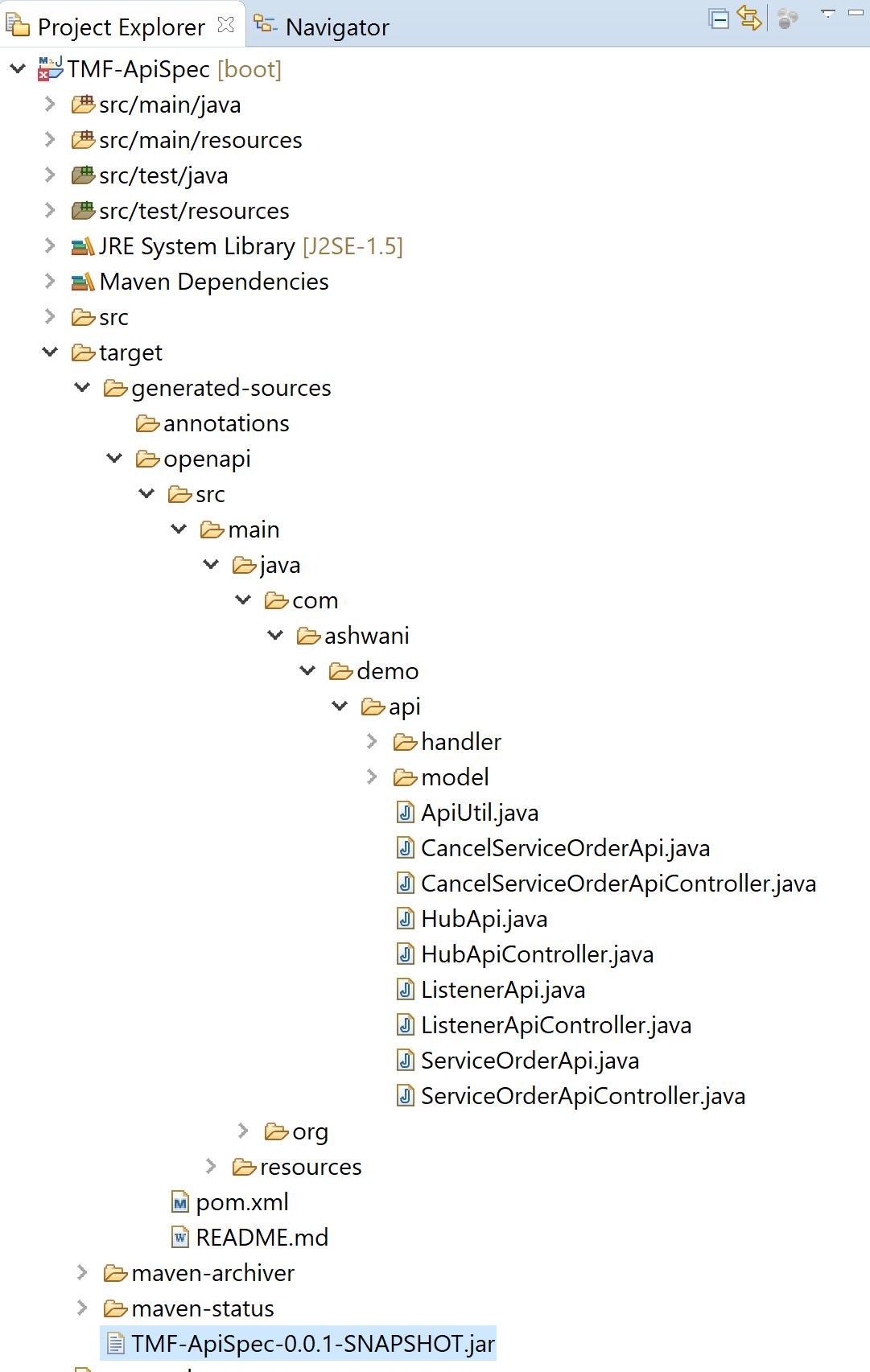
<p>Execute MVN install in the root directory of the project.
And the resulting code would be generated by openapi-generator-maven-plugin in target/generated-sources/. com.ashwani.demo.api.
<a href="https://github.com/OpenAPITools/openapi-generator/tree/master/docs/generators">Various generators</a> based on your preference.
<br/></p>


<p><img src="http://blog.ashwani.co.in/assets/swagger_part1_sourcgen.png" width="800" height="600" title="Swagger Code generation directory structure" alt="Swagger Code generation directory structure"></p>


<p><br/>
Now let's create a new spring boot project demo-service from  <a href="https://start.spring.io/">https://start.spring.io/</a>.
Once a bare spring boot project is created with Spring Web dependency.
Now add the Maven dependency in this spring project.</p>


<div class='bogus-wrapper'><notextile><figure class='code'><div class="highlight"><table><tr><td class="gutter"><pre class="line-numbers"><span class='line-number'>1</span>
<span class='line-number'>2</span>
<span class='line-number'>3</span>
<span class='line-number'>4</span>
<span class='line-number'>5</span>
<span class='line-number'>6</span>
<span class='line-number'>7</span>
</pre></td><td class='code'><pre><code class=''><span class='line'>&lt;dependency>
</span><span class='line'>              &lt;groupId>com.ashwani&lt;/groupId>
</span><span class='line'>              &lt;artifactId>openapi-serviceorder-client&lt;/artifactId>
</span><span class='line'>          &lt;version>0.0.1-SNAPSHOT&lt;/version>
</span><span class='line'>          &lt;scope>system&lt;/scope>
</span><span class='line'>          &lt;systemPath>${basedir}/lib/TMF-ApiSpec-0.0.1-SNAPSHOT.jar&lt;/systemPath>
</span><span class='line'>      &lt;/dependency></span></code></pre></td></tr></table></div></figure></notextile></div>


<p>With the other dependecies for this project , the pom.xml should look like this:</p>


<div class='bogus-wrapper'><notextile><figure class='code'><div class="highlight"><table><tr><td class="gutter"><pre class="line-numbers"><span class='line-number'>1</span>
<span class='line-number'>2</span>
<span class='line-number'>3</span>
<span class='line-number'>4</span>
<span class='line-number'>5</span>
<span class='line-number'>6</span>
<span class='line-number'>7</span>
<span class='line-number'>8</span>
<span class='line-number'>9</span>
<span class='line-number'>10</span>
<span class='line-number'>11</span>
<span class='line-number'>12</span>
<span class='line-number'>13</span>
<span class='line-number'>14</span>
<span class='line-number'>15</span>
<span class='line-number'>16</span>
<span class='line-number'>17</span>
<span class='line-number'>18</span>
<span class='line-number'>19</span>
<span class='line-number'>20</span>
<span class='line-number'>21</span>
<span class='line-number'>22</span>
<span class='line-number'>23</span>
<span class='line-number'>24</span>
<span class='line-number'>25</span>
<span class='line-number'>26</span>
<span class='line-number'>27</span>
<span class='line-number'>28</span>
<span class='line-number'>29</span>
<span class='line-number'>30</span>
<span class='line-number'>31</span>
<span class='line-number'>32</span>
<span class='line-number'>33</span>
<span class='line-number'>34</span>
<span class='line-number'>35</span>
<span class='line-number'>36</span>
<span class='line-number'>37</span>
<span class='line-number'>38</span>
<span class='line-number'>39</span>
<span class='line-number'>40</span>
<span class='line-number'>41</span>
<span class='line-number'>42</span>
<span class='line-number'>43</span>
<span class='line-number'>44</span>
<span class='line-number'>45</span>
<span class='line-number'>46</span>
<span class='line-number'>47</span>
<span class='line-number'>48</span>
<span class='line-number'>49</span>
<span class='line-number'>50</span>
<span class='line-number'>51</span>
<span class='line-number'>52</span>
<span class='line-number'>53</span>
<span class='line-number'>54</span>
<span class='line-number'>55</span>
<span class='line-number'>56</span>
<span class='line-number'>57</span>
<span class='line-number'>58</span>
<span class='line-number'>59</span>
<span class='line-number'>60</span>
<span class='line-number'>61</span>
<span class='line-number'>62</span>
<span class='line-number'>63</span>
<span class='line-number'>64</span>
<span class='line-number'>65</span>
<span class='line-number'>66</span>
<span class='line-number'>67</span>
<span class='line-number'>68</span>
<span class='line-number'>69</span>
<span class='line-number'>70</span>
<span class='line-number'>71</span>
<span class='line-number'>72</span>
<span class='line-number'>73</span>
<span class='line-number'>74</span>
<span class='line-number'>75</span>
<span class='line-number'>76</span>
<span class='line-number'>77</span>
<span class='line-number'>78</span>
<span class='line-number'>79</span>
<span class='line-number'>80</span>
<span class='line-number'>81</span>
<span class='line-number'>82</span>
<span class='line-number'>83</span>
<span class='line-number'>84</span>
<span class='line-number'>85</span>
<span class='line-number'>86</span>
<span class='line-number'>87</span>
<span class='line-number'>88</span>
<span class='line-number'>89</span>
<span class='line-number'>90</span>
<span class='line-number'>91</span>
<span class='line-number'>92</span>
<span class='line-number'>93</span>
<span class='line-number'>94</span>
<span class='line-number'>95</span>
<span class='line-number'>96</span>
<span class='line-number'>97</span>
</pre></td><td class='code'><pre><code class=''><span class='line'>&lt;?xml version="1.0" encoding="UTF-8"?>
</span><span class='line'>&lt;project xmlns="http://maven.apache.org/POM/4.0.0" xmlns:xsi="http://www.w3.org/2001/XMLSchema-instance"
</span><span class='line'>  xsi:schemaLocation="http://maven.apache.org/POM/4.0.0 https://maven.apache.org/xsd/maven-4.0.0.xsd">
</span><span class='line'>  &lt;modelVersion>4.0.0&lt;/modelVersion>
</span><span class='line'>  &lt;parent>
</span><span class='line'>      &lt;groupId>org.springframework.boot&lt;/groupId>
</span><span class='line'>      &lt;artifactId>spring-boot-starter-parent&lt;/artifactId>
</span><span class='line'>      &lt;version>2.3.2.RELEASE&lt;/version>
</span><span class='line'>      &lt;relativePath/> &lt;!-- lookup parent from repository -->
</span><span class='line'>  &lt;/parent>
</span><span class='line'>  &lt;groupId>com.ashwani&lt;/groupId>
</span><span class='line'>  &lt;artifactId>TMF-OpenAPISim&lt;/artifactId>
</span><span class='line'>  &lt;version>0.0.1-SNAPSHOT&lt;/version>
</span><span class='line'>  &lt;name>TMF-OpenAPISim&lt;/name>
</span><span class='line'>  &lt;description>Spring Boot - TMF-OpenAPISim&lt;/description>
</span><span class='line'>
</span><span class='line'>    &lt;properties>
</span><span class='line'>        &lt;java.version>9&lt;/java.version>
</span><span class='line'>        &lt;maven.compiler.source>${java.version}&lt;/maven.compiler.source>
</span><span class='line'>        &lt;maven.compiler.target>${java.version}&lt;/maven.compiler.target>
</span><span class='line'>        &lt;springfox-version>2.8.0&lt;/springfox-version>
</span><span class='line'>    &lt;/properties>
</span><span class='line'>
</span><span class='line'>  &lt;dependencies>
</span><span class='line'>      &lt;dependency>
</span><span class='line'>          &lt;groupId>org.springframework.boot&lt;/groupId>
</span><span class='line'>          &lt;artifactId>spring-boot-starter-web&lt;/artifactId>
</span><span class='line'>      &lt;/dependency>
</span><span class='line'>        &lt;!--SpringFox dependencies -->
</span><span class='line'>        &lt;dependency>
</span><span class='line'>            &lt;groupId>io.springfox&lt;/groupId>
</span><span class='line'>            &lt;artifactId>springfox-swagger2&lt;/artifactId>
</span><span class='line'>            &lt;version>${springfox-version}&lt;/version>
</span><span class='line'>        &lt;/dependency>
</span><span class='line'>        &lt;dependency>
</span><span class='line'>          &lt;groupId>javax.xml.bind&lt;/groupId>
</span><span class='line'>          &lt;artifactId>jaxb-api&lt;/artifactId>
</span><span class='line'>          &lt;version>2.3.0&lt;/version>
</span><span class='line'>      &lt;/dependency>
</span><span class='line'>        &lt;dependency>
</span><span class='line'>            &lt;groupId>io.springfox&lt;/groupId>
</span><span class='line'>            &lt;artifactId>springfox-swagger-ui&lt;/artifactId>
</span><span class='line'>            &lt;version>${springfox-version}&lt;/version>
</span><span class='line'>        &lt;/dependency>
</span><span class='line'>        
</span><span class='line'>        &lt;dependency>
</span><span class='line'>            &lt;groupId>com.fasterxml.jackson.datatype&lt;/groupId>
</span><span class='line'>            &lt;artifactId>jackson-datatype-joda&lt;/artifactId>
</span><span class='line'>        &lt;/dependency>
</span><span class='line'>            &lt;!-- Bean Validation API support -->
</span><span class='line'>        &lt;dependency>
</span><span class='line'>            &lt;groupId>javax.validation&lt;/groupId>
</span><span class='line'>            &lt;artifactId>validation-api&lt;/artifactId>
</span><span class='line'>        &lt;/dependency>
</span><span class='line'>        
</span><span class='line'>                  &lt;dependency>
</span><span class='line'>                &lt;groupId>com.github.joschi.jackson&lt;/groupId>
</span><span class='line'>                &lt;artifactId>jackson-datatype-threetenbp&lt;/artifactId>
</span><span class='line'>                &lt;version>2.9.10&lt;/version>
</span><span class='line'>            &lt;/dependency>
</span><span class='line'>      &lt;dependency>
</span><span class='line'>          &lt;groupId>org.springframework.boot&lt;/groupId>
</span><span class='line'>          &lt;artifactId>spring-boot-starter-test&lt;/artifactId>
</span><span class='line'>          &lt;scope>test&lt;/scope>
</span><span class='line'>          &lt;exclusions>
</span><span class='line'>              &lt;exclusion>
</span><span class='line'>                  &lt;groupId>org.junit.vintage&lt;/groupId>
</span><span class='line'>                  &lt;artifactId>junit-vintage-engine&lt;/artifactId>
</span><span class='line'>              &lt;/exclusion>
</span><span class='line'>          &lt;/exclusions>
</span><span class='line'>      &lt;/dependency>
</span><span class='line'>      
</span><span class='line'>      &lt;dependency>
</span><span class='line'>          &lt;groupId>com.ashwani&lt;/groupId>
</span><span class='line'>          &lt;artifactId>openapi-serviceorder-client&lt;/artifactId>
</span><span class='line'>          &lt;version>0.0.1-SNAPSHOT&lt;/version>
</span><span class='line'>          &lt;scope>system&lt;/scope>
</span><span class='line'>          &lt;systemPath>${basedir}/lib/TMF-ApiSpec-0.0.1-SNAPSHOT.jar&lt;/systemPath>
</span><span class='line'>      &lt;/dependency>
</span><span class='line'>      &lt;dependency>
</span><span class='line'>            &lt;groupId>io.springfox&lt;/groupId>
</span><span class='line'>            &lt;artifactId>springfox-swagger-ui&lt;/artifactId>
</span><span class='line'>            &lt;version>${springfox-version}&lt;/version>
</span><span class='line'>        &lt;/dependency>
</span><span class='line'>      
</span><span class='line'>  &lt;/dependencies>
</span><span class='line'>
</span><span class='line'>  &lt;build>
</span><span class='line'>      &lt;plugins>
</span><span class='line'>          &lt;plugin>
</span><span class='line'>              &lt;groupId>org.springframework.boot&lt;/groupId>
</span><span class='line'>              &lt;artifactId>spring-boot-maven-plugin&lt;/artifactId>
</span><span class='line'>          &lt;/plugin>
</span><span class='line'>      &lt;/plugins>
</span><span class='line'>  &lt;/build>
</span><span class='line'>
</span><span class='line'>&lt;/project></span></code></pre></td></tr></table></div></figure></notextile></div>


<p><br/></p>


<p>Now create a class ServiceOrderApiController which will implement previously generated ServiceOrderApi from previous step. And make some implementation of the API:</p>


<div class='bogus-wrapper'><notextile><figure class='code'><div class="highlight"><table><tr><td class="gutter"><pre class="line-numbers"><span class='line-number'>1</span>
<span class='line-number'>2</span>
<span class='line-number'>3</span>
<span class='line-number'>4</span>
<span class='line-number'>5</span>
<span class='line-number'>6</span>
<span class='line-number'>7</span>
<span class='line-number'>8</span>
<span class='line-number'>9</span>
<span class='line-number'>10</span>
<span class='line-number'>11</span>
<span class='line-number'>12</span>
<span class='line-number'>13</span>
<span class='line-number'>14</span>
<span class='line-number'>15</span>
<span class='line-number'>16</span>
<span class='line-number'>17</span>
<span class='line-number'>18</span>
<span class='line-number'>19</span>
<span class='line-number'>20</span>
<span class='line-number'>21</span>
<span class='line-number'>22</span>
<span class='line-number'>23</span>
<span class='line-number'>24</span>
<span class='line-number'>25</span>
<span class='line-number'>26</span>
<span class='line-number'>27</span>
<span class='line-number'>28</span>
<span class='line-number'>29</span>
<span class='line-number'>30</span>
<span class='line-number'>31</span>
<span class='line-number'>32</span>
<span class='line-number'>33</span>
<span class='line-number'>34</span>
<span class='line-number'>35</span>
<span class='line-number'>36</span>
<span class='line-number'>37</span>
<span class='line-number'>38</span>
<span class='line-number'>39</span>
<span class='line-number'>40</span>
<span class='line-number'>41</span>
<span class='line-number'>42</span>
<span class='line-number'>43</span>
<span class='line-number'>44</span>
<span class='line-number'>45</span>
<span class='line-number'>46</span>
<span class='line-number'>47</span>
<span class='line-number'>48</span>
<span class='line-number'>49</span>
<span class='line-number'>50</span>
<span class='line-number'>51</span>
<span class='line-number'>52</span>
<span class='line-number'>53</span>
<span class='line-number'>54</span>
<span class='line-number'>55</span>
<span class='line-number'>56</span>
<span class='line-number'>57</span>
<span class='line-number'>58</span>
<span class='line-number'>59</span>
<span class='line-number'>60</span>
<span class='line-number'>61</span>
<span class='line-number'>62</span>
<span class='line-number'>63</span>
<span class='line-number'>64</span>
<span class='line-number'>65</span>
<span class='line-number'>66</span>
<span class='line-number'>67</span>
<span class='line-number'>68</span>
<span class='line-number'>69</span>
<span class='line-number'>70</span>
<span class='line-number'>71</span>
<span class='line-number'>72</span>
<span class='line-number'>73</span>
<span class='line-number'>74</span>
<span class='line-number'>75</span>
<span class='line-number'>76</span>
<span class='line-number'>77</span>
<span class='line-number'>78</span>
<span class='line-number'>79</span>
<span class='line-number'>80</span>
<span class='line-number'>81</span>
<span class='line-number'>82</span>
<span class='line-number'>83</span>
<span class='line-number'>84</span>
<span class='line-number'>85</span>
<span class='line-number'>86</span>
<span class='line-number'>87</span>
<span class='line-number'>88</span>
</pre></td><td class='code'><pre><code class=''><span class='line'>package com.ashwani.serviceorder.api;
</span><span class='line'>
</span><span class='line'>import java.security.Principal;
</span><span class='line'>import java.util.Optional;
</span><span class='line'>
</span><span class='line'>import javax.servlet.http.HttpServletRequest;
</span><span class='line'>import javax.validation.Valid;
</span><span class='line'>
</span><span class='line'>import org.joda.time.DateTime;
</span><span class='line'>import org.slf4j.Logger;
</span><span class='line'>import org.slf4j.LoggerFactory;
</span><span class='line'>import org.springframework.beans.factory.annotation.Autowired;
</span><span class='line'>import org.springframework.http.HttpStatus;
</span><span class='line'>import org.springframework.http.MediaType;
</span><span class='line'>import org.springframework.http.ResponseEntity;
</span><span class='line'>import org.springframework.stereotype.Controller;
</span><span class='line'>import org.springframework.web.bind.annotation.PathVariable;
</span><span class='line'>import org.springframework.web.bind.annotation.RequestBody;
</span><span class='line'>import org.springframework.web.bind.annotation.RequestMapping;
</span><span class='line'>import org.springframework.web.bind.annotation.RequestMethod;
</span><span class='line'>import org.springframework.web.bind.annotation.RequestParam;
</span><span class='line'>import org.threeten.bp.OffsetDateTime;
</span><span class='line'>
</span><span class='line'>import com.ashwani.serviceorder.api.model.Error;
</span><span class='line'>import com.ashwani.serviceorder.api.model.RelatedParty;
</span><span class='line'>import com.ashwani.serviceorder.api.model.ServiceOrder;
</span><span class='line'>import com.ashwani.serviceorder.api.model.ServiceOrderCreate;
</span><span class='line'>import com.ashwani.serviceorder.api.model.ServiceOrderItem;
</span><span class='line'>import com.ashwani.serviceorder.api.model.ServiceRestriction;
</span><span class='line'>import com.ashwani.serviceorder.api.ServiceOrderRepoService;
</span><span class='line'>
</span><span class='line'>import com.fasterxml.jackson.databind.ObjectMapper;
</span><span class='line'>
</span><span class='line'>import io.swagger.annotations.ApiOperation;
</span><span class='line'>import io.swagger.annotations.ApiParam;
</span><span class='line'>import io.swagger.annotations.ApiResponse;
</span><span class='line'>import io.swagger.annotations.ApiResponses;
</span><span class='line'>
</span><span class='line'>@javax.annotation.Generated(value = "org.openapitools.codegen.languages.SpringCodegen", date = "2020-07-25T00:30:31.539259300+01:00[Europe/London]")
</span><span class='line'>
</span><span class='line'>@Controller
</span><span class='line'>@RequestMapping("${openapi.aPIServiceOrdering.base-path:/tmf-api/serviceOrdering/v3}")
</span><span class='line'>public class ServiceOrderApiController implements ServiceOrderApi {
</span><span class='line'>
</span><span class='line'>  private static final Logger logger = LoggerFactory.getLogger(ServiceOrderApiController.class);
</span><span class='line'>
</span><span class='line'>  private final ObjectMapper objectMapper;
</span><span class='line'>
</span><span class='line'>  private final HttpServletRequest request;
</span><span class='line'>  
</span><span class='line'>  @Autowired
</span><span class='line'>  ServiceOrderRepoService serviceOrderRepoService;
</span><span class='line'>
</span><span class='line'>  
</span><span class='line'>    @Autowired
</span><span class='line'>  public ServiceOrderApiController(ObjectMapper objectMapper, HttpServletRequest request) {
</span><span class='line'>      this.objectMapper = objectMapper;
</span><span class='line'>      this.request = request;
</span><span class='line'>  }
</span><span class='line'>
</span><span class='line'>    @ApiOperation(value = "Creates a ServiceOrder", nickname = "createServiceOrder", notes = "This operation creates a ServiceOrder entity.", response = ServiceOrder.class, tags={ "serviceOrder", })
</span><span class='line'>    @ApiResponses(value = { 
</span><span class='line'>        @ApiResponse(code = 201, message = "Created", response = ServiceOrder.class),
</span><span class='line'>        @ApiResponse(code = 400, message = "Bad Request", response = Error.class),
</span><span class='line'>        @ApiResponse(code = 401, message = "Unauthorized", response = Error.class),
</span><span class='line'>        @ApiResponse(code = 403, message = "Forbidden", response = Error.class),
</span><span class='line'>        @ApiResponse(code = 405, message = "Method Not allowed", response = Error.class),
</span><span class='line'>        @ApiResponse(code = 409, message = "Conflict", response = Error.class),
</span><span class='line'>        @ApiResponse(code = 500, message = "Internal Server Error", response = Error.class) })
</span><span class='line'>    @RequestMapping(value = "/serviceOrder",
</span><span class='line'>        produces = { "application/json;charset=utf-8" }, 
</span><span class='line'>        consumes = { "application/json;charset=utf-8" },
</span><span class='line'>        method = RequestMethod.POST)
</span><span class='line'>    public ResponseEntity&lt;ServiceOrder> createServiceOrder(@ApiParam(value = "The ServiceOrder to be created" ,required=true )  @Valid @RequestBody ServiceOrderCreate serviceOrderCreate) {
</span><span class='line'>        ServiceOrderCreate soc = serviceOrderCreate;
</span><span class='line'>        
</span><span class='line'>            try {
</span><span class='line'>                  System.out.println(serviceOrderCreate.toString());
</span><span class='line'>                  ServiceOrder c = serviceOrderRepoService.addServiceOrder(soc);
</span><span class='line'>                  return new ResponseEntity&lt;ServiceOrder>(c, HttpStatus.OK);               
</span><span class='line'>
</span><span class='line'>          }catch (Exception e) {
</span><span class='line'>              e.printStackTrace();
</span><span class='line'>              return new ResponseEntity&lt;ServiceOrder>(HttpStatus.INTERNAL_SERVER_ERROR);
</span><span class='line'>          }
</span><span class='line'>    }
</span><span class='line'>}</span></code></pre></td></tr></table></div></figure></notextile></div>


<p><br/></p>


<div class='bogus-wrapper'><notextile><figure class='code'><div class="highlight"><table><tr><td class="gutter"><pre class="line-numbers"><span class='line-number'>1</span>
<span class='line-number'>2</span>
<span class='line-number'>3</span>
<span class='line-number'>4</span>
<span class='line-number'>5</span>
<span class='line-number'>6</span>
<span class='line-number'>7</span>
<span class='line-number'>8</span>
<span class='line-number'>9</span>
<span class='line-number'>10</span>
<span class='line-number'>11</span>
<span class='line-number'>12</span>
<span class='line-number'>13</span>
<span class='line-number'>14</span>
<span class='line-number'>15</span>
<span class='line-number'>16</span>
<span class='line-number'>17</span>
<span class='line-number'>18</span>
<span class='line-number'>19</span>
<span class='line-number'>20</span>
<span class='line-number'>21</span>
<span class='line-number'>22</span>
<span class='line-number'>23</span>
<span class='line-number'>24</span>
<span class='line-number'>25</span>
<span class='line-number'>26</span>
<span class='line-number'>27</span>
<span class='line-number'>28</span>
<span class='line-number'>29</span>
<span class='line-number'>30</span>
<span class='line-number'>31</span>
<span class='line-number'>32</span>
<span class='line-number'>33</span>
<span class='line-number'>34</span>
<span class='line-number'>35</span>
<span class='line-number'>36</span>
<span class='line-number'>37</span>
<span class='line-number'>38</span>
<span class='line-number'>39</span>
<span class='line-number'>40</span>
<span class='line-number'>41</span>
<span class='line-number'>42</span>
<span class='line-number'>43</span>
<span class='line-number'>44</span>
<span class='line-number'>45</span>
<span class='line-number'>46</span>
<span class='line-number'>47</span>
<span class='line-number'>48</span>
<span class='line-number'>49</span>
<span class='line-number'>50</span>
<span class='line-number'>51</span>
<span class='line-number'>52</span>
<span class='line-number'>53</span>
<span class='line-number'>54</span>
<span class='line-number'>55</span>
<span class='line-number'>56</span>
<span class='line-number'>57</span>
<span class='line-number'>58</span>
<span class='line-number'>59</span>
<span class='line-number'>60</span>
<span class='line-number'>61</span>
<span class='line-number'>62</span>
<span class='line-number'>63</span>
<span class='line-number'>64</span>
<span class='line-number'>65</span>
<span class='line-number'>66</span>
<span class='line-number'>67</span>
<span class='line-number'>68</span>
<span class='line-number'>69</span>
<span class='line-number'>70</span>
<span class='line-number'>71</span>
<span class='line-number'>72</span>
<span class='line-number'>73</span>
<span class='line-number'>74</span>
<span class='line-number'>75</span>
<span class='line-number'>76</span>
<span class='line-number'>77</span>
<span class='line-number'>78</span>
<span class='line-number'>79</span>
<span class='line-number'>80</span>
<span class='line-number'>81</span>
<span class='line-number'>82</span>
<span class='line-number'>83</span>
<span class='line-number'>84</span>
<span class='line-number'>85</span>
<span class='line-number'>86</span>
<span class='line-number'>87</span>
<span class='line-number'>88</span>
<span class='line-number'>89</span>
<span class='line-number'>90</span>
</pre></td><td class='code'><pre><code class=''><span class='line'>package com.ashwani.serviceorder.api;
</span><span class='line'>
</span><span class='line'>import java.util.Date;
</span><span class='line'>import java.util.Set;
</span><span class='line'>
</span><span class='line'>import javax.validation.Valid;
</span><span class='line'>
</span><span class='line'>import org.joda.time.DateTime;
</span><span class='line'>import org.springframework.stereotype.Service;
</span><span class='line'>import org.threeten.bp.OffsetDateTime;
</span><span class='line'>import org.threeten.bp.ZoneOffset;
</span><span class='line'>
</span><span class='line'>import com.ashwani.serviceorder.api.model.Any;
</span><span class='line'>import com.ashwani.serviceorder.api.model.Characteristic;
</span><span class='line'>import com.ashwani.serviceorder.api.model.ServiceOrder;
</span><span class='line'>import com.ashwani.serviceorder.api.model.ServiceOrderAttributeValueChangeEvent;
</span><span class='line'>import com.ashwani.serviceorder.api.model.ServiceOrderAttributeValueChangeNotification;
</span><span class='line'>import com.ashwani.serviceorder.api.model.ServiceOrderCreate;
</span><span class='line'>import com.ashwani.serviceorder.api.model.ServiceOrderItem;
</span><span class='line'>import com.ashwani.serviceorder.api.model.ServiceOrderStateChangeEvent;
</span><span class='line'>import com.ashwani.serviceorder.api.model.ServiceOrderStateChangeNotification;
</span><span class='line'>import com.ashwani.serviceorder.api.model.ServiceOrderStateType;
</span><span class='line'>
</span><span class='line'>@Service
</span><span class='line'>public class ServiceOrderRepoService {
</span><span class='line'>
</span><span class='line'>  public ServiceOrder addServiceOrder(@Valid ServiceOrderCreate serviceOrderCreate) {
</span><span class='line'>      ServiceOrder so = new ServiceOrder();
</span><span class='line'>      DateTime d = DateTime.now();
</span><span class='line'>      so.setOrderDate(d);
</span><span class='line'>      so.setCategory(serviceOrderCreate.getCategory());
</span><span class='line'>      so.setDescription(serviceOrderCreate.getDescription());
</span><span class='line'>      so.setExternalId(serviceOrderCreate.getExternalId());
</span><span class='line'>      so.setNotificationContact(serviceOrderCreate.getNotificationContact());
</span><span class='line'>      so.priority(serviceOrderCreate.getPriority());
</span><span class='line'>      so.requestedCompletionDate(serviceOrderCreate.getRequestedCompletionDate());
</span><span class='line'>      so.requestedStartDate(serviceOrderCreate.getRequestedStartDate());
</span><span class='line'>      so.setExpectedCompletionDate(serviceOrderCreate.getRequestedCompletionDate()); // this is by default
</span><span class='line'>      if (serviceOrderCreate.getNote() != null) {
</span><span class='line'>          //so.getNote().addAll(serviceOrderCreate.getNote()); // --> This works with v3 of TMF Specification
</span><span class='line'>          so.setNote(serviceOrderCreate.getNote());
</span><span class='line'>      }
</span><span class='line'>
</span><span class='line'>      boolean allAcknowledged = true;
</span><span class='line'>      //if (serviceOrderCreate.getOrderItem() != null) { //--> This works with v3 of TMF Specification
</span><span class='line'>          //so.getOrderItem().addAll(serviceOrderCreate.getOrderItem()); // --> This works with v3 of TMF Specification
</span><span class='line'>          //for (ServiceOrderItem soi : so.getOrderItem()) {
</span><span class='line'>
</span><span class='line'>      if (serviceOrderCreate.getServiceOrderItem() != null) {
</span><span class='line'>          so.setServiceOrderItem(serviceOrderCreate.getServiceOrderItem());
</span><span class='line'>          for (ServiceOrderItem soi : so.getServiceOrderItem()) { 
</span><span class='line'>              //copySpecCharacteristicsToServiceCharacteristic(soi.getService().getServiceSpecification().getId(),
</span><span class='line'>              //      soi.getService().getServiceCharacteristic());
</span><span class='line'>              
</span><span class='line'>              System.out.println("SOI --> " + soi.toString());
</span><span class='line'>              
</span><span class='line'>              if (soi.getState()!= null && !soi.getState().equals(ServiceOrderStateType.ACKNOWLEDGED)) {
</span><span class='line'>                  allAcknowledged = false;
</span><span class='line'>              }
</span><span class='line'>          }
</span><span class='line'>
</span><span class='line'>      }
</span><span class='line'>
</span><span class='line'>      if (serviceOrderCreate.getRelatedParty() != null) {
</span><span class='line'>          //so.getRelatedParty().addAll(serviceOrderCreate.getRelatedParty()); // --> This works with v3 of TMF Specification
</span><span class='line'>          so.setRelatedParty(serviceOrderCreate.getRelatedParty());
</span><span class='line'>      }
</span><span class='line'>      if (serviceOrderCreate.getOrderRelationship() != null) {
</span><span class='line'>          //so.getOrderRelationship().addAll(serviceOrderCreate.getOrderRelationship()); // --> This works with v3 of TMF Specification
</span><span class='line'>          so.setOrderRelationship(serviceOrderCreate.getOrderRelationship());
</span><span class='line'>      }
</span><span class='line'>
</span><span class='line'>      // so = this.serviceOrderRepo.save(so);  You can save this in DB.
</span><span class='line'>
</span><span class='line'>      if (allAcknowledged) { // in the case were order items are automatically acknowledged
</span><span class='line'>          so.setState(ServiceOrderStateType.ACKNOWLEDGED);
</span><span class='line'>          d = DateTime.now();
</span><span class='line'>          so.setOrderDate(d);
</span><span class='line'>          //so = this.serviceOrderRepo.save(so);
</span><span class='line'>      }
</span><span class='line'>
</span><span class='line'>      //raiseSOCreateNotification(so);
</span><span class='line'>
</span><span class='line'>      return so;
</span><span class='line'>  }
</span><span class='line'>  
</span><span class='line'>}</span></code></pre></td></tr></table></div></figure></notextile></div>


<p>Now we can test the server.
Send a request from postman on following end point.
<a href="http://localhost:8080/tmf-api/serviceOrdering/v3/serviceOrder">http://localhost:8080/tmf-api/serviceOrdering/v3/serviceOrder</a></p>


<h5>Request Body</h5>


<div class='bogus-wrapper'><notextile><figure class='code'><div class="highlight"><table><tr><td class="gutter"><pre class="line-numbers"><span class='line-number'>1</span>
<span class='line-number'>2</span>
<span class='line-number'>3</span>
<span class='line-number'>4</span>
<span class='line-number'>5</span>
<span class='line-number'>6</span>
<span class='line-number'>7</span>
<span class='line-number'>8</span>
<span class='line-number'>9</span>
<span class='line-number'>10</span>
<span class='line-number'>11</span>
<span class='line-number'>12</span>
<span class='line-number'>13</span>
<span class='line-number'>14</span>
<span class='line-number'>15</span>
<span class='line-number'>16</span>
<span class='line-number'>17</span>
<span class='line-number'>18</span>
<span class='line-number'>19</span>
<span class='line-number'>20</span>
<span class='line-number'>21</span>
<span class='line-number'>22</span>
<span class='line-number'>23</span>
<span class='line-number'>24</span>
<span class='line-number'>25</span>
<span class='line-number'>26</span>
<span class='line-number'>27</span>
<span class='line-number'>28</span>
<span class='line-number'>29</span>
<span class='line-number'>30</span>
<span class='line-number'>31</span>
<span class='line-number'>32</span>
<span class='line-number'>33</span>
<span class='line-number'>34</span>
<span class='line-number'>35</span>
<span class='line-number'>36</span>
<span class='line-number'>37</span>
<span class='line-number'>38</span>
<span class='line-number'>39</span>
<span class='line-number'>40</span>
<span class='line-number'>41</span>
<span class='line-number'>42</span>
<span class='line-number'>43</span>
<span class='line-number'>44</span>
<span class='line-number'>45</span>
<span class='line-number'>46</span>
<span class='line-number'>47</span>
<span class='line-number'>48</span>
<span class='line-number'>49</span>
<span class='line-number'>50</span>
<span class='line-number'>51</span>
<span class='line-number'>52</span>
<span class='line-number'>53</span>
<span class='line-number'>54</span>
<span class='line-number'>55</span>
<span class='line-number'>56</span>
<span class='line-number'>57</span>
<span class='line-number'>58</span>
<span class='line-number'>59</span>
<span class='line-number'>60</span>
<span class='line-number'>61</span>
<span class='line-number'>62</span>
<span class='line-number'>63</span>
<span class='line-number'>64</span>
<span class='line-number'>65</span>
<span class='line-number'>66</span>
<span class='line-number'>67</span>
<span class='line-number'>68</span>
<span class='line-number'>69</span>
<span class='line-number'>70</span>
<span class='line-number'>71</span>
<span class='line-number'>72</span>
<span class='line-number'>73</span>
<span class='line-number'>74</span>
<span class='line-number'>75</span>
<span class='line-number'>76</span>
<span class='line-number'>77</span>
<span class='line-number'>78</span>
<span class='line-number'>79</span>
<span class='line-number'>80</span>
<span class='line-number'>81</span>
<span class='line-number'>82</span>
<span class='line-number'>83</span>
<span class='line-number'>84</span>
<span class='line-number'>85</span>
<span class='line-number'>86</span>
<span class='line-number'>87</span>
<span class='line-number'>88</span>
<span class='line-number'>89</span>
<span class='line-number'>90</span>
<span class='line-number'>91</span>
<span class='line-number'>92</span>
<span class='line-number'>93</span>
<span class='line-number'>94</span>
<span class='line-number'>95</span>
<span class='line-number'>96</span>
<span class='line-number'>97</span>
<span class='line-number'>98</span>
<span class='line-number'>99</span>
<span class='line-number'>100</span>
<span class='line-number'>101</span>
<span class='line-number'>102</span>
<span class='line-number'>103</span>
<span class='line-number'>104</span>
<span class='line-number'>105</span>
<span class='line-number'>106</span>
<span class='line-number'>107</span>
<span class='line-number'>108</span>
<span class='line-number'>109</span>
<span class='line-number'>110</span>
<span class='line-number'>111</span>
<span class='line-number'>112</span>
<span class='line-number'>113</span>
<span class='line-number'>114</span>
<span class='line-number'>115</span>
<span class='line-number'>116</span>
<span class='line-number'>117</span>
<span class='line-number'>118</span>
<span class='line-number'>119</span>
<span class='line-number'>120</span>
<span class='line-number'>121</span>
<span class='line-number'>122</span>
<span class='line-number'>123</span>
<span class='line-number'>124</span>
<span class='line-number'>125</span>
<span class='line-number'>126</span>
<span class='line-number'>127</span>
<span class='line-number'>128</span>
<span class='line-number'>129</span>
<span class='line-number'>130</span>
<span class='line-number'>131</span>
<span class='line-number'>132</span>
<span class='line-number'>133</span>
<span class='line-number'>134</span>
<span class='line-number'>135</span>
<span class='line-number'>136</span>
<span class='line-number'>137</span>
<span class='line-number'>138</span>
<span class='line-number'>139</span>
<span class='line-number'>140</span>
<span class='line-number'>141</span>
<span class='line-number'>142</span>
<span class='line-number'>143</span>
<span class='line-number'>144</span>
<span class='line-number'>145</span>
<span class='line-number'>146</span>
<span class='line-number'>147</span>
<span class='line-number'>148</span>
<span class='line-number'>149</span>
<span class='line-number'>150</span>
<span class='line-number'>151</span>
<span class='line-number'>152</span>
<span class='line-number'>153</span>
<span class='line-number'>154</span>
<span class='line-number'>155</span>
<span class='line-number'>156</span>
<span class='line-number'>157</span>
<span class='line-number'>158</span>
<span class='line-number'>159</span>
<span class='line-number'>160</span>
<span class='line-number'>161</span>
<span class='line-number'>162</span>
<span class='line-number'>163</span>
<span class='line-number'>164</span>
<span class='line-number'>165</span>
<span class='line-number'>166</span>
<span class='line-number'>167</span>
<span class='line-number'>168</span>
<span class='line-number'>169</span>
<span class='line-number'>170</span>
<span class='line-number'>171</span>
<span class='line-number'>172</span>
<span class='line-number'>173</span>
<span class='line-number'>174</span>
<span class='line-number'>175</span>
<span class='line-number'>176</span>
<span class='line-number'>177</span>
<span class='line-number'>178</span>
<span class='line-number'>179</span>
<span class='line-number'>180</span>
<span class='line-number'>181</span>
<span class='line-number'>182</span>
<span class='line-number'>183</span>
<span class='line-number'>184</span>
<span class='line-number'>185</span>
<span class='line-number'>186</span>
<span class='line-number'>187</span>
<span class='line-number'>188</span>
<span class='line-number'>189</span>
<span class='line-number'>190</span>
<span class='line-number'>191</span>
<span class='line-number'>192</span>
<span class='line-number'>193</span>
<span class='line-number'>194</span>
<span class='line-number'>195</span>
<span class='line-number'>196</span>
<span class='line-number'>197</span>
<span class='line-number'>198</span>
<span class='line-number'>199</span>
<span class='line-number'>200</span>
<span class='line-number'>201</span>
<span class='line-number'>202</span>
<span class='line-number'>203</span>
<span class='line-number'>204</span>
<span class='line-number'>205</span>
<span class='line-number'>206</span>
<span class='line-number'>207</span>
<span class='line-number'>208</span>
<span class='line-number'>209</span>
<span class='line-number'>210</span>
<span class='line-number'>211</span>
<span class='line-number'>212</span>
<span class='line-number'>213</span>
<span class='line-number'>214</span>
<span class='line-number'>215</span>
<span class='line-number'>216</span>
<span class='line-number'>217</span>
<span class='line-number'>218</span>
<span class='line-number'>219</span>
<span class='line-number'>220</span>
<span class='line-number'>221</span>
<span class='line-number'>222</span>
<span class='line-number'>223</span>
<span class='line-number'>224</span>
<span class='line-number'>225</span>
<span class='line-number'>226</span>
<span class='line-number'>227</span>
<span class='line-number'>228</span>
<span class='line-number'>229</span>
<span class='line-number'>230</span>
<span class='line-number'>231</span>
<span class='line-number'>232</span>
<span class='line-number'>233</span>
<span class='line-number'>234</span>
<span class='line-number'>235</span>
<span class='line-number'>236</span>
<span class='line-number'>237</span>
<span class='line-number'>238</span>
<span class='line-number'>239</span>
<span class='line-number'>240</span>
<span class='line-number'>241</span>
<span class='line-number'>242</span>
<span class='line-number'>243</span>
<span class='line-number'>244</span>
<span class='line-number'>245</span>
<span class='line-number'>246</span>
<span class='line-number'>247</span>
<span class='line-number'>248</span>
<span class='line-number'>249</span>
<span class='line-number'>250</span>
<span class='line-number'>251</span>
<span class='line-number'>252</span>
<span class='line-number'>253</span>
<span class='line-number'>254</span>
<span class='line-number'>255</span>
<span class='line-number'>256</span>
<span class='line-number'>257</span>
<span class='line-number'>258</span>
<span class='line-number'>259</span>
<span class='line-number'>260</span>
<span class='line-number'>261</span>
<span class='line-number'>262</span>
<span class='line-number'>263</span>
<span class='line-number'>264</span>
<span class='line-number'>265</span>
<span class='line-number'>266</span>
<span class='line-number'>267</span>
<span class='line-number'>268</span>
<span class='line-number'>269</span>
<span class='line-number'>270</span>
<span class='line-number'>271</span>
<span class='line-number'>272</span>
<span class='line-number'>273</span>
<span class='line-number'>274</span>
<span class='line-number'>275</span>
<span class='line-number'>276</span>
<span class='line-number'>277</span>
<span class='line-number'>278</span>
<span class='line-number'>279</span>
<span class='line-number'>280</span>
<span class='line-number'>281</span>
<span class='line-number'>282</span>
<span class='line-number'>283</span>
<span class='line-number'>284</span>
<span class='line-number'>285</span>
<span class='line-number'>286</span>
<span class='line-number'>287</span>
<span class='line-number'>288</span>
<span class='line-number'>289</span>
<span class='line-number'>290</span>
<span class='line-number'>291</span>
<span class='line-number'>292</span>
<span class='line-number'>293</span>
<span class='line-number'>294</span>
<span class='line-number'>295</span>
<span class='line-number'>296</span>
<span class='line-number'>297</span>
<span class='line-number'>298</span>
<span class='line-number'>299</span>
<span class='line-number'>300</span>
<span class='line-number'>301</span>
<span class='line-number'>302</span>
<span class='line-number'>303</span>
<span class='line-number'>304</span>
<span class='line-number'>305</span>
<span class='line-number'>306</span>
<span class='line-number'>307</span>
</pre></td><td class='code'><pre><code class=''><span class='line'>{
</span><span class='line'>  "cancellationDate": "2020-08-08T11:55:14.450Z",
</span><span class='line'>  "cancellationReason": "string",
</span><span class='line'>  "category": "string",
</span><span class='line'>  "description": "string",
</span><span class='line'>  "externalId": "string",
</span><span class='line'>  "notificationContact": "string",
</span><span class='line'>  "priority": "string",
</span><span class='line'>  "requestedCompletionDate": "2020-08-08T11:55:14.450Z",
</span><span class='line'>  "requestedStartDate": "2020-08-08T11:55:14.450Z",
</span><span class='line'>  "externalReference": [
</span><span class='line'>    {
</span><span class='line'>      "externalReferenceType": "string",
</span><span class='line'>      "name": "string",
</span><span class='line'>      "@baseType": "string",
</span><span class='line'>      "@schemaLocation": "string",
</span><span class='line'>      "@type": "string"
</span><span class='line'>    }
</span><span class='line'>  ],
</span><span class='line'>  "note": [
</span><span class='line'>    {
</span><span class='line'>      "id": "string",
</span><span class='line'>      "author": "string",
</span><span class='line'>      "date": "2020-08-08T11:55:14.450Z",
</span><span class='line'>      "text": "string",
</span><span class='line'>      "@baseType": "string",
</span><span class='line'>      "@schemaLocation": "string",
</span><span class='line'>      "@type": "string"
</span><span class='line'>    }
</span><span class='line'>  ],
</span><span class='line'>  "orderRelationship": [
</span><span class='line'>    {
</span><span class='line'>      "id": "string",
</span><span class='line'>      "href": "string",
</span><span class='line'>      "relationshipType": "string",
</span><span class='line'>      "@baseType": "string",
</span><span class='line'>      "@schemaLocation": "string",
</span><span class='line'>      "@type": "string",
</span><span class='line'>      "@referredType": "string"
</span><span class='line'>    }
</span><span class='line'>  ],
</span><span class='line'>  "relatedParty": [
</span><span class='line'>    {
</span><span class='line'>      "id": "string",
</span><span class='line'>      "href": "string",
</span><span class='line'>      "name": "string",
</span><span class='line'>      "role": "string",
</span><span class='line'>      "@baseType": "ResourceSpecification",
</span><span class='line'>      "@schemaLocation": "https://mycsp.com:8080/tmf-api/schema/Resource/LogicalResourceSpecification.schema.json",
</span><span class='line'>      "@type": "LogicalResourceSpecification",
</span><span class='line'>      "@referredType": "string"
</span><span class='line'>    }
</span><span class='line'>  ],
</span><span class='line'>  "serviceOrderItem": [
</span><span class='line'>    {
</span><span class='line'>      "id": "string",
</span><span class='line'>      "quantity": 0,
</span><span class='line'>      "action": "add",
</span><span class='line'>      "appointment": {
</span><span class='line'>        "id": "string",
</span><span class='line'>        "href": "string",
</span><span class='line'>        "description": "string",
</span><span class='line'>        "@baseType": "string",
</span><span class='line'>        "@schemaLocation": "string",
</span><span class='line'>        "@type": "string",
</span><span class='line'>        "@referredType": "string"
</span><span class='line'>      },
</span><span class='line'>      "service": {
</span><span class='line'>        "id": "string",
</span><span class='line'>        "href": "string",
</span><span class='line'>        "category": "string",
</span><span class='line'>        "description": "string",
</span><span class='line'>        "endDate": "2020-08-08T11:55:14.450Z",
</span><span class='line'>        "hasStarted": true,
</span><span class='line'>        "isBundle": true,
</span><span class='line'>        "isServiceEnabled": true,
</span><span class='line'>        "isStateful": true,
</span><span class='line'>        "name": "string",
</span><span class='line'>        "serviceDate": "string",
</span><span class='line'>        "serviceType": "string",
</span><span class='line'>        "startDate": "2020-08-08T11:55:14.450Z",
</span><span class='line'>        "startMode": "string",
</span><span class='line'>        "feature": [
</span><span class='line'>          {
</span><span class='line'>            "id": "string",
</span><span class='line'>            "isBundle": true,
</span><span class='line'>            "isEnabled": true,
</span><span class='line'>            "name": "string",
</span><span class='line'>            "constraint": [
</span><span class='line'>              {
</span><span class='line'>                "id": "string",
</span><span class='line'>                "href": "string",
</span><span class='line'>                "name": "string",
</span><span class='line'>                "version": "string",
</span><span class='line'>                "@baseType": "string",
</span><span class='line'>                "@schemaLocation": "string",
</span><span class='line'>                "@type": "string",
</span><span class='line'>                "@referredType": "string"
</span><span class='line'>              }
</span><span class='line'>            ],
</span><span class='line'>            "featureCharacteristic": [
</span><span class='line'>              {
</span><span class='line'>                "id": "string",
</span><span class='line'>                "name": "string",
</span><span class='line'>                "valueType": "string",
</span><span class='line'>                "characteristicRelationship": [
</span><span class='line'>                  {
</span><span class='line'>                    "id": "string",
</span><span class='line'>                    "relationshipType": "string",
</span><span class='line'>                    "@baseType": "string",
</span><span class='line'>                    "@schemaLocation": "string",
</span><span class='line'>                    "@type": "string"
</span><span class='line'>                  }
</span><span class='line'>                ],
</span><span class='line'>                "@baseType": "ResourceSpecification",
</span><span class='line'>                "@schemaLocation": "https://mycsp.com:8080/tmf-api/schema/Resource/LogicalResourceSpecification.schema.json",
</span><span class='line'>                "@type": "LogicalResourceSpecification"
</span><span class='line'>              }
</span><span class='line'>            ],
</span><span class='line'>            "featureRelationship": [
</span><span class='line'>              {
</span><span class='line'>                "id": "string",
</span><span class='line'>                "name": "string",
</span><span class='line'>                "relationshipType": "string",
</span><span class='line'>                "validFor": {
</span><span class='line'>                  "endDateTime": "1985-04-12T23:20:50.52Z",
</span><span class='line'>                  "startDateTime": "1985-04-12T23:20:50.52Z",
</span><span class='line'>                  "@baseType": "string",
</span><span class='line'>                  "@schemaLocation": "string",
</span><span class='line'>                  "@type": "string"
</span><span class='line'>                },
</span><span class='line'>                "@baseType": "string",
</span><span class='line'>                "@schemaLocation": "string",
</span><span class='line'>                "@type": "string"
</span><span class='line'>              }
</span><span class='line'>            ],
</span><span class='line'>            "@baseType": "string",
</span><span class='line'>            "@schemaLocation": "string",
</span><span class='line'>            "@type": "string"
</span><span class='line'>          }
</span><span class='line'>        ],
</span><span class='line'>        "note": [
</span><span class='line'>          {
</span><span class='line'>            "id": "string",
</span><span class='line'>            "author": "string",
</span><span class='line'>            "date": "2020-08-08T11:55:14.450Z",
</span><span class='line'>            "text": "string",
</span><span class='line'>            "@baseType": "string",
</span><span class='line'>            "@schemaLocation": "string",
</span><span class='line'>            "@type": "string"
</span><span class='line'>          }
</span><span class='line'>        ],
</span><span class='line'>        "place": [
</span><span class='line'>          {
</span><span class='line'>            "id": "string",
</span><span class='line'>            "href": "string",
</span><span class='line'>            "name": "string",
</span><span class='line'>            "role": "string",
</span><span class='line'>            "@baseType": "ResourceSpecification",
</span><span class='line'>            "@schemaLocation": "https://mycsp.com:8080/tmf-api/schema/Resource/LogicalResourceSpecification.schema.json",
</span><span class='line'>            "@type": "LogicalResourceSpecification",
</span><span class='line'>            "@referredType": "string"
</span><span class='line'>          }
</span><span class='line'>        ],
</span><span class='line'>        "relatedEntity": [
</span><span class='line'>          {
</span><span class='line'>            "id": "string",
</span><span class='line'>            "href": "string",
</span><span class='line'>            "name": "string",
</span><span class='line'>            "role": "string",
</span><span class='line'>            "@baseType": "ResourceSpecification",
</span><span class='line'>            "@schemaLocation": "https://mycsp.com:8080/tmf-api/schema/Resource/LogicalResourceSpecification.schema.json",
</span><span class='line'>            "@type": "LogicalResourceSpecification",
</span><span class='line'>            "@referredType": "string"
</span><span class='line'>          }
</span><span class='line'>        ],
</span><span class='line'>        "relatedParty": [
</span><span class='line'>          {
</span><span class='line'>            "id": "string",
</span><span class='line'>            "href": "string",
</span><span class='line'>            "name": "string",
</span><span class='line'>            "role": "string",
</span><span class='line'>            "@baseType": "ResourceSpecification",
</span><span class='line'>            "@schemaLocation": "https://mycsp.com:8080/tmf-api/schema/Resource/LogicalResourceSpecification.schema.json",
</span><span class='line'>            "@type": "LogicalResourceSpecification",
</span><span class='line'>            "@referredType": "string"
</span><span class='line'>          }
</span><span class='line'>        ],
</span><span class='line'>        "serviceCharacteristic": [
</span><span class='line'>          {
</span><span class='line'>            "id": "string",
</span><span class='line'>            "name": "string",
</span><span class='line'>            "valueType": "string",
</span><span class='line'>            "characteristicRelationship": [
</span><span class='line'>              {
</span><span class='line'>                "id": "string",
</span><span class='line'>                "relationshipType": "string",
</span><span class='line'>                "@baseType": "string",
</span><span class='line'>                "@schemaLocation": "string",
</span><span class='line'>                "@type": "string"
</span><span class='line'>              }
</span><span class='line'>            ],
</span><span class='line'>            "@baseType": "ResourceSpecification",
</span><span class='line'>            "@schemaLocation": "https://mycsp.com:8080/tmf-api/schema/Resource/LogicalResourceSpecification.schema.json",
</span><span class='line'>            "@type": "LogicalResourceSpecification"
</span><span class='line'>          }
</span><span class='line'>        ],
</span><span class='line'>        "serviceOrderItem": [
</span><span class='line'>          {
</span><span class='line'>            "itemId": "string",
</span><span class='line'>            "role": "string",
</span><span class='line'>            "serviceOrderHref": "string",
</span><span class='line'>            "serviceOrderId": "string",
</span><span class='line'>            "itemAction": "add",
</span><span class='line'>            "@baseType": "string",
</span><span class='line'>            "@schemaLocation": "string",
</span><span class='line'>            "@type": "string",
</span><span class='line'>            "@referredType": "string"
</span><span class='line'>          }
</span><span class='line'>        ],
</span><span class='line'>        "serviceRelationship": [
</span><span class='line'>          {
</span><span class='line'>            "relationshipType": "string",
</span><span class='line'>            "serviceRelationshipCharacteristic": [
</span><span class='line'>              {
</span><span class='line'>                "id": "string",
</span><span class='line'>                "name": "string",
</span><span class='line'>                "valueType": "string",
</span><span class='line'>                "characteristicRelationship": [
</span><span class='line'>                  {
</span><span class='line'>                    "id": "string",
</span><span class='line'>                    "relationshipType": "string",
</span><span class='line'>                    "@baseType": "string",
</span><span class='line'>                    "@schemaLocation": "string",
</span><span class='line'>                    "@type": "string"
</span><span class='line'>                  }
</span><span class='line'>                ],
</span><span class='line'>                "@baseType": "ResourceSpecification",
</span><span class='line'>                "@schemaLocation": "https://mycsp.com:8080/tmf-api/schema/Resource/LogicalResourceSpecification.schema.json",
</span><span class='line'>                "@type": "LogicalResourceSpecification"
</span><span class='line'>              }
</span><span class='line'>            ],
</span><span class='line'>            "@baseType": "string",
</span><span class='line'>            "@schemaLocation": "string",
</span><span class='line'>            "@type": "string"
</span><span class='line'>          }
</span><span class='line'>        ],
</span><span class='line'>        "serviceSpecification": {
</span><span class='line'>          "id": "string",
</span><span class='line'>          "href": "string",
</span><span class='line'>          "name": "string",
</span><span class='line'>          "version": "string",
</span><span class='line'>          "@baseType": "ResourceSpecification",
</span><span class='line'>          "@schemaLocation": "https://mycsp.com:8080/tmf-api/schema/Resource/LogicalResourceSpecification.schema.json",
</span><span class='line'>          "@type": "LogicalResourceSpecification",
</span><span class='line'>          "@referredType": "string"
</span><span class='line'>        },
</span><span class='line'>        "state": "feasibilityChecked",
</span><span class='line'>        "supportingResource": [
</span><span class='line'>          {
</span><span class='line'>            "id": "string",
</span><span class='line'>            "href": "string",
</span><span class='line'>            "name": "string",
</span><span class='line'>            "@baseType": "ResourceSpecification",
</span><span class='line'>            "@schemaLocation": "https://mycsp.com:8080/tmf-api/schema/Resource/LogicalResourceSpecification.schema.json",
</span><span class='line'>            "@type": "LogicalResourceSpecification",
</span><span class='line'>            "@referredType": "string"
</span><span class='line'>          }
</span><span class='line'>        ],
</span><span class='line'>        "supportingService": [
</span><span class='line'>          null
</span><span class='line'>        ],
</span><span class='line'>        "@baseType": "ResourceSpecification",
</span><span class='line'>        "@schemaLocation": "https://mycsp.com:8080/tmf-api/schema/Resource/LogicalResourceSpecification.schema.json",
</span><span class='line'>        "@type": "LogicalResourceSpecification",
</span><span class='line'>        "@referredType": "string"
</span><span class='line'>      },
</span><span class='line'>      "serviceOrderItem": [
</span><span class='line'>        null
</span><span class='line'>      ],
</span><span class='line'>      "serviceOrderItemRelationship": [
</span><span class='line'>        {
</span><span class='line'>          "relationshipType": "string",
</span><span class='line'>          "orderItem": {
</span><span class='line'>            "itemId": "string",
</span><span class='line'>            "serviceOrderHref": "string",
</span><span class='line'>            "serviceOrderId": "string",
</span><span class='line'>            "@baseType": "ResourceSpecification",
</span><span class='line'>            "@schemaLocation": "https://mycsp.com:8080/tmf-api/schema/Resource/LogicalResourceSpecification.schema.json",
</span><span class='line'>            "@type": "LogicalResourceSpecification",
</span><span class='line'>            "@referredType": "string"
</span><span class='line'>          },
</span><span class='line'>          "@baseType": "ResourceSpecification",
</span><span class='line'>          "@schemaLocation": "https://mycsp.com:8080/tmf-api/schema/Resource/LogicalResourceSpecification.schema.json",
</span><span class='line'>          "@type": "LogicalResourceSpecification"
</span><span class='line'>        }
</span><span class='line'>      ],
</span><span class='line'>      "state": "acknowledged",
</span><span class='line'>      "@baseType": "ResourceSpecification",
</span><span class='line'>      "@schemaLocation": "https://mycsp.com:8080/tmf-api/schema/Resource/LogicalResourceSpecification.schema.json",
</span><span class='line'>      "@type": "LogicalResourceSpecification"
</span><span class='line'>    }
</span><span class='line'>  ],
</span><span class='line'>  "@baseType": "string",
</span><span class='line'>  "@schemaLocation": "string",
</span><span class='line'>  "@type": "string"
</span><span class='line'>}</span></code></pre></td></tr></table></div></figure></notextile></div>


<p>If all goes well you will get the following response:</p>


<h5>Response Body</h5>


<div class='bogus-wrapper'><notextile><figure class='code'><div class="highlight"><table><tr><td class="gutter"><pre class="line-numbers"><span class='line-number'>1</span>
<span class='line-number'>2</span>
<span class='line-number'>3</span>
<span class='line-number'>4</span>
<span class='line-number'>5</span>
<span class='line-number'>6</span>
<span class='line-number'>7</span>
<span class='line-number'>8</span>
<span class='line-number'>9</span>
<span class='line-number'>10</span>
<span class='line-number'>11</span>
<span class='line-number'>12</span>
<span class='line-number'>13</span>
<span class='line-number'>14</span>
<span class='line-number'>15</span>
<span class='line-number'>16</span>
<span class='line-number'>17</span>
<span class='line-number'>18</span>
<span class='line-number'>19</span>
<span class='line-number'>20</span>
<span class='line-number'>21</span>
<span class='line-number'>22</span>
<span class='line-number'>23</span>
<span class='line-number'>24</span>
<span class='line-number'>25</span>
<span class='line-number'>26</span>
<span class='line-number'>27</span>
<span class='line-number'>28</span>
<span class='line-number'>29</span>
<span class='line-number'>30</span>
<span class='line-number'>31</span>
<span class='line-number'>32</span>
<span class='line-number'>33</span>
<span class='line-number'>34</span>
<span class='line-number'>35</span>
<span class='line-number'>36</span>
<span class='line-number'>37</span>
<span class='line-number'>38</span>
<span class='line-number'>39</span>
<span class='line-number'>40</span>
<span class='line-number'>41</span>
<span class='line-number'>42</span>
<span class='line-number'>43</span>
<span class='line-number'>44</span>
<span class='line-number'>45</span>
<span class='line-number'>46</span>
<span class='line-number'>47</span>
<span class='line-number'>48</span>
<span class='line-number'>49</span>
<span class='line-number'>50</span>
<span class='line-number'>51</span>
<span class='line-number'>52</span>
<span class='line-number'>53</span>
<span class='line-number'>54</span>
<span class='line-number'>55</span>
<span class='line-number'>56</span>
<span class='line-number'>57</span>
<span class='line-number'>58</span>
<span class='line-number'>59</span>
<span class='line-number'>60</span>
<span class='line-number'>61</span>
<span class='line-number'>62</span>
<span class='line-number'>63</span>
<span class='line-number'>64</span>
<span class='line-number'>65</span>
<span class='line-number'>66</span>
<span class='line-number'>67</span>
<span class='line-number'>68</span>
<span class='line-number'>69</span>
<span class='line-number'>70</span>
<span class='line-number'>71</span>
<span class='line-number'>72</span>
<span class='line-number'>73</span>
<span class='line-number'>74</span>
<span class='line-number'>75</span>
<span class='line-number'>76</span>
<span class='line-number'>77</span>
<span class='line-number'>78</span>
<span class='line-number'>79</span>
<span class='line-number'>80</span>
<span class='line-number'>81</span>
<span class='line-number'>82</span>
<span class='line-number'>83</span>
<span class='line-number'>84</span>
<span class='line-number'>85</span>
<span class='line-number'>86</span>
<span class='line-number'>87</span>
<span class='line-number'>88</span>
<span class='line-number'>89</span>
<span class='line-number'>90</span>
<span class='line-number'>91</span>
<span class='line-number'>92</span>
<span class='line-number'>93</span>
<span class='line-number'>94</span>
<span class='line-number'>95</span>
<span class='line-number'>96</span>
<span class='line-number'>97</span>
<span class='line-number'>98</span>
<span class='line-number'>99</span>
<span class='line-number'>100</span>
<span class='line-number'>101</span>
<span class='line-number'>102</span>
<span class='line-number'>103</span>
<span class='line-number'>104</span>
<span class='line-number'>105</span>
<span class='line-number'>106</span>
<span class='line-number'>107</span>
<span class='line-number'>108</span>
<span class='line-number'>109</span>
<span class='line-number'>110</span>
<span class='line-number'>111</span>
<span class='line-number'>112</span>
<span class='line-number'>113</span>
<span class='line-number'>114</span>
<span class='line-number'>115</span>
<span class='line-number'>116</span>
<span class='line-number'>117</span>
<span class='line-number'>118</span>
<span class='line-number'>119</span>
<span class='line-number'>120</span>
<span class='line-number'>121</span>
<span class='line-number'>122</span>
<span class='line-number'>123</span>
<span class='line-number'>124</span>
<span class='line-number'>125</span>
<span class='line-number'>126</span>
<span class='line-number'>127</span>
<span class='line-number'>128</span>
<span class='line-number'>129</span>
<span class='line-number'>130</span>
<span class='line-number'>131</span>
<span class='line-number'>132</span>
<span class='line-number'>133</span>
<span class='line-number'>134</span>
<span class='line-number'>135</span>
<span class='line-number'>136</span>
<span class='line-number'>137</span>
<span class='line-number'>138</span>
<span class='line-number'>139</span>
<span class='line-number'>140</span>
<span class='line-number'>141</span>
<span class='line-number'>142</span>
<span class='line-number'>143</span>
<span class='line-number'>144</span>
<span class='line-number'>145</span>
<span class='line-number'>146</span>
<span class='line-number'>147</span>
<span class='line-number'>148</span>
<span class='line-number'>149</span>
<span class='line-number'>150</span>
<span class='line-number'>151</span>
<span class='line-number'>152</span>
<span class='line-number'>153</span>
<span class='line-number'>154</span>
<span class='line-number'>155</span>
<span class='line-number'>156</span>
<span class='line-number'>157</span>
<span class='line-number'>158</span>
<span class='line-number'>159</span>
<span class='line-number'>160</span>
<span class='line-number'>161</span>
<span class='line-number'>162</span>
<span class='line-number'>163</span>
<span class='line-number'>164</span>
<span class='line-number'>165</span>
<span class='line-number'>166</span>
<span class='line-number'>167</span>
<span class='line-number'>168</span>
<span class='line-number'>169</span>
<span class='line-number'>170</span>
<span class='line-number'>171</span>
<span class='line-number'>172</span>
<span class='line-number'>173</span>
<span class='line-number'>174</span>
<span class='line-number'>175</span>
<span class='line-number'>176</span>
<span class='line-number'>177</span>
<span class='line-number'>178</span>
<span class='line-number'>179</span>
<span class='line-number'>180</span>
<span class='line-number'>181</span>
<span class='line-number'>182</span>
<span class='line-number'>183</span>
<span class='line-number'>184</span>
<span class='line-number'>185</span>
<span class='line-number'>186</span>
<span class='line-number'>187</span>
<span class='line-number'>188</span>
<span class='line-number'>189</span>
<span class='line-number'>190</span>
<span class='line-number'>191</span>
<span class='line-number'>192</span>
<span class='line-number'>193</span>
<span class='line-number'>194</span>
<span class='line-number'>195</span>
<span class='line-number'>196</span>
<span class='line-number'>197</span>
<span class='line-number'>198</span>
<span class='line-number'>199</span>
<span class='line-number'>200</span>
<span class='line-number'>201</span>
<span class='line-number'>202</span>
<span class='line-number'>203</span>
<span class='line-number'>204</span>
<span class='line-number'>205</span>
<span class='line-number'>206</span>
<span class='line-number'>207</span>
<span class='line-number'>208</span>
<span class='line-number'>209</span>
<span class='line-number'>210</span>
<span class='line-number'>211</span>
<span class='line-number'>212</span>
<span class='line-number'>213</span>
<span class='line-number'>214</span>
<span class='line-number'>215</span>
<span class='line-number'>216</span>
<span class='line-number'>217</span>
<span class='line-number'>218</span>
<span class='line-number'>219</span>
<span class='line-number'>220</span>
<span class='line-number'>221</span>
<span class='line-number'>222</span>
<span class='line-number'>223</span>
<span class='line-number'>224</span>
<span class='line-number'>225</span>
<span class='line-number'>226</span>
<span class='line-number'>227</span>
<span class='line-number'>228</span>
<span class='line-number'>229</span>
<span class='line-number'>230</span>
<span class='line-number'>231</span>
<span class='line-number'>232</span>
<span class='line-number'>233</span>
<span class='line-number'>234</span>
<span class='line-number'>235</span>
<span class='line-number'>236</span>
<span class='line-number'>237</span>
<span class='line-number'>238</span>
<span class='line-number'>239</span>
<span class='line-number'>240</span>
<span class='line-number'>241</span>
<span class='line-number'>242</span>
<span class='line-number'>243</span>
<span class='line-number'>244</span>
<span class='line-number'>245</span>
<span class='line-number'>246</span>
<span class='line-number'>247</span>
<span class='line-number'>248</span>
<span class='line-number'>249</span>
<span class='line-number'>250</span>
<span class='line-number'>251</span>
<span class='line-number'>252</span>
<span class='line-number'>253</span>
<span class='line-number'>254</span>
<span class='line-number'>255</span>
<span class='line-number'>256</span>
<span class='line-number'>257</span>
<span class='line-number'>258</span>
<span class='line-number'>259</span>
<span class='line-number'>260</span>
<span class='line-number'>261</span>
<span class='line-number'>262</span>
<span class='line-number'>263</span>
<span class='line-number'>264</span>
<span class='line-number'>265</span>
<span class='line-number'>266</span>
<span class='line-number'>267</span>
<span class='line-number'>268</span>
<span class='line-number'>269</span>
<span class='line-number'>270</span>
<span class='line-number'>271</span>
<span class='line-number'>272</span>
<span class='line-number'>273</span>
<span class='line-number'>274</span>
<span class='line-number'>275</span>
<span class='line-number'>276</span>
<span class='line-number'>277</span>
<span class='line-number'>278</span>
<span class='line-number'>279</span>
<span class='line-number'>280</span>
<span class='line-number'>281</span>
<span class='line-number'>282</span>
<span class='line-number'>283</span>
<span class='line-number'>284</span>
<span class='line-number'>285</span>
<span class='line-number'>286</span>
<span class='line-number'>287</span>
<span class='line-number'>288</span>
<span class='line-number'>289</span>
<span class='line-number'>290</span>
<span class='line-number'>291</span>
<span class='line-number'>292</span>
<span class='line-number'>293</span>
<span class='line-number'>294</span>
<span class='line-number'>295</span>
<span class='line-number'>296</span>
<span class='line-number'>297</span>
<span class='line-number'>298</span>
<span class='line-number'>299</span>
<span class='line-number'>300</span>
<span class='line-number'>301</span>
<span class='line-number'>302</span>
<span class='line-number'>303</span>
<span class='line-number'>304</span>
<span class='line-number'>305</span>
<span class='line-number'>306</span>
<span class='line-number'>307</span>
<span class='line-number'>308</span>
<span class='line-number'>309</span>
<span class='line-number'>310</span>
</pre></td><td class='code'><pre><code class=''><span class='line'>{
</span><span class='line'>    "id": null,
</span><span class='line'>    "href": null,
</span><span class='line'>    "cancellationDate": null,
</span><span class='line'>    "cancellationReason": null,
</span><span class='line'>    "category": "string",
</span><span class='line'>    "completionDate": null,
</span><span class='line'>    "description": "string",
</span><span class='line'>    "expectedCompletionDate": "2020-08-08T11:55:14.450Z",
</span><span class='line'>    "externalId": "string",
</span><span class='line'>    "notificationContact": "string",
</span><span class='line'>    "orderDate": "2020-08-08T12:16:55.457Z",
</span><span class='line'>    "priority": "string",
</span><span class='line'>    "requestedCompletionDate": "2020-08-08T11:55:14.450Z",
</span><span class='line'>    "requestedStartDate": "2020-08-08T11:55:14.450Z",
</span><span class='line'>    "startDate": null,
</span><span class='line'>    "externalReference": null,
</span><span class='line'>    "note": [
</span><span class='line'>        {
</span><span class='line'>            "id": "string",
</span><span class='line'>            "author": "string",
</span><span class='line'>            "date": "2020-08-08T11:55:14.450Z",
</span><span class='line'>            "text": "string",
</span><span class='line'>            "@baseType": "string",
</span><span class='line'>            "@schemaLocation": "string",
</span><span class='line'>            "@type": "string"
</span><span class='line'>        }
</span><span class='line'>    ],
</span><span class='line'>    "orderRelationship": [
</span><span class='line'>        {
</span><span class='line'>            "id": "string",
</span><span class='line'>            "href": "string",
</span><span class='line'>            "relationshipType": "string",
</span><span class='line'>            "@baseType": "string",
</span><span class='line'>            "@schemaLocation": "string",
</span><span class='line'>            "@type": "string",
</span><span class='line'>            "@referredType": "string"
</span><span class='line'>        }
</span><span class='line'>    ],
</span><span class='line'>    "relatedParty": [
</span><span class='line'>        {
</span><span class='line'>            "id": "string",
</span><span class='line'>            "href": "string",
</span><span class='line'>            "name": "string",
</span><span class='line'>            "role": "string",
</span><span class='line'>            "@baseType": "ResourceSpecification",
</span><span class='line'>            "@schemaLocation": "https://mycsp.com:8080/tmf-api/schema/Resource/LogicalResourceSpecification.schema.json",
</span><span class='line'>            "@type": "LogicalResourceSpecification",
</span><span class='line'>            "@referredType": "string"
</span><span class='line'>        }
</span><span class='line'>    ],
</span><span class='line'>    "serviceOrderItem": [
</span><span class='line'>        {
</span><span class='line'>            "id": "string",
</span><span class='line'>            "quantity": 0,
</span><span class='line'>            "action": "add",
</span><span class='line'>            "appointment": {
</span><span class='line'>                "id": "string",
</span><span class='line'>                "href": "string",
</span><span class='line'>                "description": "string",
</span><span class='line'>                "@baseType": "string",
</span><span class='line'>                "@schemaLocation": "string",
</span><span class='line'>                "@type": "string",
</span><span class='line'>                "@referredType": "string"
</span><span class='line'>            },
</span><span class='line'>            "service": {
</span><span class='line'>                "id": "string",
</span><span class='line'>                "href": "string",
</span><span class='line'>                "category": "string",
</span><span class='line'>                "description": "string",
</span><span class='line'>                "endDate": "2020-08-08T11:55:14.450Z",
</span><span class='line'>                "hasStarted": true,
</span><span class='line'>                "isBundle": true,
</span><span class='line'>                "isServiceEnabled": true,
</span><span class='line'>                "isStateful": true,
</span><span class='line'>                "name": "string",
</span><span class='line'>                "serviceDate": "string",
</span><span class='line'>                "serviceType": "string",
</span><span class='line'>                "startDate": "2020-08-08T11:55:14.450Z",
</span><span class='line'>                "startMode": "string",
</span><span class='line'>                "feature": [
</span><span class='line'>                    {
</span><span class='line'>                        "id": "string",
</span><span class='line'>                        "isBundle": true,
</span><span class='line'>                        "isEnabled": true,
</span><span class='line'>                        "name": "string",
</span><span class='line'>                        "constraint": [
</span><span class='line'>                            {
</span><span class='line'>                                "id": "string",
</span><span class='line'>                                "href": "string",
</span><span class='line'>                                "name": "string",
</span><span class='line'>                                "version": "string",
</span><span class='line'>                                "@baseType": "string",
</span><span class='line'>                                "@schemaLocation": "string",
</span><span class='line'>                                "@type": "string",
</span><span class='line'>                                "@referredType": "string"
</span><span class='line'>                            }
</span><span class='line'>                        ],
</span><span class='line'>                        "featureCharacteristic": [
</span><span class='line'>                            {
</span><span class='line'>                                "id": "string",
</span><span class='line'>                                "name": "string",
</span><span class='line'>                                "valueType": "string",
</span><span class='line'>                                "characteristicRelationship": [
</span><span class='line'>                                    {
</span><span class='line'>                                        "id": "string",
</span><span class='line'>                                        "relationshipType": "string",
</span><span class='line'>                                        "@baseType": "string",
</span><span class='line'>                                        "@schemaLocation": "string",
</span><span class='line'>                                        "@type": "string"
</span><span class='line'>                                    }
</span><span class='line'>                                ],
</span><span class='line'>                                "value": null,
</span><span class='line'>                                "@baseType": "ResourceSpecification",
</span><span class='line'>                                "@schemaLocation": "https://mycsp.com:8080/tmf-api/schema/Resource/LogicalResourceSpecification.schema.json",
</span><span class='line'>                                "@type": "LogicalResourceSpecification"
</span><span class='line'>                            }
</span><span class='line'>                        ],
</span><span class='line'>                        "featureRelationship": [
</span><span class='line'>                            {
</span><span class='line'>                                "id": "string",
</span><span class='line'>                                "name": "string",
</span><span class='line'>                                "relationshipType": "string",
</span><span class='line'>                                "validFor": {
</span><span class='line'>                                    "endDateTime": "1985-04-12T23:20:50.520Z",
</span><span class='line'>                                    "startDateTime": "1985-04-12T23:20:50.520Z",
</span><span class='line'>                                    "@baseType": "string",
</span><span class='line'>                                    "@schemaLocation": "string",
</span><span class='line'>                                    "@type": "string"
</span><span class='line'>                                },
</span><span class='line'>                                "@baseType": "string",
</span><span class='line'>                                "@schemaLocation": "string",
</span><span class='line'>                                "@type": "string"
</span><span class='line'>                            }
</span><span class='line'>                        ],
</span><span class='line'>                        "@baseType": "string",
</span><span class='line'>                        "@schemaLocation": "string",
</span><span class='line'>                        "@type": "string"
</span><span class='line'>                    }
</span><span class='line'>                ],
</span><span class='line'>                "note": [
</span><span class='line'>                    {
</span><span class='line'>                        "id": "string",
</span><span class='line'>                        "author": "string",
</span><span class='line'>                        "date": "2020-08-08T11:55:14.450Z",
</span><span class='line'>                        "text": "string",
</span><span class='line'>                        "@baseType": "string",
</span><span class='line'>                        "@schemaLocation": "string",
</span><span class='line'>                        "@type": "string"
</span><span class='line'>                    }
</span><span class='line'>                ],
</span><span class='line'>                "place": [
</span><span class='line'>                    {
</span><span class='line'>                        "id": "string",
</span><span class='line'>                        "href": "string",
</span><span class='line'>                        "name": "string",
</span><span class='line'>                        "role": "string",
</span><span class='line'>                        "@baseType": "ResourceSpecification",
</span><span class='line'>                        "@schemaLocation": "https://mycsp.com:8080/tmf-api/schema/Resource/LogicalResourceSpecification.schema.json",
</span><span class='line'>                        "@type": "LogicalResourceSpecification",
</span><span class='line'>                        "@referredType": "string"
</span><span class='line'>                    }
</span><span class='line'>                ],
</span><span class='line'>                "relatedEntity": [
</span><span class='line'>                    {
</span><span class='line'>                        "id": "string",
</span><span class='line'>                        "href": "string",
</span><span class='line'>                        "name": "string",
</span><span class='line'>                        "role": "string",
</span><span class='line'>                        "@baseType": "ResourceSpecification",
</span><span class='line'>                        "@schemaLocation": "https://mycsp.com:8080/tmf-api/schema/Resource/LogicalResourceSpecification.schema.json",
</span><span class='line'>                        "@type": "LogicalResourceSpecification",
</span><span class='line'>                        "@referredType": "string"
</span><span class='line'>                    }
</span><span class='line'>                ],
</span><span class='line'>                "relatedParty": [
</span><span class='line'>                    {
</span><span class='line'>                        "id": "string",
</span><span class='line'>                        "href": "string",
</span><span class='line'>                        "name": "string",
</span><span class='line'>                        "role": "string",
</span><span class='line'>                        "@baseType": "ResourceSpecification",
</span><span class='line'>                        "@schemaLocation": "https://mycsp.com:8080/tmf-api/schema/Resource/LogicalResourceSpecification.schema.json",
</span><span class='line'>                        "@type": "LogicalResourceSpecification",
</span><span class='line'>                        "@referredType": "string"
</span><span class='line'>                    }
</span><span class='line'>                ],
</span><span class='line'>                "serviceCharacteristic": [
</span><span class='line'>                    {
</span><span class='line'>                        "id": "string",
</span><span class='line'>                        "name": "string",
</span><span class='line'>                        "valueType": "string",
</span><span class='line'>                        "characteristicRelationship": [
</span><span class='line'>                            {
</span><span class='line'>                                "id": "string",
</span><span class='line'>                                "relationshipType": "string",
</span><span class='line'>                                "@baseType": "string",
</span><span class='line'>                                "@schemaLocation": "string",
</span><span class='line'>                                "@type": "string"
</span><span class='line'>                            }
</span><span class='line'>                        ],
</span><span class='line'>                        "value": null,
</span><span class='line'>                        "@baseType": "ResourceSpecification",
</span><span class='line'>                        "@schemaLocation": "https://mycsp.com:8080/tmf-api/schema/Resource/LogicalResourceSpecification.schema.json",
</span><span class='line'>                        "@type": "LogicalResourceSpecification"
</span><span class='line'>                    }
</span><span class='line'>                ],
</span><span class='line'>                "serviceOrderItem": [
</span><span class='line'>                    {
</span><span class='line'>                        "itemId": "string",
</span><span class='line'>                        "role": "string",
</span><span class='line'>                        "serviceOrderHref": "string",
</span><span class='line'>                        "serviceOrderId": "string",
</span><span class='line'>                        "itemAction": "add",
</span><span class='line'>                        "@baseType": "string",
</span><span class='line'>                        "@schemaLocation": "string",
</span><span class='line'>                        "@type": "string",
</span><span class='line'>                        "@referredType": "string"
</span><span class='line'>                    }
</span><span class='line'>                ],
</span><span class='line'>                "serviceRelationship": [
</span><span class='line'>                    {
</span><span class='line'>                        "relationshipType": "string",
</span><span class='line'>                        "service": null,
</span><span class='line'>                        "serviceRelationshipCharacteristic": [
</span><span class='line'>                            {
</span><span class='line'>                                "id": "string",
</span><span class='line'>                                "name": "string",
</span><span class='line'>                                "valueType": "string",
</span><span class='line'>                                "characteristicRelationship": [
</span><span class='line'>                                    {
</span><span class='line'>                                        "id": "string",
</span><span class='line'>                                        "relationshipType": "string",
</span><span class='line'>                                        "@baseType": "string",
</span><span class='line'>                                        "@schemaLocation": "string",
</span><span class='line'>                                        "@type": "string"
</span><span class='line'>                                    }
</span><span class='line'>                                ],
</span><span class='line'>                                "value": null,
</span><span class='line'>                                "@baseType": "ResourceSpecification",
</span><span class='line'>                                "@schemaLocation": "https://mycsp.com:8080/tmf-api/schema/Resource/LogicalResourceSpecification.schema.json",
</span><span class='line'>                                "@type": "LogicalResourceSpecification"
</span><span class='line'>                            }
</span><span class='line'>                        ],
</span><span class='line'>                        "@baseType": "string",
</span><span class='line'>                        "@schemaLocation": "string",
</span><span class='line'>                        "@type": "string"
</span><span class='line'>                    }
</span><span class='line'>                ],
</span><span class='line'>                "serviceSpecification": {
</span><span class='line'>                    "id": "string",
</span><span class='line'>                    "href": "string",
</span><span class='line'>                    "name": "string",
</span><span class='line'>                    "version": "string",
</span><span class='line'>                    "@baseType": "ResourceSpecification",
</span><span class='line'>                    "@schemaLocation": "https://mycsp.com:8080/tmf-api/schema/Resource/LogicalResourceSpecification.schema.json",
</span><span class='line'>                    "@type": "LogicalResourceSpecification",
</span><span class='line'>                    "@referredType": "string"
</span><span class='line'>                },
</span><span class='line'>                "state": "feasibilityChecked",
</span><span class='line'>                "supportingResource": [
</span><span class='line'>                    {
</span><span class='line'>                        "id": "string",
</span><span class='line'>                        "href": "string",
</span><span class='line'>                        "name": "string",
</span><span class='line'>                        "@baseType": "ResourceSpecification",
</span><span class='line'>                        "@schemaLocation": "https://mycsp.com:8080/tmf-api/schema/Resource/LogicalResourceSpecification.schema.json",
</span><span class='line'>                        "@type": "LogicalResourceSpecification",
</span><span class='line'>                        "@referredType": "string"
</span><span class='line'>                    }
</span><span class='line'>                ],
</span><span class='line'>                "supportingService": [
</span><span class='line'>                    null
</span><span class='line'>                ],
</span><span class='line'>                "@baseType": "ResourceSpecification",
</span><span class='line'>                "@schemaLocation": "https://mycsp.com:8080/tmf-api/schema/Resource/LogicalResourceSpecification.schema.json",
</span><span class='line'>                "@type": "LogicalResourceSpecification",
</span><span class='line'>                "@referredType": "string"
</span><span class='line'>            },
</span><span class='line'>            "serviceOrderItem": [
</span><span class='line'>                null
</span><span class='line'>            ],
</span><span class='line'>            "serviceOrderItemRelationship": [
</span><span class='line'>                {
</span><span class='line'>                    "relationshipType": "string",
</span><span class='line'>                    "orderItem": {
</span><span class='line'>                        "itemId": "string",
</span><span class='line'>                        "serviceOrderHref": "string",
</span><span class='line'>                        "serviceOrderId": "string",
</span><span class='line'>                        "@baseType": "ResourceSpecification",
</span><span class='line'>                        "@schemaLocation": "https://mycsp.com:8080/tmf-api/schema/Resource/LogicalResourceSpecification.schema.json",
</span><span class='line'>                        "@type": "LogicalResourceSpecification",
</span><span class='line'>                        "@referredType": "string"
</span><span class='line'>                    },
</span><span class='line'>                    "@baseType": "ResourceSpecification",
</span><span class='line'>                    "@schemaLocation": "https://mycsp.com:8080/tmf-api/schema/Resource/LogicalResourceSpecification.schema.json",
</span><span class='line'>                    "@type": "LogicalResourceSpecification"
</span><span class='line'>                }
</span><span class='line'>            ],
</span><span class='line'>            "state": "acknowledged",
</span><span class='line'>            "@baseType": "ResourceSpecification",
</span><span class='line'>            "@schemaLocation": "https://mycsp.com:8080/tmf-api/schema/Resource/LogicalResourceSpecification.schema.json",
</span><span class='line'>            "@type": "LogicalResourceSpecification"
</span><span class='line'>        }
</span><span class='line'>    ],
</span><span class='line'>    "state": null,
</span><span class='line'>    "@baseType": null,
</span><span class='line'>    "@schemaLocation": null,
</span><span class='line'>    "@type": null
</span><span class='line'>}</span></code></pre></td></tr></table></div></figure></notextile></div>


<h4>Next steps:</h4>


<p>To add persistent to the order creation etc. Something similar to <a href="https://github.com/tmforum-rand/RI-TMF641-ServiceOrderingManagement-R18-5">this</a></p>


<h4>Few References:</h4>


<p><a href="https://swagger.io/docs/open-source-tools/swagger-codegen/">Swagger-codegen/</a>
<a href="https://editor.swagger.io/">Swagger Editor online</a>
<a href="https://projects.tmforum.org/wiki/display/API/Open+API+Table">TMForum OpenAPI Table</a>
<a href="https://github.com/OpenAPITools/openapi-generator/blob/master/modules/openapi-generator-maven-plugin/README.md">openapi-generator-maven-plugin</a>
<a href="http://localhost:8080/swagger-ui.html/serviceOrder/createServiceOrder">Swagger UI-Once you generate the code, it also generates a swagger UI</a>
<a href="https://github.com/openslice/io.openslice.tmf.web">openslice</a>
<a href="http://datamodel.tmforum.org/en/latest/">TMForum Datamodel</a></p>

]]></content>
  </entry>
  
  <entry>
    <title type="html"><![CDATA[Python Vs Java - Uses, Performance, Learning]]></title>
    <link href="http://blog.ashwani.co.in/blog/2020-07-09/pythonvsjava/"/>
    <updated>2020-07-09T00:00:00+01:00</updated>
    <id>http://blog.ashwani.co.in/blog/2020-07-09/pythonvsjava</id>
    <content type="html"><![CDATA[<p>Python vs. Java: Uses, Performance, Learning</p>


<p>In the world of computer science, there are many programming languages, and no single language is superior to another. <br/>
In other words, each language is best suited to solve certain problems, and in fact there is often no one best language to choose for a given programming project.  <br/>
For this reason, it is important for students who wish to develop software or to solve interesting problems through code to have strong computer science fundamentals that will apply across any programming language.</p>


<!--more-->


<p>Programming languages tend to share certain characteristics in how they function, for example in the way they deal with memory usage or how heavily they use objects.  <br/>
Students will start seeing these patterns as they are exposed to more languages. This article will focus primarily on Python versus Java, which are two of the most widely used programming languages in the world. While it is hard to measure exactly the rate at which each programming language is growing, these are two of the most popular programming languages used in industry today.
One major difference between Python and Java is that Python is dynamically typed, while Java is statically typed. Loosely, this means that Java is much more strict about how variables are defined and used in code.  <br/>
As a result, Java tends to be more verbose in its syntax, which is one of the reasons we recommend learning Python before Java for beginners.   <br/>
For example, here is how you would create a variable named numbers that holds the numbers 0 through 9 in Python:</p>


<p>numbers = []
for i in range(10):
numbers.append(i)</p>


<p>Here's how you would do the same thing in Java:
ArrayList numbers = new ArrayList();</p>


<p>for (int i = 0; i &lt; 10; i++) {
    numbers.add(i);
}</p>


<p>Another major difference is that Java generally runs programs more quickly than Python, as it is a compiled language. <br/>
This means that before a program is actually run, the compiler translates the Java code into machine-level code.   <br/>
By contrast, Python is an interpreted language, meaning there is no compile step.</p>


<h2>Usage and Practicality</h2>


<p>Historically, Java has been the more popular language in part due to its lengthy legacy. However, Python is rapidly gaining ground. According to Github.s State of the Octoberst Report, it has recently surpassed Java as the most widely used programming language. As per the 2018 developer survey, Python is now the fastest-growing computer programing language.
Both Python and Java have large communities of developers to answer questions on websites like Stack Overflow. As you can see from Stack Overflow trends, Python surpassed Java in terms the percentage of questions asked about it on Stack Overflow in 2017. At the time of writing, about 13% of the questions on Stack Overflow are tagged with Python, while about 8% are tagged with Java!</p>


<h2>Web Development</h2>


<p>Python and Java can both be used for backend web development. Typically developers will use the Django and Flask frameworks for Python and Spring for Java. Python is known for its code readability, meaning Python code is clean, readable, and concise. Python also has a large, comprehensive set of modules, packages, and libraries that exist beyond its standard library, developed by the community of Python enthusiasts. Java has a similar ecosystem, although perhaps to a lesser extent.</p>


<h2>Mobile App Development</h2>


<p>In terms of mobile app development, Java dominates the field, as it is the primary langauge used for building Android apps and games. Thanks to the aforementioned tailored libraries, developers have the option to write Android apps by leveraging robust frameworks and development tools built specifically for the operating system. Currently, Python is not used commonly for mobile development, although there are tools like Kivy and BeeWare that allow you to write code once and deploy apps across Windows, OS X, iOS, and Android.</p>


<h2>Machine Learning and Big Data</h2>


<p>Conversely, in the world of machine learning and data science, Python is the most popular language. Python is often used for big data, scientific computing, and artificial intelligence (A.I.) projects. The vast majority of data scientists and machine learning programmers opt for Python over Java while working on projects that involve sentiment analysis. At the same time, it is important to note that many machine learning programmers may choose to use Java while they work on projects related to network security, cyber attack prevention, and fraud detection.</p>


<h2>Where to Start</h2>


<p>When it comes to learning the foundations of programming, many studies have concluded that it is easier to learn Python over Java, due to Python's simple and intuitive syntax, as seen in the earlier example. Java programs often have more boilerplate code - sections of code that have to be included in many places with little or no alteration - than Python. That being said, there are some notable advantages to Java, in particular its speed as a compiled language. Learning both Python and Java will give students exposure to two languages that lay their foundation on similar computer science concepts, yet differ in educational ways.
Overall, it is clear that both Python and Java are powerful programming languages in practice, and it would be advisable for any aspiring software developer to learn both languages proficiently. Programmers should compare Python and Java based on the specific needs of each software development project, as opposed to simply learning the one language that they prefer. In short, neither language is superior to another, and programmers should aim to have both in their coding experience.</p>


<h1>Score card</h1>


<p>Runtime Performance (Winner - Java)  <br/>
Ease of Learning (Winner - Python) <br/>
Practical Agility (Tie b/w Java and Python)<br/>
Mobile App Development (Winner - Java) <br/>
Big Data (Winner - Python)</p>


<p>Disclaimer:
I recenty came across a startup junilearning.com - This Startup Connects Your Kid With Ivy League Student Instructors.
You should go check it out.</p>


<p>This is Collaboration post with junilearning.com and this post is directly published on collaboration request from Jasmine Gordon <a href="&#109;&#97;&#105;&#108;&#116;&#x6f;&#58;&#x6a;&#x61;&#x73;&#109;&#x69;&#110;&#101;&#x2e;&#120;&#x2e;&#x78;&#x78;&#120;&#x78;&#120;&#120;&#x40;&#x6a;&#117;&#110;&#x69;&#x6c;&#x65;&#97;&#x72;&#x6e;&#105;&#110;&#x67;&#46;&#99;&#111;">&#x6a;&#x61;&#115;&#109;&#x69;&#110;&#x65;&#x2e;&#120;&#x2e;&#x78;&#120;&#120;&#x78;&#120;&#x78;&#64;&#x6a;&#x75;&#x6e;&#105;&#108;&#101;&#97;&#x72;&#110;&#105;&#110;&#103;&#46;&#x63;&#111;</a>
This <a href="https://junilearning.com/blog/guide/python-vs-java/">article</a> originally appeared on <a href="https://junilearning.com/">junilearning.com</a></p>

]]></content>
  </entry>
  
  <entry>
    <title type="html"><![CDATA[Symbols Used in Architecture Diagrams]]></title>
    <link href="http://blog.ashwani.co.in/blog/2020-07-03/symbols-used-in-architecture-diagrams/"/>
    <updated>2020-07-03T00:00:00+01:00</updated>
    <id>http://blog.ashwani.co.in/blog/2020-07-03/symbols-used-in-architecture-diagrams</id>
    <content type="html"><![CDATA[<p>Sometime back I was looking for these standard #symbols to demonstrate level of change for each system and interface.  <br/>
The key to the symbols used in attached to each of the overall #technical #architecture #diagrams and a full definition is given in this article.</p>


<!-- more -->


<p>Some of the following symbols are used in the architecture diagrams (there can be more).</p>


<p><img src="http://blog.ashwani.co.in/assets/ArchitectureSymbol_Part1.png" width="800" height="600" title="ArchitectureSymbol Part1" alt="ArchitectureSymbol Part1"></p>


<p>The Architecture diagrams show the level of change for each system and interface. The key to the symbols used in attached to each of the overall architecture diagrams and a full definition is given below.</p>


<p>This application of these symbols applies to the particular diagram. For example, a system that is removed from the provisioning interface but still exists for Billing will be shown as functionally changed at the project level, removed for provisioning and unchanged for Billing.</p>


<p>Marking of text only applies to new or removed parameters within a message in the flow diagrams for a changed message.</p>


<p><img src="http://blog.ashwani.co.in/assets/ArchitectureSymbol_Part2.png" width="800" height="600" title="ArchitectureSymbol Part2" alt="ArchitectureSymbol Part2"></p>


<p>Some references:</p>


<p><a href="https://en.wikipedia.org/wiki/Architectural_pattern#Examples">https://en.wikipedia.org/wiki/Architectural_pattern#Examples</a></p>


<p><a href="https://en.wikipedia.org/wiki/List_of_software_architecture_styles_and_patterns">https://en.wikipedia.org/wiki/List_of_software_architecture_styles_and_patterns</a></p>


<p><a href="https://www.visual-paradigm.com/features/aws-architecture-diagram-tool/">https://www.visual-paradigm.com/features/aws-architecture-diagram-tool/</a></p>

]]></content>
  </entry>
  
  <entry>
    <title type="html"><![CDATA[Install Hashicorp Vault on a Credit card sized computer - RaspberryPi]]></title>
    <link href="http://blog.ashwani.co.in/blog/2020-05-12/install-hashicorp-vault-on-a-credit-card-sized-computer-raspberrypi/"/>
    <updated>2020-05-12T00:00:00+01:00</updated>
    <id>http://blog.ashwani.co.in/blog/2020-05-12/install-hashicorp-vault-on-a-credit-card-sized-computer-raspberrypi</id>
    <content type="html"><![CDATA[<p>We want to discuss about one of growing secret service, which can be used with most of cloud services and DevOps tools.
In this guide, will explain about How to Setup HashiCorp Vault on RaspberryPi.</p>


<p>In this blog, we're using the filesystem backend to store encrypted secrets on the local filesystem at ~/Hashicorp/vault-data. <br/>
This is suitable for local or single-server deployments that do not need to be replicated. This is not suitable for HA Setup.</p>


<!-- more -->


<div class='bogus-wrapper'><notextile><figure class='code'><div class="highlight"><table><tr><td class="gutter"><pre class="line-numbers"><span class='line-number'>1</span>
<span class='line-number'>2</span>
<span class='line-number'>3</span>
<span class='line-number'>4</span>
<span class='line-number'>5</span>
<span class='line-number'>6</span>
<span class='line-number'>7</span>
<span class='line-number'>8</span>
<span class='line-number'>9</span>
<span class='line-number'>10</span>
<span class='line-number'>11</span>
</pre></td><td class='code'><pre><code class=''><span class='line'>cat /etc/os-release
</span><span class='line'>PRETTY_NAME="Raspbian GNU/Linux 9 (stretch)"
</span><span class='line'>NAME="Raspbian GNU/Linux"
</span><span class='line'>VERSION_ID="9"
</span><span class='line'>VERSION="9 (stretch)"
</span><span class='line'>VERSION_CODENAME=stretch
</span><span class='line'>ID=raspbian
</span><span class='line'>ID_LIKE=debian
</span><span class='line'>HOME_URL="http://www.raspbian.org/"
</span><span class='line'>SUPPORT_URL="http://www.raspbian.org/RaspbianForums"
</span><span class='line'>BUG_REPORT_URL="http://www.raspbian.org/RaspbianBugs"</span></code></pre></td></tr></table></div></figure></notextile></div>


<p><br/></p>


<p>Introduction</p>


<p>Vault is an open-source tool that provides a secure, reliable way to store and distribute secrets like API keys, access tokens, and passwords. Software like Vault can be critically important when deploying applications that require the use of secrets or sensitive data.</p>


<p>To download latest vault package, Go to Hashicorp vault downloads page and download the latest package.
I am using this:</p>


<div class='bogus-wrapper'><notextile><figure class='code'><div class="highlight"><table><tr><td class="gutter"><pre class="line-numbers"><span class='line-number'>1</span>
</pre></td><td class='code'><pre><code class=''><span class='line'>https://releases.hashicorp.com/vault/1.4.3/vault_1.4.3_linux_arm.zip</span></code></pre></td></tr></table></div></figure></notextile></div>


<p>Unzip the package</p>


<div class='bogus-wrapper'><notextile><figure class='code'><div class="highlight"><table><tr><td class="gutter"><pre class="line-numbers"><span class='line-number'>1</span>
</pre></td><td class='code'><pre><code class=''><span class='line'>unzip vault_1.4.3_linux_arm.zip</span></code></pre></td></tr></table></div></figure></notextile></div>


<p>Make the vault executable to /usr/bin</p>


<div class='bogus-wrapper'><notextile><figure class='code'><div class="highlight"><table><tr><td class="gutter"><pre class="line-numbers"><span class='line-number'>1</span>
</pre></td><td class='code'><pre><code class=''><span class='line'>sudo mv vault /usr/bin/</span></code></pre></td></tr></table></div></figure></notextile></div>


<p>Checking its version.</p>


<div class='bogus-wrapper'><notextile><figure class='code'><div class="highlight"><table><tr><td class="gutter"><pre class="line-numbers"><span class='line-number'>1</span>
</pre></td><td class='code'><pre><code class=''><span class='line'>vault -v</span></code></pre></td></tr></table></div></figure></notextile></div>


<p>Finally, set a Linux capability flag on the binary. This adds extra security by letting the binary perform memory locking without unnecessarily elevating its privileges.</p>


<div class='bogus-wrapper'><notextile><figure class='code'><div class="highlight"><table><tr><td class="gutter"><pre class="line-numbers"><span class='line-number'>1</span>
</pre></td><td class='code'><pre><code class=''><span class='line'>sudo setcap cap_ipc_lock=+ep /usr/bin/vault</span></code></pre></td></tr></table></div></figure></notextile></div>


<p>Create vault data folder.</p>


<div class='bogus-wrapper'><notextile><figure class='code'><div class="highlight"><table><tr><td class="gutter"><pre class="line-numbers"><span class='line-number'>1</span>
</pre></td><td class='code'><pre><code class=''><span class='line'>sudo mkdir ~/hashicorp/vault-data</span></code></pre></td></tr></table></div></figure></notextile></div>


<p>Creating the Vault startup file</p>


<div class='bogus-wrapper'><notextile><figure class='code'><div class="highlight"><table><tr><td class="gutter"><pre class="line-numbers"><span class='line-number'>1</span>
</pre></td><td class='code'><pre><code class=''><span class='line'>sudo useradd -r -d ~/hashicorp/vault-data -s /bin/nologin vault</span></code></pre></td></tr></table></div></figure></notextile></div>


<p>Set the ownership of /vault-data to the vault user and the vault group exclusively.</p>


<div class='bogus-wrapper'><notextile><figure class='code'><div class="highlight"><table><tr><td class="gutter"><pre class="line-numbers"><span class='line-number'>1</span>
</pre></td><td class='code'><pre><code class=''><span class='line'>sudo install -o vault -g vault -m 750 -d ~/hashicorp/vault-data</span></code></pre></td></tr></table></div></figure></notextile></div>


<p>Now let’s set up Vault’s configuration file, /etc/vault.hcl</p>


<div class='bogus-wrapper'><notextile><figure class='code'><div class="highlight"><table><tr><td class="gutter"><pre class="line-numbers"><span class='line-number'>1</span>
<span class='line-number'>2</span>
<span class='line-number'>3</span>
<span class='line-number'>4</span>
<span class='line-number'>5</span>
<span class='line-number'>6</span>
<span class='line-number'>7</span>
<span class='line-number'>8</span>
<span class='line-number'>9</span>
</pre></td><td class='code'><pre><code class=''><span class='line'>sudo vi /etc/vault.hcl
</span><span class='line'>ui = true
</span><span class='line'>storage "file" {
</span><span class='line'>  path = "/home/theashwanik/hashicorp/vault-data""
</span><span class='line'>}
</span><span class='line'>listener "tcp" {
</span><span class='line'> address     = "0.0.0.0:8200"
</span><span class='line'> tls_disable = 1
</span><span class='line'>}</span></code></pre></td></tr></table></div></figure></notextile></div>


<p>Change ownership</p>


<div class='bogus-wrapper'><notextile><figure class='code'><div class="highlight"><table><tr><td class="gutter"><pre class="line-numbers"><span class='line-number'>1</span>
<span class='line-number'>2</span>
</pre></td><td class='code'><pre><code class=''><span class='line'>sudo chown vault:vault /etc/vault.hcl
</span><span class='line'>sudo chmod 640 /etc/vault.hcl</span></code></pre></td></tr></table></div></figure></notextile></div>


<p><br/></p>


<h4>Startup script /etc/systemd/system/vault.service</h4>


<div class='bogus-wrapper'><notextile><figure class='code'><div class="highlight"><table><tr><td class="gutter"><pre class="line-numbers"><span class='line-number'>1</span>
<span class='line-number'>2</span>
<span class='line-number'>3</span>
<span class='line-number'>4</span>
<span class='line-number'>5</span>
<span class='line-number'>6</span>
<span class='line-number'>7</span>
<span class='line-number'>8</span>
<span class='line-number'>9</span>
<span class='line-number'>10</span>
<span class='line-number'>11</span>
<span class='line-number'>12</span>
<span class='line-number'>13</span>
<span class='line-number'>14</span>
<span class='line-number'>15</span>
<span class='line-number'>16</span>
<span class='line-number'>17</span>
<span class='line-number'>18</span>
<span class='line-number'>19</span>
<span class='line-number'>20</span>
<span class='line-number'>21</span>
</pre></td><td class='code'><pre><code class=''><span class='line'>sudo vi /etc/systemd/system/vault.service
</span><span class='line'>
</span><span class='line'>[Unit]
</span><span class='line'>Description=HashiCorp Vault to manage secrets
</span><span class='line'>Documentation=https://vaultproject.io/docs/
</span><span class='line'>After=network.target
</span><span class='line'>ConditionFileNotEmpty=/etc/vault.hcl
</span><span class='line'>
</span><span class='line'>[Service]
</span><span class='line'>User=vault
</span><span class='line'>Group=vault
</span><span class='line'>ExecStart=/usr/bin/vault server -config=/etc/vault.hcl
</span><span class='line'>ExecReload=/usr/local/bin/kill --signal HUP $MAINPID
</span><span class='line'>CapabilityBoundingSet=CAP_SYSLOG CAP_IPC_LOCK
</span><span class='line'>AmbientCapabilities=CAP_IPC_LOCK
</span><span class='line'>SecureBits=keep-caps
</span><span class='line'>NoNewPrivileges=yes
</span><span class='line'>KillSignal=SIGINT
</span><span class='line'>
</span><span class='line'>[Install]
</span><span class='line'>WantedBy=multi-user.target</span></code></pre></td></tr></table></div></figure></notextile></div>


<p><br/></p>


<h4>Start the service using following command</h4>


<div class='bogus-wrapper'><notextile><figure class='code'><div class="highlight"><table><tr><td class="gutter"><pre class="line-numbers"><span class='line-number'>1</span>
<span class='line-number'>2</span>
<span class='line-number'>3</span>
</pre></td><td class='code'><pre><code class=''><span class='line'>systemctl deamon-reload  
</span><span class='line'>systemctl start vault.service  
</span><span class='line'>systemctl status vault.service</span></code></pre></td></tr></table></div></figure></notextile></div>


<p><br/></p>


<h4>Preparing to Administer Vault</h4>


<p>Add the Vault bin directory to your PATH environment variable.</p>


<div class='bogus-wrapper'><notextile><figure class='code'><div class="highlight"><table><tr><td class="gutter"><pre class="line-numbers"><span class='line-number'>1</span>
<span class='line-number'>2</span>
<span class='line-number'>3</span>
<span class='line-number'>4</span>
<span class='line-number'>5</span>
<span class='line-number'>6</span>
<span class='line-number'>7</span>
<span class='line-number'>8</span>
<span class='line-number'>9</span>
<span class='line-number'>10</span>
<span class='line-number'>11</span>
<span class='line-number'>12</span>
</pre></td><td class='code'><pre><code class=''><span class='line'>export PATH=$PATH:/opt/vault/bin
</span><span class='line'>echo "export PATH=$PATH:/opt/vault/bin" >> ~/.bashrc
</span><span class='line'>Set environment variables for Vault
</span><span class='line'>
</span><span class='line'>export VAULT_ADDRESS=http://192.168.1.111:8200
</span><span class='line'>echo "export VAULT_ADDR=http://192.168.1.111:8200" >> ~/.bashrc
</span><span class='line'>
</span><span class='line'>And Probably
</span><span class='line'> export VAULT_TOKEN=&lt;token value>
</span><span class='line'>
</span><span class='line'>**Start the command with a space. See Protip.</span></code></pre></td></tr></table></div></figure></notextile></div>


<blockquote><p>Attention: Be careful when you export sensitive data as environment variable using a command. <br/>ProTip: Start your command with a space, and it will not get recorded in the command history.</p></blockquote>


<p><br/></p>


<h4>Initialize Vault</h4>


<p>There are two pieces of information that Vault will expose at initialization time that will not be available at any other point, so make sure you noted some secure place,</p>


<pre><code>Initial root token: This is equivalent to root permissions to your Vault deployment, which allows the management of all Vault policies, mounts, and so on.

Unseal keys: These are used to unseal Vault when the daemon starts, which permits the Vault daemon to decrypt the backend secret stor
</code></pre>


<div class='bogus-wrapper'><notextile><figure class='code'><div class="highlight"><table><tr><td class="gutter"><pre class="line-numbers"><span class='line-number'>1</span>
</pre></td><td class='code'><pre><code class=''><span class='line'>vim /etc/systemd/system/vault.service</span></code></pre></td></tr></table></div></figure></notextile></div>


<p><br/></p>


<h4>Seal/Unseal</h4>


<p>Every initialized Vault server starts in the sealed state. From the configuration, Vault can access the physical storage, but it can't read any of it because it doesn't know how to decrypt it. The process of teaching Vault how to decrypt the data is known as unsealing the Vault.</p>


<p>Unsealing has to happen every time Vault starts. It can be done via the API and via the command line. To unseal the Vault, you must have the threshold number of unseal keys. In the output above, notice that the "key threshold" is 3. This means that to unseal the Vault, you need 3 of the 5 keys that were generated.</p>


<p>Note: Vault does not store any of the unseal key shards. Vault uses an algorithm known as <a href="https://en.wikipedia.org/wiki/Shamir%27s_Secret_Sharing">Shamir's Secret</a> Sharing to split the master key into shards. Only with the threshold number of keys can it be reconstructed and your data finally accessed.</p>


<p><br/></p>


<h4>Initialize vault to get the keys.</h4>


<div class='bogus-wrapper'><notextile><figure class='code'><div class="highlight"><table><tr><td class="gutter"><pre class="line-numbers"><span class='line-number'>1</span>
<span class='line-number'>2</span>
<span class='line-number'>3</span>
<span class='line-number'>4</span>
<span class='line-number'>5</span>
<span class='line-number'>6</span>
<span class='line-number'>7</span>
<span class='line-number'>8</span>
</pre></td><td class='code'><pre><code class=''><span class='line'>vault operator init
</span><span class='line'>Unseal Key 1: UBXbFKpvvytWeR3rUWi1k3xxxxxxxxxK8LIKtdMGvsjA
</span><span class='line'>Unseal Key 2: 13sjixnJMSvNyANqwdxxxxxxxxE3OPd/izsg8nezTv3F
</span><span class='line'>Unseal Key 3: /Jo+IW40WN7UQZXL6TxxxxxxxQAABhdlwth8IenTuduV
</span><span class='line'>Unseal Key 4: 8YkysMXH/rsS3GOdCfW1qEwBiBk4JaKSXPjv/B0StaSF
</span><span class='line'>Unseal Key 5: RRqXVkJ7o0nSsYxxxxxxxFUvvONI2meiF+E+dhssnSdO
</span><span class='line'>
</span><span class='line'>Initial Root Token: s.VCVsxxxxxxxYMaxeYbMBUNPF0</span></code></pre></td></tr></table></div></figure></notextile></div>


<p>By default, vault will be sealed. It should be unsealed with minimum of three unseal keys as shown below.</p>


<div class='bogus-wrapper'><notextile><figure class='code'><div class="highlight"><table><tr><td class="gutter"><pre class="line-numbers"><span class='line-number'>1</span>
<span class='line-number'>2</span>
<span class='line-number'>3</span>
<span class='line-number'>4</span>
<span class='line-number'>5</span>
<span class='line-number'>6</span>
<span class='line-number'>7</span>
<span class='line-number'>8</span>
<span class='line-number'>9</span>
<span class='line-number'>10</span>
<span class='line-number'>11</span>
<span class='line-number'>12</span>
<span class='line-number'>13</span>
<span class='line-number'>14</span>
<span class='line-number'>15</span>
<span class='line-number'>16</span>
<span class='line-number'>17</span>
<span class='line-number'>18</span>
<span class='line-number'>19</span>
<span class='line-number'>20</span>
<span class='line-number'>21</span>
<span class='line-number'>22</span>
<span class='line-number'>23</span>
<span class='line-number'>24</span>
<span class='line-number'>25</span>
<span class='line-number'>26</span>
<span class='line-number'>27</span>
<span class='line-number'>28</span>
<span class='line-number'>29</span>
<span class='line-number'>30</span>
<span class='line-number'>31</span>
<span class='line-number'>32</span>
<span class='line-number'>33</span>
<span class='line-number'>34</span>
<span class='line-number'>35</span>
<span class='line-number'>36</span>
<span class='line-number'>37</span>
<span class='line-number'>38</span>
<span class='line-number'>39</span>
<span class='line-number'>40</span>
</pre></td><td class='code'><pre><code class=''><span class='line'>vault operator unseal UBXbFKpvvytWeR3rUWi1k3xxxxxxxxxK8LIKtdMGvsjA
</span><span class='line'>vault operator unseal 13sjixnJMSvNyANqwdxxxxxxxxE3OPd/izsg8nezTv3F
</span><span class='line'>vault operator unseal RRqXVkJ7o0nSsYxxxxxxxFUvvONI2meiF+E+dhssnSdO
</span><span class='line'>
</span><span class='line'>theashwanik@ashberrypi:~/hashicorp/vault $   vault operator unseal UBXbFKpvvytWeR3rUWi1k3xxxxxxxxxK8LIKtdMGvsjA
</span><span class='line'>Key                Value
</span><span class='line'>---                -----
</span><span class='line'>Seal Type          shamir
</span><span class='line'>Initialized        true
</span><span class='line'>Sealed             true
</span><span class='line'>Total Shares       5
</span><span class='line'>Threshold          3
</span><span class='line'>Unseal Progress    1/3
</span><span class='line'>Unseal Nonce       634a8b1a-6d15-d4a3-740f-f6b8f01a4a37
</span><span class='line'>Version            1.4.3+ent
</span><span class='line'>HA Enabled         false
</span><span class='line'>theashwanik@ashberrypi:~/hashicorp/vault $  vault operator unseal 13sjixnJMSvNyANqwdxxxxxxxxE3OPd/izsg8nezTv3F
</span><span class='line'>Key                Value
</span><span class='line'>---                -----
</span><span class='line'>Seal Type          shamir
</span><span class='line'>Initialized        true
</span><span class='line'>Sealed             true
</span><span class='line'>Total Shares       5
</span><span class='line'>Threshold          3
</span><span class='line'>Unseal Progress    2/3
</span><span class='line'>Unseal Nonce       634a8b1a-6d15-d4a3-740f-f6b8f01a4a37
</span><span class='line'>Version            1.4.3+ent
</span><span class='line'>HA Enabled         false
</span><span class='line'>theashwanik@ashberrypi:~/hashicorp/vault $  vault operator unseal RRqXVkJ7o0nSsYxxxxxxxFUvvONI2meiF+E+dhssnSdO
</span><span class='line'>Key             Value
</span><span class='line'>---             -----
</span><span class='line'>Seal Type       shamir
</span><span class='line'>Initialized     true
</span><span class='line'>Sealed          false
</span><span class='line'>Total Shares    5
</span><span class='line'>Threshold       3
</span><span class='line'>Version         1.4.3+ent
</span><span class='line'>Cluster Name    vault-cluster-7944b651
</span><span class='line'>Cluster ID      2573fdfa-01a5-19e1-8a20-0cd5fcc89df8
</span><span class='line'>HA Enabled      false</span></code></pre></td></tr></table></div></figure></notextile></div>


<p><br/></p>


<h4>Check the status</h4>


<div class='bogus-wrapper'><notextile><figure class='code'><div class="highlight"><table><tr><td class="gutter"><pre class="line-numbers"><span class='line-number'>1</span>
<span class='line-number'>2</span>
<span class='line-number'>3</span>
<span class='line-number'>4</span>
<span class='line-number'>5</span>
<span class='line-number'>6</span>
<span class='line-number'>7</span>
<span class='line-number'>8</span>
<span class='line-number'>9</span>
<span class='line-number'>10</span>
<span class='line-number'>11</span>
</pre></td><td class='code'><pre><code class=''><span class='line'>Key             Value
</span><span class='line'>---             -----
</span><span class='line'>Seal Type       shamir
</span><span class='line'>Initialized     true
</span><span class='line'>Sealed          false
</span><span class='line'>Total Shares    5
</span><span class='line'>Threshold       3
</span><span class='line'>Version         1.4.3+ent
</span><span class='line'>Cluster Name    vault-cluster-7944b651
</span><span class='line'>Cluster ID      2573fdfa-01a5-19e1-8a20-0cd5fcc89df8
</span><span class='line'>HA Enabled      false</span></code></pre></td></tr></table></div></figure></notextile></div>


<p><br/></p>


<p>Note: Every time you restart vault or if it gets restarted during server restarts, you need to perform the unseal operation using the same unseal key.</p>


<p>You can also access the vault UI on port 8200 of your vault server.</p>


<div class='bogus-wrapper'><notextile><figure class='code'><div class="highlight"><table><tr><td class="gutter"><pre class="line-numbers"><span class='line-number'>1</span>
</pre></td><td class='code'><pre><code class=''><span class='line'>http://192.168.1.111:8200/ui/</span></code></pre></td></tr></table></div></figure></notextile></div>


<p><br/></p>


<hr />


<h3>Usage</h3>


<p><br/></p>


<h4>Create secrets at the kv/my-secret path.</h4>


<div class='bogus-wrapper'><notextile><figure class='code'><div class="highlight"><table><tr><td class="gutter"><pre class="line-numbers"><span class='line-number'>1</span>
<span class='line-number'>2</span>
</pre></td><td class='code'><pre><code class=''><span class='line'>$ vault kv put kv/my-secret value="s3c(eT"
</span><span class='line'>Success! Data written to: kv/my-secret</span></code></pre></td></tr></table></div></figure></notextile></div>


<p><br/></p>


<h4>Read the secrets at kv/my-secret.</h4>


<div class='bogus-wrapper'><notextile><figure class='code'><div class="highlight"><table><tr><td class="gutter"><pre class="line-numbers"><span class='line-number'>1</span>
<span class='line-number'>2</span>
<span class='line-number'>3</span>
<span class='line-number'>4</span>
<span class='line-number'>5</span>
<span class='line-number'>6</span>
</pre></td><td class='code'><pre><code class=''><span class='line'>$ vault kv get kv/my-secret
</span><span class='line'>
</span><span class='line'>==== Data ====
</span><span class='line'>Key      Value
</span><span class='line'>---      -----
</span><span class='line'>value    s3c(eT</span></code></pre></td></tr></table></div></figure></notextile></div>


<p><br/></p>


<h4>Delete the secrets at kv/my-secret.</h4>


<div class='bogus-wrapper'><notextile><figure class='code'><div class="highlight"><table><tr><td class="gutter"><pre class="line-numbers"><span class='line-number'>1</span>
<span class='line-number'>2</span>
</pre></td><td class='code'><pre><code class=''><span class='line'>$ vault kv delete kv/my-secret
</span><span class='line'>Success! Data deleted (if it existed) at: kv/my-secret</span></code></pre></td></tr></table></div></figure></notextile></div>


<p><br/></p>


<h4>List existing keys at the kv path.</h4>


<div class='bogus-wrapper'><notextile><figure class='code'><div class="highlight"><table><tr><td class="gutter"><pre class="line-numbers"><span class='line-number'>1</span>
<span class='line-number'>2</span>
<span class='line-number'>3</span>
<span class='line-number'>4</span>
<span class='line-number'>5</span>
</pre></td><td class='code'><pre><code class=''><span class='line'>$ vault kv list kv/
</span><span class='line'>
</span><span class='line'>Keys
</span><span class='line'>----
</span><span class='line'>hello</span></code></pre></td></tr></table></div></figure></notextile></div>


<p><br/></p>


<h4>Disable a Secrets Engine</h4>


<p>When a secrets engine is no longer needed, it can be disabled. When a secrets engine is disabled, all secrets are revoked and the corresponding Vault data and configuration is removed.</p>


<div class='bogus-wrapper'><notextile><figure class='code'><div class="highlight"><table><tr><td class="gutter"><pre class="line-numbers"><span class='line-number'>1</span>
<span class='line-number'>2</span>
</pre></td><td class='code'><pre><code class=''><span class='line'>$ vault secrets disable kv/
</span><span class='line'>Success! Disabled the secrets engine (if it existed) at: kv/</span></code></pre></td></tr></table></div></figure></notextile></div>


<p><br/>
Note that this command takes a PATH to the secrets engine as an argument, not the TYPE of the secrets engine.</p>


<h4>Dynamic Secret Engines:</h4>


<div class='bogus-wrapper'><notextile><figure class='code'><div class="highlight"><table><tr><td class="gutter"><pre class="line-numbers"><span class='line-number'>1</span>
<span class='line-number'>2</span>
</pre></td><td class='code'><pre><code class=''><span class='line'>vault secrets enable -path=aws aws
</span><span class='line'>Success! Enabled the aws secrets engine at: aws/</span></code></pre></td></tr></table></div></figure></notextile></div>


<p><br/></p>


<h4>Getting help</h4>


<div class='bogus-wrapper'><notextile><figure class='code'><div class="highlight"><table><tr><td class="gutter"><pre class="line-numbers"><span class='line-number'>1</span>
<span class='line-number'>2</span>
<span class='line-number'>3</span>
<span class='line-number'>4</span>
<span class='line-number'>5</span>
<span class='line-number'>6</span>
<span class='line-number'>7</span>
<span class='line-number'>8</span>
<span class='line-number'>9</span>
<span class='line-number'>10</span>
<span class='line-number'>11</span>
<span class='line-number'>12</span>
<span class='line-number'>13</span>
<span class='line-number'>14</span>
<span class='line-number'>15</span>
<span class='line-number'>16</span>
<span class='line-number'>17</span>
<span class='line-number'>18</span>
<span class='line-number'>19</span>
<span class='line-number'>20</span>
<span class='line-number'>21</span>
<span class='line-number'>22</span>
<span class='line-number'>23</span>
<span class='line-number'>24</span>
<span class='line-number'>25</span>
<span class='line-number'>26</span>
<span class='line-number'>27</span>
<span class='line-number'>28</span>
<span class='line-number'>29</span>
<span class='line-number'>30</span>
<span class='line-number'>31</span>
<span class='line-number'>32</span>
<span class='line-number'>33</span>
<span class='line-number'>34</span>
<span class='line-number'>35</span>
<span class='line-number'>36</span>
</pre></td><td class='code'><pre><code class=''><span class='line'>vault path-help aws
</span><span class='line'>
</span><span class='line'>DESCRIPTION
</span><span class='line'>
</span><span class='line'>The AWS backend dynamically generates AWS access keys for a set of
</span><span class='line'>IAM policies. The AWS access keys have a configurable lease set and
</span><span class='line'>are automatically revoked at the end of the lease.
</span><span class='line'>
</span><span class='line'>After mounting this backend, credentials to generate IAM keys must
</span><span class='line'>be configured with the "root" path and policies must be written using
</span><span class='line'>the "roles/" endpoints before any access keys can be generated.
</span><span class='line'>
</span><span class='line'>PATHS
</span><span class='line'>
</span><span class='line'>The following paths are supported by this backend. To view help for
</span><span class='line'>any of the paths below, use the help command with any route matching
</span><span class='line'>the path pattern. Note that depending on the policy of your auth token,
</span><span class='line'>you may or may not be able to access certain paths.
</span><span class='line'>
</span><span class='line'>    ^(creds|sts)/(?P&lt;name>\w(([\w-.@]+)?\w)?)$
</span><span class='line'>        Generate AWS credentials from a specific Vault role.
</span><span class='line'>
</span><span class='line'>    ^config/lease$
</span><span class='line'>        Configure the default lease information for generated credentials.
</span><span class='line'>
</span><span class='line'>    ^config/root$
</span><span class='line'>        Configure the root credentials that are used to manage IAM.
</span><span class='line'>
</span><span class='line'>    ^config/rotate-root$
</span><span class='line'>        Request to rotate the AWS credentials used by Vault
</span><span class='line'>
</span><span class='line'>    ^roles/(?P&lt;name>\w(([\w-.@]+)?\w)?)$
</span><span class='line'>        Read, write and reference IAM policies that access keys can be made for.
</span><span class='line'>
</span><span class='line'>    ^roles/?$
</span><span class='line'>        List the existing roles in this backend</span></code></pre></td></tr></table></div></figure></notextile></div>


<p><br/></p>


<h4>Authentication</h4>


<div class='bogus-wrapper'><notextile><figure class='code'><div class="highlight"><table><tr><td class="gutter"><pre class="line-numbers"><span class='line-number'>1</span>
<span class='line-number'>2</span>
<span class='line-number'>3</span>
<span class='line-number'>4</span>
<span class='line-number'>5</span>
<span class='line-number'>6</span>
<span class='line-number'>7</span>
<span class='line-number'>8</span>
<span class='line-number'>9</span>
<span class='line-number'>10</span>
</pre></td><td class='code'><pre><code class=''><span class='line'>vault token create
</span><span class='line'>Key                  Value
</span><span class='line'>---                  -----
</span><span class='line'>token                s.7vM3kUTFSNxxxxxxxxxf4f8R9
</span><span class='line'>token_accessor       Dtuk4LtxxxxxxxrEDNXiB5EZ
</span><span class='line'>token_duration       -
</span><span class='line'>token_renewable      false
</span><span class='line'>token_policies       ["root"]
</span><span class='line'>identity_policies    []
</span><span class='line'>policies             ["root"]</span></code></pre></td></tr></table></div></figure></notextile></div>


<p><br/></p>


<p>The token is created and displayed here as s.7vM3kUTFSNxxxxxxxxxf4f8R9. Each token that Vault creates is unique.</p>


<div class='bogus-wrapper'><notextile><figure class='code'><div class="highlight"><table><tr><td class="gutter"><pre class="line-numbers"><span class='line-number'>1</span>
<span class='line-number'>2</span>
<span class='line-number'>3</span>
<span class='line-number'>4</span>
<span class='line-number'>5</span>
<span class='line-number'>6</span>
<span class='line-number'>7</span>
<span class='line-number'>8</span>
<span class='line-number'>9</span>
<span class='line-number'>10</span>
<span class='line-number'>11</span>
<span class='line-number'>12</span>
<span class='line-number'>13</span>
<span class='line-number'>14</span>
<span class='line-number'>15</span>
<span class='line-number'>16</span>
<span class='line-number'>17</span>
<span class='line-number'>18</span>
<span class='line-number'>19</span>
</pre></td><td class='code'><pre><code class=''><span class='line'>vault login s.7vM3kUTFSNxxxxxxxxxf4f8R9
</span><span class='line'>WARNING! The VAULT_TOKEN environment variable is set! This takes precedence
</span><span class='line'>over the value set by this command. To use the value set by this command,
</span><span class='line'>unset the VAULT_TOKEN environment variable or set it to the token displayed
</span><span class='line'>below.
</span><span class='line'>
</span><span class='line'>Success! You are now authenticated. The token information displayed below
</span><span class='line'>is already stored in the token helper. You do NOT need to run "vault login"
</span><span class='line'>again. Future Vault requests will automatically use this token.
</span><span class='line'>
</span><span class='line'>Key                  Value
</span><span class='line'>---                  -----
</span><span class='line'>token                s.7vM3kUTFSNxxxxxxxxxf4f8R9
</span><span class='line'>token_accessor       Dtuk4LtxxxxxxxrEDNXiB5EZ
</span><span class='line'>token_duration       ∞
</span><span class='line'>token_renewable      false
</span><span class='line'>token_policies       ["root"]
</span><span class='line'>identity_policies    []
</span><span class='line'>policies             ["root"]</span></code></pre></td></tr></table></div></figure></notextile></div>


<p></p>


<p><br/></p>


<p>When a token is no longer needed it can be revoked.</p>


<p>Revoke the first token you created.</p>


<div class='bogus-wrapper'><notextile><figure class='code'><div class="highlight"><table><tr><td class="gutter"><pre class="line-numbers"><span class='line-number'>1</span>
<span class='line-number'>2</span>
</pre></td><td class='code'><pre><code class=''><span class='line'>$ vault token revoke s.7vM3kUTFSNxxxxxxxxxf4f8R9
</span><span class='line'>Success! Revoked token (if it existed)</span></code></pre></td></tr></table></div></figure></notextile></div>


<p>The token has been revoked.</p>


<p>That's it folks.</p>


<p><br/></p>


<hr/>


<h3>Few screenshots</h3>


<h4>Home page of Hashicorp UI once you login successfully.</h4>


<p><img src="https://i.paste.pics/10b1aa14ec9bc9625be539d05290736f.png" alt="Home page for Hashicorp UI" width="" border="1" />
<br/></p>


<h4>Secrets screen - where all your secret engines and secrets can be seen.</h4>


<p><img src="https://i.paste.pics/3ea230d1be49295493f1c6ea9e5f938c.png" alt="Secrets screen - where all your secret engines and secrets can be seen" width="" border="1" />
<br/></p>


<h4>Secrets screen - configuration of KV secret engine</h4>


<p><img src="https://i.paste.pics/05ab5e0d9654ea3cf636a99549fcb9d2.png" alt="Secrets screen - configuration of KV secret engine" width="" border="1" />
<br/></p>


<hr/>


<h3>References</h3>


<h4>More information here by <a href="https://learn.hashicorp.com/vault/getting-started/vault-intro">hashicorp</a></h4>


<h4><a href="https://github.com/hashicorp/vault/issues/6616">Issue</a></h4>


<hr/>


]]></content>
  </entry>
  
  <entry>
    <title type="html"><![CDATA[Google 2FA with OpenVPN on AWS]]></title>
    <link href="http://blog.ashwani.co.in/blog/2020-04-02/google-2fa-with-openvpn-on-aws/"/>
    <updated>2020-04-02T00:00:00+01:00</updated>
    <id>http://blog.ashwani.co.in/blog/2020-04-02/google-2fa-with-openvpn-on-aws</id>
    <content type="html"><![CDATA[<h5><strong>OpenVPN Google authenticator setup</strong></h5>


<h5>How to enable Google Authenticator**</h5>


<p>The Access Server supports the Google Authenticator multi-factor authentication system, but it is not enabled by default. It can be enabled globally via the admin web service (AS 2.7.4 and older) or via the .Authentication" section (AS 2.7.5 and newer) <!-- more--> or via the command line with the command line examples given below. It is also possible to enable or disable the requirement for a Google Authenticator per user or per group on the command line. This can be important if for example for some reason a client device making a VPN connection is unable to provide the Google Authenticator key by itself.</p>


<h3><strong>Command line configuration parameters</strong></h3>


<p>Disable Google Authenticator globally for all users and groups (the default):</p>


<div class='bogus-wrapper'><notextile><figure class='code'><div class="highlight"><table><tr><td class="gutter"><pre class="line-numbers"><span class='line-number'>1</span>
<span class='line-number'>2</span>
</pre></td><td class='code'><pre><code class=''><span class='line'>./sacli --key "vpn.server.google_auth.enable" --value "false" ConfigPut
</span><span class='line'>./sacli start</span></code></pre></td></tr></table></div></figure></notextile></div>


<p>Enable Google Authenticator globally for all users and groups:</p>


<div class='bogus-wrapper'><notextile><figure class='code'><div class="highlight"><table><tr><td class="gutter"><pre class="line-numbers"><span class='line-number'>1</span>
<span class='line-number'>2</span>
</pre></td><td class='code'><pre><code class=''><span class='line'>./sacli --key "vpn.server.google_auth.enable" --value "true" ConfigPut
</span><span class='line'>./sacli start</span></code></pre></td></tr></table></div></figure></notextile></div>


<p>Disable Google Authenticator for a specific user or group:</p>


<div class='bogus-wrapper'><notextile><figure class='code'><div class="highlight"><table><tr><td class="gutter"><pre class="line-numbers"><span class='line-number'>1</span>
</pre></td><td class='code'><pre><code class=''><span class='line'>./sacli --user &lt;USER_OR_GROUP> --key "prop_google_auth" --value "false" UserPropPut</span></code></pre></td></tr></table></div></figure></notextile></div>


<p>Enable Google Authenticator for a specific user or group:</p>


<div class='bogus-wrapper'><notextile><figure class='code'><div class="highlight"><table><tr><td class="gutter"><pre class="line-numbers"><span class='line-number'>1</span>
</pre></td><td class='code'><pre><code class=''><span class='line'>./sacli --user &lt;USER_OR_GROUP> --key "prop_google_auth" --value "true" UserPropPut</span></code></pre></td></tr></table></div></figure></notextile></div>


<p>Undo an enable/disable override for Google Authenticator on a group or user, so that it inherits the setting instead:</p>


<div class='bogus-wrapper'><notextile><figure class='code'><div class="highlight"><table><tr><td class="gutter"><pre class="line-numbers"><span class='line-number'>1</span>
</pre></td><td class='code'><pre><code class=''><span class='line'>./sacli --user &lt;USER_OR_GROUP> --key "prop_google_auth" UserPropDel</span></code></pre></td></tr></table></div></figure></notextile></div>


<p>To unlock an already scanned and locked secret for a user, so the user can obtain/scan it again:</p>


<div class='bogus-wrapper'><notextile><figure class='code'><div class="highlight"><table><tr><td class="gutter"><pre class="line-numbers"><span class='line-number'>1</span>
</pre></td><td class='code'><pre><code class=''><span class='line'>./sacli --user &lt;USER> --lock 0 GoogleAuthLock</span></code></pre></td></tr></table></div></figure></notextile></div>


<p>To manually lock a secret key, for example when you as administrator have already set up the user.s device yourself:</p>


<div class='bogus-wrapper'><notextile><figure class='code'><div class="highlight"><table><tr><td class="gutter"><pre class="line-numbers"><span class='line-number'>1</span>
</pre></td><td class='code'><pre><code class=''><span class='line'>./sacli --user &lt;USER> --lock 1 GoogleAuthLock</span></code></pre></td></tr></table></div></figure></notextile></div>


<p>To generate a new secret key and unlock it so the user can enroll anew:</p>


<div class='bogus-wrapper'><notextile><figure class='code'><div class="highlight"><table><tr><td class="gutter"><pre class="line-numbers"><span class='line-number'>1</span>
</pre></td><td class='code'><pre><code class=''><span class='line'>./sacli --user &lt;USER> --lock 0 GoogleAuthRegen</span></code></pre></td></tr></table></div></figure></notextile></div>


<p>To generate a new secret key and lock it so the user must obtain the secret key from the server administrator:</p>


<div class='bogus-wrapper'><notextile><figure class='code'><div class="highlight"><table><tr><td class="gutter"><pre class="line-numbers"><span class='line-number'>1</span>
</pre></td><td class='code'><pre><code class=''><span class='line'>./sacli --user &lt;USER> --lock 1 GoogleAuthRegen</span></code></pre></td></tr></table></div></figure></notextile></div>


<p>The <strong>GoogleAuthLock</strong> and <strong>GoogleAuthRegen</strong> functions that actually handle these two keys, which can also be edited manually:</p>


<div class='bogus-wrapper'><notextile><figure class='code'><div class="highlight"><table><tr><td class="gutter"><pre class="line-numbers"><span class='line-number'>1</span>
<span class='line-number'>2</span>
<span class='line-number'>3</span>
</pre></td><td class='code'><pre><code class=''><span class='line'>./sacli --user &lt;USER> --key "pvt_google_auth_secret" --value &lt;GOOGLE_AUTH_SECRET> UserPropPut
</span><span class='line'>
</span><span class='line'>./sacli --user &lt;USER> --key "pvt_google_auth_secret_locked" --value &lt;SCANNED/LOCKED> UserPropPut</span></code></pre></td></tr></table></div></figure></notextile></div>


<p>Where <GOOGLE_AUTH_SECRET> must be a 16 character alphanumerical value in capitals and must be known at the Google Authenticator device/application to generate the 6 digit codes, and the <SCANNED/LOCKED> value must be either 1 or 0, indicating that the code is scanned and must now be used by the user, or is awaiting enrollment by the user.</p>


<div class='bogus-wrapper'><notextile><figure class='code'><div class="highlight"><table><tr><td class="gutter"><pre class="line-numbers"><span class='line-number'>1</span>
<span class='line-number'>2</span>
<span class='line-number'>3</span>
<span class='line-number'>4</span>
<span class='line-number'>5</span>
<span class='line-number'>6</span>
<span class='line-number'>7</span>
<span class='line-number'>8</span>
<span class='line-number'>9</span>
<span class='line-number'>10</span>
<span class='line-number'>11</span>
<span class='line-number'>12</span>
<span class='line-number'>13</span>
<span class='line-number'>14</span>
<span class='line-number'>15</span>
<span class='line-number'>16</span>
<span class='line-number'>17</span>
<span class='line-number'>18</span>
<span class='line-number'>19</span>
<span class='line-number'>20</span>
<span class='line-number'>21</span>
</pre></td><td class='code'><pre><code class=''><span class='line'>cd /usr/local/openvpn_as/scripts
</span><span class='line'>
</span><span class='line'>sudo ./confdba -us -p joe _#display info about a user_
</span><span class='line'>
</span><span class='line'>{
</span><span class='line'>
</span><span class='line'>  "joe": {
</span><span class='line'>
</span><span class='line'>  "access_to.0": "+NAT:10.0.0.0/8",
</span><span class='line'>
</span><span class='line'>  "pvt_google_auth_secret": "Z********B", _#this is GoogleAuth MFA secret_token that a user scans as QR code_
</span><span class='line'>
</span><span class='line'>  "pvt_google_auth_secret_locked": "false",
</span><span class='line'>
</span><span class='line'>  "pvt_password_digest": "30******bb71",
</span><span class='line'>
</span><span class='line'>  "type": "user_compile"
</span><span class='line'>
</span><span class='line'> }
</span><span class='line'>
</span><span class='line'>}</span></code></pre></td></tr></table></div></figure></notextile></div>


<div class='bogus-wrapper'><notextile><figure class='code'><div class="highlight"><table><tr><td class="gutter"><pre class="line-numbers"><span class='line-number'>1</span>
</pre></td><td class='code'><pre><code class=''><span class='line'>sudo ./confdba -u -m -k pvt_google_auth_secret_locked -v false -p joe  _#unlock locked out user_</span></code></pre></td></tr></table></div></figure></notextile></div>


<div class='bogus-wrapper'><notextile><figure class='code'><div class="highlight"><table><tr><td class="gutter"><pre class="line-numbers"><span class='line-number'>1</span>
<span class='line-number'>2</span>
<span class='line-number'>3</span>
<span class='line-number'>4</span>
<span class='line-number'>5</span>
</pre></td><td class='code'><pre><code class=''><span class='line'>_#Disable/enable Google Authenticator for a specific user or group:   _
</span><span class='line'>
</span><span class='line'>./sacli --user &lt;USER_OR_GROUP> --key "prop_google_auth" --value "false" UserPropPut _#disable_
</span><span class='line'>
</span><span class='line'>./sacli --user &lt;USER_OR_GROUP> --key "prop_google_auth" --value "true" UserPropPut _#enable_</span></code></pre></td></tr></table></div></figure></notextile></div>


<div class='bogus-wrapper'><notextile><figure class='code'><div class="highlight"><table><tr><td class="gutter"><pre class="line-numbers"><span class='line-number'>1</span>
<span class='line-number'>2</span>
<span class='line-number'>3</span>
</pre></td><td class='code'><pre><code class=''><span class='line'>_#Undo an enable/disable override for Google Authenticator on a group or user, so that it inherits the setting instead_
</span><span class='line'>
</span><span class='line'>./sacli --user &lt;USER_OR_GROUP> --key "prop_google_auth" UserPropDel</span></code></pre></td></tr></table></div></figure></notextile></div>


<div class='bogus-wrapper'><notextile><figure class='code'><div class="highlight"><table><tr><td class="gutter"><pre class="line-numbers"><span class='line-number'>1</span>
<span class='line-number'>2</span>
<span class='line-number'>3</span>
</pre></td><td class='code'><pre><code class=''><span class='line'>_#To unlock an already scanned and locked secret for a user, so the user can obtain/scan it again_
</span><span class='line'>
</span><span class='line'>./sacli --user &lt;USER> --lock 0 GoogleAuthLock</span></code></pre></td></tr></table></div></figure></notextile></div>


<div class='bogus-wrapper'><notextile><figure class='code'><div class="highlight"><table><tr><td class="gutter"><pre class="line-numbers"><span class='line-number'>1</span>
<span class='line-number'>2</span>
<span class='line-number'>3</span>
</pre></td><td class='code'><pre><code class=''><span class='line'>_#To manually lock a secret key, for example when you as administrator have already set up the user.s device yourself_
</span><span class='line'>
</span><span class='line'>./sacli --user &lt;USER> --lock 1 GoogleAuthLock</span></code></pre></td></tr></table></div></figure></notextile></div>


<div class='bogus-wrapper'><notextile><figure class='code'><div class="highlight"><table><tr><td class="gutter"><pre class="line-numbers"><span class='line-number'>1</span>
<span class='line-number'>2</span>
<span class='line-number'>3</span>
<span class='line-number'>4</span>
<span class='line-number'>5</span>
</pre></td><td class='code'><pre><code class=''><span class='line'>_#To generate a new secret key and lock or leave it unlocked_
</span><span class='line'>
</span><span class='line'>./sacli --user &lt;USER> --lock 0 GoogleAuthRegen _#unlocked, user can scan_
</span><span class='line'>
</span><span class='line'>./sacli -u  joe  GoogleAuthRegen _#regenerate Google token, so a user can scan QR code again_</span></code></pre></td></tr></table></div></figure></notextile></div>


<p>The GoogleAuthLock and GoogleAuthRegen functions that actually handle these two keys, which can also be edited manually</p>


<div class='bogus-wrapper'><notextile><figure class='code'><div class="highlight"><table><tr><td class="gutter"><pre class="line-numbers"><span class='line-number'>1</span>
<span class='line-number'>2</span>
<span class='line-number'>3</span>
</pre></td><td class='code'><pre><code class=''><span class='line'>./sacli --user &lt;USER> --key "pvt_google_auth_secret" --value &lt;GOOGLE_AUTH_SECRET> UserPropPut
</span><span class='line'>
</span><span class='line'>./sacli --user &lt;USER> --key "pvt_google_auth_secret_locked" --value &lt;SCANNED/LOCKED>  UserPropPut</span></code></pre></td></tr></table></div></figure></notextile></div>


<p>Logs</p>


<div class='bogus-wrapper'><notextile><figure class='code'><div class="highlight"><table><tr><td class="gutter"><pre class="line-numbers"><span class='line-number'>1</span>
</pre></td><td class='code'><pre><code class=''><span class='line'>tail -f /var/log/openvpnas.log</span></code></pre></td></tr></table></div></figure></notextile></div>


<p>When new MFA/Google secret has been generated user need to login to Access Server, scann QR code, then download the Connection Client that the bundle contains the new user settings; this will enable VPN login.</p>


<h3>AWS SSM Document:</h3>


<p>Handy AWS Sytems Manager Document that can be used to unlock Google Authenticator for a user. Simply add this Document to Systems Manager and Run it with an instance and the username of the user to unlock. This requires installation of the SSM agent on each OpenVPN instance. You'll probably need to read up on the AWS Systems Manager docs but it is well worth it for this and a whole host of other use cases.</p>


<div class='bogus-wrapper'><notextile><figure class='code'><div class="highlight"><table><tr><td class="gutter"><pre class="line-numbers"><span class='line-number'>1</span>
<span class='line-number'>2</span>
<span class='line-number'>3</span>
<span class='line-number'>4</span>
<span class='line-number'>5</span>
<span class='line-number'>6</span>
<span class='line-number'>7</span>
<span class='line-number'>8</span>
<span class='line-number'>9</span>
<span class='line-number'>10</span>
<span class='line-number'>11</span>
<span class='line-number'>12</span>
<span class='line-number'>13</span>
<span class='line-number'>14</span>
<span class='line-number'>15</span>
<span class='line-number'>16</span>
<span class='line-number'>17</span>
<span class='line-number'>18</span>
<span class='line-number'>19</span>
<span class='line-number'>20</span>
<span class='line-number'>21</span>
<span class='line-number'>22</span>
<span class='line-number'>23</span>
<span class='line-number'>24</span>
<span class='line-number'>25</span>
<span class='line-number'>26</span>
<span class='line-number'>27</span>
<span class='line-number'>28</span>
<span class='line-number'>29</span>
<span class='line-number'>30</span>
<span class='line-number'>31</span>
<span class='line-number'>32</span>
<span class='line-number'>33</span>
<span class='line-number'>34</span>
</pre></td><td class='code'><pre><code class=''><span class='line'>{
</span><span class='line'>
</span><span class='line'>      "schemaVersion": "2.2",
</span><span class='line'>      "description": "Unlock the Google Authenticator for a given Username. After doing this, the user must login to the OpenVPN server with their browser and scan the barcode.",
</span><span class='line'>      "parameters": { 
</span><span class='line'>          "Username": {
</span><span class='line'>          "description": "Username of the user to unlock",
</span><span class='line'>          "minChars": 3,
</span><span class='line'>          "type": "String"
</span><span class='line'>          }
</span><span class='line'>      },
</span><span class='line'>      "mainSteps": [
</span><span class='line'>          {
</span><span class='line'>              "action": "aws:runShellScript",
</span><span class='line'>              "name": "OpenVPNASUnlockGoogleAuthenticator",
</span><span class='line'>              "inputs": {
</span><span class='line'>                  "runCommand": [
</span><span class='line'>                      "#!/bin/bash",
</span><span class='line'>                      "cd /usr/local/openvpn_as/scripts",
</span><span class='line'>                      "sudo ./sacli -u {REMOVE_THIS_TEXT% Username %} --lock 0 GoogleAuthLock"
</span><span class='line'>                      ]
</span><span class='line'>                  },
</span><span class='line'>              "precondition":{
</span><span class='line'>              "StringEquals":[
</span><span class='line'>                      "platformType",
</span><span class='line'>                      "Linux"
</span><span class='line'>                      ]
</span><span class='line'>
</span><span class='line'>              }
</span><span class='line'>
</span><span class='line'>          }
</span><span class='line'>      ]
</span><span class='line'>
</span><span class='line'>  }</span></code></pre></td></tr></table></div></figure></notextile></div>


<h3>Issues:</h3>


<p>Sometimes you would wonder , why is my EC2 instance not appearing under Managed Instances in the Systems Manager console?</p>


<p>A <a href="https://docs.aws.amazon.com/systems-manager/latest/userguide/managed_instances.html">managed instance</a> is an EC2 instance that is configured for use with Systems Manager. Managed instances can use Systems Manager services such as Run Command, Patch Manager, and Automation workflows.</p>


<p>Instances must meet the following prerequisites to be managed instances:</p>


<ul>
<li><p>Have the AWS Systems Manager Agent (SSM Agent) installed and running.</p></li>
<li><p>Have connectivity with Systems Manager endpoints using the SSM Agent.</p></li>
<li><p>Have the correct AWS Identity and Access Management (IAM) role attached.</p></li>
</ul>


<p>Have connectivity to the instance metadata service</p>


<h4>Resolution</h4>


<ol>
<li>SSM Agent is installed and running on the instance</li>
</ol>


<p>Latest Ubuntu 18.04 systems that use snap:</p>


<div class='bogus-wrapper'><notextile><figure class='code'><div class="highlight"><table><tr><td class="gutter"><pre class="line-numbers"><span class='line-number'>1</span>
<span class='line-number'>2</span>
<span class='line-number'>3</span>
<span class='line-number'>4</span>
<span class='line-number'>5</span>
</pre></td><td class='code'><pre><code class=''><span class='line'>$ sudo snap services amazon-ssm-agent
</span><span class='line'>
</span><span class='line'>Service  Startup  Current  Notes
</span><span class='line'>
</span><span class='line'>amazon-ssm-agent.amazon-ssm-agent  enabled  active  -</span></code></pre></td></tr></table></div></figure></notextile></div>


<ol>
<li>Verify connectivity to Systems Manager endpoints on port 443
To test connectivity to endpoints from port 443, use the telnet command. The following example shows how to test connectivity to endpoints in the us-east-1 Region.</li>
</ol>


<div class='bogus-wrapper'><notextile><figure class='code'><div class="highlight"><table><tr><td class="gutter"><pre class="line-numbers"><span class='line-number'>1</span>
</pre></td><td class='code'><pre><code class=''><span class='line'>telnet ssm.us-east-1.amazonaws.com 443</span></code></pre></td></tr></table></div></figure></notextile></div>


<div class='bogus-wrapper'><notextile><figure class='code'><div class="highlight"><table><tr><td class="gutter"><pre class="line-numbers"><span class='line-number'>1</span>
</pre></td><td class='code'><pre><code class=''><span class='line'>telnet ec2messages.us-east-1.amazonaws.com 443</span></code></pre></td></tr></table></div></figure></notextile></div>


<div class='bogus-wrapper'><notextile><figure class='code'><div class="highlight"><table><tr><td class="gutter"><pre class="line-numbers"><span class='line-number'>1</span>
</pre></td><td class='code'><pre><code class=''><span class='line'>telnet ssmmessages.us-east-1.amazonaws.com 443</span></code></pre></td></tr></table></div></figure></notextile></div>


<ol>
<li><p>Verify that the correct IAM role is attached to the instance
To use APIs to call a Systems Manager endpoint, the correct IAM role must be attached to the instance. Make sure that the IAM role has the AWS managed policy AmazonSSMManagedInstanceCore attached to it. If you are using a custom IAM policy, make sure that the permissions found under AmazonSSMManagedInstanceCore are used in your custom policy. Also, make sure that the trust policy of the IAM role allows ec2.amazonaws.com to assume this role.</p></li>
<li><p>Verify connectivity to the instance metadata service
SSM Agent must be able to communicate with the instance metadata service in order to get necessary information about the instance. To test this connection, use the telnet command.</p></li>
</ol>


<div class='bogus-wrapper'><notextile><figure class='code'><div class="highlight"><table><tr><td class="gutter"><pre class="line-numbers"><span class='line-number'>1</span>
</pre></td><td class='code'><pre><code class=''><span class='line'>telnet 169.254.169.254 80</span></code></pre></td></tr></table></div></figure></notextile></div>


<h4>References</h4>


<p><a href="https://openvpn.net/vpn-server-resources/google-authenticator-multi-factor-authentication/">https://openvpn.net/vpn-server-resources/google-authenticator-multi-factor-authentication/</a></p>


<p><a href="https://openvpn.net/vpn-server-resources/additional-security-command-line-options/">https://openvpn.net/vpn-server-resources/additional-security-command-line-options/</a></p>


<p><a href="https://aws.amazon.com/premiumsupport/knowledge-center/systems-manager-ec2-instance-not-appear/">https://aws.amazon.com/premiumsupport/knowledge-center/systems-manager-ec2-instance-not-appear/</a></p>


<p><a href="https://docs.aws.amazon.com/systems-manager/latest/userguide/agent-install-ubuntu.html">https://docs.aws.amazon.com/systems-manager/latest/userguide/agent-install-ubuntu.html</a></p>

]]></content>
  </entry>
  
  <entry>
    <title type="html"><![CDATA[Open VPN with LetsEncrypt certificate]]></title>
    <link href="http://blog.ashwani.co.in/blog/2020-02-09/open-vpn-with-letsencrypt-certificate/"/>
    <updated>2020-02-09T00:00:00+00:00</updated>
    <id>http://blog.ashwani.co.in/blog/2020-02-09/open-vpn-with-letsencrypt-certificate</id>
    <content type="html"><![CDATA[<p>LetsEncrypt HTTPS Certificates for OpenVPN AS (Access Server)</p>


<p>So you want secure transport using ssl certificate for your openvpn Access server ( the admin GUI)
To load a new HTTPS certificate for OpenVPN AS (Access Server), you.ll want to use the ./usr/local/openvpn_as/scripts/confdba command. This can be combined with a Lets Encrypt client to obtain free a HTTPs certificate for the AS web server.</p>


<!--more-->


<h1>Step 1 . Installing Certbot</h1>


<p>The first step to using LetsEncrypt to obtain an SSL certificate is to install the certbot software on your server.</p>


<p>First, add the repository:</p>


<p>sudo add-apt-repository ppa:certbot/certbot ````</p>


<p>You'll need to press ENTER to accept. Afterwards, update the package list to pick up the new repository.s package information:</p>


<p>sudo apt-get update</p>


<p>And finally, install Certbot with apt-get:</p>


<p>sudo apt-get install python-certbot-nginx</p>


<p>The certbot LetsEncrypt client is now ready to use.</p>


<h1>Step 2 . Setting up Nginx - Optional Not needed for OpenVPN</h1>


<p>Certbot can automatically configure SSL for Nginx, but it needs to be able to find the correct server block in your config. It does this by looking for a server_name directive that matches the domain you.re requesting a certificate for. If you.re starting out with a fresh Nginx install, you can update the default config file:</p>


<p>sudo nano /etc/nginx/sites-available/default
Find the existing server_name line:</p>


<p>/etc/nginx/sites-available/default
server_name localhost;
Replace localhost with your domain name:</p>


<p>/etc/nginx/sites-available/default
server_name example.com www.example.com;
Save the file and quit your editor. Verify the syntax of your configuration edits with:</p>


<p>sudo nginx -t
If that runs with no errors, reload Nginx to load the new configuration:</p>


<p>sudo service nginx reload
Certbot will now be able to find the correct server block and update it. Now we.ll update our firewall to allow HTTPS traffic.</p>


<h1>Step 3 . Obtaining an SSL Certificate</h1>


<p>Certbot provides a variety of ways to obtain SSL certificates, through various plugins. The Nginx plugin will take care of reconfiguring Nginx and reloading the config whenever necessary:</p>


<p>sudo certbot --nginx -d example.com -d www.example.com
This runs certbot with the --nginx plugin, using -d to specify the names we.d like the certificate to be valid for.</p>


<p>If this is your first time running certbot, you will be prompted to enter an email address and agree to the terms of service. After doing so, certbot will communicate with the Let.s Encrypt server, then run a challenge to verify that you control the domain you.re requesting a certificate for.</p>


<p>If that.s successful, certbot will ask how you.d like to configure your HTTPS settings:</p>


<p>Output</p>


<h2>Please choose whether or not to redirect HTTP traffic to HTTPS, removing HTTP access.</h2>


<p>1: No redirect - Make no further changes to the webserver configuration.
2: Redirect - Make all requests redirect to secure HTTPS access. Choose this for
new sites, or if you're confident your site works on HTTPS. You can undo this</p>


<h2>change by editing your web server's configuration.</h2>


<p>Select the appropriate number [1-2] then [enter] (press 'c' to cancel):
Select your choice then hit ENTER. The configuration will be updated, and Nginx will reload to pick up the new settings. certbot will wrap up with a message telling you the process was successful and where your certificates are stored:</p>


<p>Output
IMPORTANT NOTES:
 - Congratulations! Your certificate and chain have been saved at
   /etc/letsencrypt/live/example.com/fullchain.pem. Your cert will
   expire on 2017-10-23. To obtain a new or tweaked version of this
   certificate in the future, simply run certbot again with the
   "certonly" option. To non-interactively renew <em>all</em> of your
   certificates, run "certbot renew"
 - Your account credentials have been saved in your Certbot
   configuration directory at /etc/letsencrypt. You should make a
   secure backup of this folder now. This configuration directory will
   also contain certificates and private keys obtained by Certbot so
   making regular backups of this folder is ideal.
 - If you like Certbot, please consider supporting our work by:</p>


<p>   Donating to ISRG / Let's Encrypt:   <a href="https://letsencrypt.org/donate">https://letsencrypt.org/donate</a>
   Donating to EFF:                    <a href="https://eff.org/donate-le">https://eff.org/donate-le</a>
Your certificates are now downloaded, installed, and configured. Try reloading your website using <a href="https://">https://</a> and notice your browser.s security indicator. It should represent that the site is properly secured, usually with a green lock icon. If you test your server using the SSL Labs Server Test, it will get an A grade.</p>


<h1>Step 4 . Verifying Certbot Auto-Renewal</h1>


<p>Let.s Encrypt.s certificates are only valid for ninety days. This is to encourage users to automate their certificate renewal process. The certbot package we installed takes care of this for us by running .certbot renew. twice a day via a systemd timer. On non-systemd distributions this functionality is provided by a script placed in /etc/cron.d. This task runs twice a day and will renew any certificate that.s within thirty days of expiration.</p>


<p>To test the renewal process, you can do a dry run with certbot:</p>


<p>sudo certbot renew --dry-run</p>


<h1>Commands Used</h1>


<p> <script src="https://gist.github.com/TheAshwanik/217872fc935431a6a1e8dd63992d9d24.js"></script></p>

]]></content>
  </entry>
  
  <entry>
    <title type="html"><![CDATA[Proxies Explained or Demystified]]></title>
    <link href="http://blog.ashwani.co.in/blog/2019-11-02/proxies-explained-or-demystified/"/>
    <updated>2019-11-02T00:00:00+00:00</updated>
    <id>http://blog.ashwani.co.in/blog/2019-11-02/proxies-explained-or-demystified</id>
    <content type="html"><![CDATA[<p>Proxy is Essentially, a middle man.
When dealing with computers the concept is largely the same. A web proxy is simply a bit of software that will relay a HTTP request for you.</p>


<p>This post is about - Proxies Made Easy or as my good friend at <a href="verygoodsecurity.com">very good security</a> say - "Proxies Demystified.."</p>


<h3>What is a Proxy</h3>


<p>HTTP Proxies are an essential component when using the internet day to day - load balancers, routers, content <!--more--> accelerators, content protection systems, these are all simple examples of web proxies and they all act as intermediaries to send your HTTP requests where they need to go, anonymize requests, handle routing of traffic, speed up the net, and many other uses.</p>


<p><a href="https://www.google.com/search?q=what+is+a+proxy">Google defines</a> a proxy as</p>


<pre><code>the authority to represent someone else
</code></pre>


<p>When it comes down to it, most web proxies fall into two camps:</p>


<ol>
<li><strong>Reverse Proxies</strong> - A reverse proxy is usually an internal-facing proxy used as a front-end to control and protect access to servers on a private network. A reverse proxy commonly also performs tasks such as load-balancing, authentication, decryption or caching.</li>
<li><strong>Forward Proxies</strong> - A forward proxy is an Internet-facing proxy used to retrieve from a wide range of sources.
Let.s look at these two types in more detail</li>
</ol>


<h3>What is a Reverse Proxy</h3>


<p>You.re probably using a reverse proxy in order to view this content. When you make a request to the server that serves this blog post it will pass through a load balancer. This load balancer is a type of reverse proxy. Reverse proxies will sit in front of one of more servers and distribute requests to these servers. Common examples of these would be Nginx.s proxy_pass module, HAProxy, Squid, and AWS. ELB.</p>


<p>Let.s look at an example of a reverse proxy:</p>


<p>Reverse Proxy
<a href="https://upload.wikimedia.org/wikipedia/commons/6/67/Reverse_proxy_h2g2bob.svg"><img src="https://upload.wikimedia.org/wikipedia/commons/6/67/Reverse_proxy_h2g2bob.svg" alt="N|Solid" /></a></p>


<p>You can see in this graphic that the reverse proxy receives a request from a client on the internet and retrieves the requested resources from one of more servers that sit behind it. To the client there is no knowledge required of the servers (often called upstream servers) that serve the original content and they can be changed as required without any outside knowledge. The reverse proxy handles that information.</p>


<p>As part of this handling of the request the reverse proxy will often provide additional value such as terminating SSL, performing authentication and/or authorization, accelerating (caching or compressing) content or rewriting the request and/or response.</p>


<p>The word .reverse. in the name reverse proxy has no special meaning, it.s just used as the inverse of forward proxy which actually has a meaning as you.ll read shortly.</p>


<h3>What is a Forward Proxy</h3>


<p>Forward proxies are commonly used to control traffic leaving networks. When you send a request via the proxy it will .forward. your request on to the requested website, hence the name .Forward Proxy..</p>


<p>A common job of a forward proxy is to both control access to the internet by inspecting certain attributes as the request passes through it. If you.re on a corporate network and they prohibit you from going to a social network such as facebook.com, this will often be the job of a forward proxy. The forward proxy is able to inspect the host of the request and, since on a corporate network traffic is often mandated to flow through the proxy, it will deny any requests that use the prohibited host.</p>


<p>A similar implementation to the above will scan outbound content of the payload as it passes through the proxy. This can be used for a variety of data protection applications e.g., for data loss prevention; or scan content for malicious software.</p>


<p>Another common use-case for a forward proxy is to anonymize where the request originally came from.</p>


<p>Let.s look at an example of a forward proxy:</p>


<p>Forward Proxy
<a href="https://upload.wikimedia.org/wikipedia/commons/1/19/Forward_proxy_h2g2bob.svg"><img src="https://upload.wikimedia.org/wikipedia/commons/1/19/Forward_proxy_h2g2bob.svg" alt="N|Solid" /></a></p>


<p>As you can see it sits in between requests from the user to the internet. As such, when the forward proxy sends a request to a host the host computer will see the IP address of the forward proxy, not of the user. This is commonly used to perform IP anonymization and is a major feature of VPNs.</p>


<h4>Layer 7 versus layer 3</h4>


<p>Most of the time .proxy. refers to a layer-7 application on the OSI reference model. However, another way of proxying is through layer-3 and is known as Network Address Translation (NAT). The difference between these two proxy technologies is the layer in which they operate, and the procedure to configuring the proxy clients and proxy servers.</p>


<p>Layer-7 proxies are more suitable if you.re inspecting the content of the payload to perform routing or otherwise manipulating the payload.</p>


<p>References  <br/>
   <a href="https://www.youtube.com/watch?v=s25cSWkGD38">Youtube link</a>  <br/>
   <a href="https://www.quora.com/Whats-the-difference-between-a-reverse-proxy-and-forward-proxy">Quora  - Whats-the-difference-between-a-reverse-proxy-and-forward-proxy</a>  <br/>
   <a href="http://www.jscape.com/blog/bid/87783/Forward-Proxy-vs-Reverse-Proxy">Jscape - Forward-Proxy-vs-Reverse-Proxy</a>   <br/>
   <a href="https://www.citrix.com/blogs/2010/10/04/reverse-vs-forward-proxy/">Citrix - reverse-vs-forward-proxy</a>  <br/>
   <a href="https://www.google.com/search?q=forward+versus+reverse+proxy">Google - forward+versus+reverse+proxy</a>  <br/>
   <a href="http://httpd.apache.org/docs/2.0/mod/mod_proxy.html#forwardreverse">Apache - mod_proxy.html#forwardreverse</a></p>


<p>Disclaimer:
**This is Collaboration post with verygoodsecurity.com and this post is directly published on collaboration request from Eugene - <a href="&#109;&#x61;&#x69;&#108;&#x74;&#111;&#x3a;&#x67;&#101;&#x6e;&#x65;&#x77;&#x61;&#108;&#x7a;&#x2e;&#x78;&#x78;&#x78;&#120;&#64;&#x67;&#x6d;&#x61;&#105;&#108;&#46;&#x63;&#111;&#x6d;">&#103;&#101;&#110;&#x65;&#x77;&#97;&#108;&#122;&#x2e;&#120;&#x78;&#x78;&#120;&#x40;&#x67;&#x6d;&#97;&#105;&#x6c;&#46;&#x63;&#x6f;&#x6d;</a>   <br/>
<a href="https://blog.verygoodsecurity.com/posts/proxies-demystified/">Original article</a></p>

]]></content>
  </entry>
  
  <entry>
    <title type="html"><![CDATA[Few Tweaks in Diaspora installation]]></title>
    <link href="http://blog.ashwani.co.in/blog/2019-07-15/few-tweaks-in-diaspora-installation/"/>
    <updated>2019-07-15T19:41:00+01:00</updated>
    <id>http://blog.ashwani.co.in/blog/2019-07-15/few-tweaks-in-diaspora-installation</id>
    <content type="html"><![CDATA[<p>Recently I wanted to checkout the <a href="https://joindiaspora.com/">Diaspora</a> project, and to my despair I faced lot of problems
installing it in Windows OS.<br/>
I could not install it on Windows, and I did'nt want to invest lot of time , as it was not important and I was trying
this only for killing my time.  However, I installed it on a VM (Ubuntu) and faced a few problems.</p>


<!--more-->


<p>This post is about keeping a note of what I faced and use it in future (if needed).</p>


<h4>1. Issue with installing <strong>rmagick</strong>:</h4>


<p><small></p>


<div class='bogus-wrapper'><notextile><figure class='code'><figcaption><span>rmagick installation issue </span></figcaption>
<div class="highlight"><table><tr><td class="gutter"><pre class="line-numbers"><span class='line-number'>1</span>
<span class='line-number'>2</span>
<span class='line-number'>3</span>
<span class='line-number'>4</span>
<span class='line-number'>5</span>
<span class='line-number'>6</span>
<span class='line-number'>7</span>
<span class='line-number'>8</span>
<span class='line-number'>9</span>
<span class='line-number'>10</span>
<span class='line-number'>11</span>
<span class='line-number'>12</span>
<span class='line-number'>13</span>
<span class='line-number'>14</span>
<span class='line-number'>15</span>
</pre></td><td class='code'><pre><code class=''><span class='line'>ERROR:  Error installing rmagick:
</span><span class='line'>    ERROR: Failed to build gem native extension.
</span><span class='line'>
</span><span class='line'>/usr/local/bin/ruby extconf.rb
</span><span class='line'>checking for Ruby version >= 1.8.5... yes
</span><span class='line'>checking for gcc... yes
</span><span class='line'>checking for Magick-config... no
</span><span class='line'>Can't install RMagick 2.13.1. Can't find Magick-config in /usr/local/bin:/bin:
</span><span class='line'>/sbin:/usr/bin:/usr/sbin:/usr/libexec
</span><span class='line'>.
</span><span class='line'>Gem files will remain installed in /usr/local/lib/ruby/gems/1.8/gems/rmagick-2.13.1 for inspection.
</span><span class='line'>Results logged to /usr/local/lib/ruby/gems/1.8/gems/rmagick-2.13.1/ext/RMagick/gem_make.out
</span><span class='line'>Building native extensions.  This could take a while....</span></code></pre></td></tr></table></div></figure></notextile></div>


<p></small></p>


<p>I found a solution <a href="https://gist.github.com/4012713">here</a>  but it did not work for me.</p>


<p>To solve the rmagick issue, run the following commands:</p>


<div class='bogus-wrapper'><notextile><figure class='code'><figcaption><span>Run the following commands to fix issues with rmagick </span></figcaption>
<div class="highlight"><table><tr><td class="gutter"><pre class="line-numbers"><span class='line-number'>1</span>
<span class='line-number'>2</span>
</pre></td><td class='code'><pre><code class=''><span class='line'>sudo apt-get install libmagickcore-dev libmagickwand-dev  
</span><span class='line'>sudo gem install rmagick</span></code></pre></td></tr></table></div></figure></notextile></div>


<p><br/>
<br/></p>


<h4>2. Issue with installing <strong>typhoeus</strong>:</h4>


<p><small></p>


<div class='bogus-wrapper'><notextile><figure class='code'><figcaption><span>rmagick installation issue </span></figcaption>
<div class="highlight"><table><tr><td class="gutter"><pre class="line-numbers"><span class='line-number'>1</span>
<span class='line-number'>2</span>
<span class='line-number'>3</span>
<span class='line-number'>4</span>
<span class='line-number'>5</span>
<span class='line-number'>6</span>
<span class='line-number'>7</span>
<span class='line-number'>8</span>
<span class='line-number'>9</span>
<span class='line-number'>10</span>
</pre></td><td class='code'><pre><code class=''><span class='line'>If you get this:
</span><span class='line'>
</span><span class='line'>Installing typhoeus (0.3.3) with native extensions
</span><span class='line'>/usr/local/lib/site_ruby/1.8/rubygems/installer.rb:483:in `build_extensions': 
</span><span class='line'>ERROR: Failed to build gem native extension. (Gem::Installer::ExtensionBuildError)
</span><span class='line'>
</span><span class='line'>/usr/bin/ruby1.8 extconf.rb 
</span><span class='line'>checking for curl/curl.h in /opt/local/include,/opt/local/include/curl,/usr/include/curl,
</span><span class='line'>/usr/include,/usr/include/curl,/usr/local/include/curl... no
</span><span class='line'>need libcurl</span></code></pre></td></tr></table></div></figure></notextile></div>


<p></small></p>


<p>You can fix it by installing the libcurl3-dev package:</p>


<div class='bogus-wrapper'><notextile><figure class='code'><figcaption><span>commands to fix issues with typhoeus </span></figcaption>
<div class="highlight"><table><tr><td class="gutter"><pre class="line-numbers"><span class='line-number'>1</span>
<span class='line-number'>2</span>
</pre></td><td class='code'><pre><code class=''><span class='line'>sudo apt-get install libcurl3-dev
</span><span class='line'>sudo apt-get install typhoeus</span></code></pre></td></tr></table></div></figure></notextile></div>


<p><br/>
<br/></p>


<p>I did not want to use mysql2 adapter for diaspora
so I had to install postgreSQL (Since sqlite had problems with some length of index names)</p>


<div class='bogus-wrapper'><notextile><figure class='code'><figcaption><span>installing postgresql in linux </span></figcaption>
<div class="highlight"><table><tr><td class="gutter"><pre class="line-numbers"><span class='line-number'>1</span>
</pre></td><td class='code'><pre><code class=''><span class='line'>sudo apt-get install postgresql-9.1</span></code></pre></td></tr></table></div></figure></notextile></div>


<p></p>


<p>If you find issue in some gem which depends on curl, then you must install curl first.</p>


<div class='bogus-wrapper'><notextile><figure class='code'><figcaption><span>installing curl </span></figcaption>
<div class="highlight"><table><tr><td class="gutter"><pre class="line-numbers"><span class='line-number'>1</span>
</pre></td><td class='code'><pre><code class=''><span class='line'>sudo apt-get install curl</span></code></pre></td></tr></table></div></figure></notextile></div>


<p>That's all folks.  <br/>
<strong>au revoir</strong></p>

]]></content>
  </entry>
  
  <entry>
    <title type="html"><![CDATA[Simple Port Forwarding script]]></title>
    <link href="http://blog.ashwani.co.in/blog/2019-05-15/simple-port-forwarding-script/"/>
    <updated>2019-05-15T19:29:00+01:00</updated>
    <id>http://blog.ashwani.co.in/blog/2019-05-15/simple-port-forwarding-script</id>
    <content type="html"><![CDATA[<p>Port forwarding allows remote computers (for example, computers on the Internet) to
connect to a specific computer or service within a private local-area network (LAN).  <br/>
Source:<a href="http://en.wikipedia.org/wiki/Port_forwarding">Wiki</a></p>


<p>Here is my version of local port forwarding.
I created a script for finding me a local unused port <!--more--> and then forward all traffic on
that local port to some remote server on a predefined port.</p>


<div class='bogus-wrapper'><notextile><figure class='code'><div class="highlight"><table><tr><td class="gutter"><pre class="line-numbers"><span class='line-number'>1</span>
<span class='line-number'>2</span>
<span class='line-number'>3</span>
<span class='line-number'>4</span>
<span class='line-number'>5</span>
<span class='line-number'>6</span>
<span class='line-number'>7</span>
<span class='line-number'>8</span>
<span class='line-number'>9</span>
<span class='line-number'>10</span>
<span class='line-number'>11</span>
<span class='line-number'>12</span>
<span class='line-number'>13</span>
</pre></td><td class='code'><pre><code class=''><span class='line'>// Create a script called portForward.sh
</span><span class='line'>// (This has to be run from the Server where you need to setup port forwarding)
</span><span class='line'>//
</span><span class='line'>Port=32000  // Set initial port to start lookup from.
</span><span class='line'>while netstat -atwn | grep "^.*:${Port}.*:\*\s*LISTEN\s*$"
</span><span class='line'>do
</span><span class='line'>  echo "Port $Port is already used"
</span><span class='line'>  Port=$(( ${Port} + 1 ))
</span><span class='line'>done
</span><span class='line'>echo "Looks like you get port ${Port}."  // Say you got 32003
</span><span class='line'>
</span><span class='line'>//ssh -f userOfRemoteServer@remoteserverIP -L LocalhostIPaddress:localport:RemotehostIPaddress:remoteport -N
</span><span class='line'>ssh -f user@10.145.2.233 -L 10.115.13.108:${Port}:10.145.2.233:8000 -N</span></code></pre></td></tr></table></div></figure></notextile></div>


<p>The above script will forward all the traffic on 10.115.13.108:32003 to 10.145.2.233:8000.</p>


<p>Please note that you will need a user to be existing on 10.145.2.233.  The script will ask you for the password.</p>


<p>Hope this helps someone.</p>


<p>To read more about different types of port forwarding etc, See also: <br/>
<a href="http://www.debianadmin.com/howto-use-ssh-local-and-remote-port-forwarding.html">http://www.debianadmin.com/howto-use-ssh-local-and-remote-port-forwarding.html</a>  <br/>
<a href="http://www.networkactiv.com/AUTAPF.html">http://www.networkactiv.com/AUTAPF.html</a> <br/>
<a href="https://help.ubuntu.com/community/SSH/OpenSSH/PortForwarding">https://help.ubuntu.com/community/SSH/OpenSSH/PortForwarding</a> <br/>
<a href="http://www.revsys.com/writings/quicktips/ssh-tunnel.html">http://www.revsys.com/writings/quicktips/ssh-tunnel.html</a></p>

]]></content>
  </entry>
  
  <entry>
    <title type="html"><![CDATA[HAProxy for load balancing]]></title>
    <link href="http://blog.ashwani.co.in/blog/2019-03-25/haproxy-for-load-balancing/"/>
    <updated>2019-03-25T00:00:00+00:00</updated>
    <id>http://blog.ashwani.co.in/blog/2019-03-25/haproxy-for-load-balancing</id>
    <content type="html"><![CDATA[<p>HAProxy, which stands for High Availability Proxy, is a popular open source software TCP/HTTP Load Balancer and proxying solution which can be run on Linux, Solaris.
Improves the performance and reliability of a server environment by distributing the traffic across servers (e.g. web, application, database).
It is used in many high-profile environments websites.</p>


<p>In this guide, I will provide a general overview of what HAProxy is, basic load-balancing terminology, and examples of how it might be <!--more--> used to improve the performance and reliability of your own server environment.</p>


<p>This post is about some setup required for <a href="http://cbonte.github.io/haproxy-dconv/1.9/intro.html">HAProxy</a></p>


<p>HAProxy can balance requests between any application that can handle HTTP or even TCP requests.</p>


<h3>Install HAProxy on Pi</h3>


<p>Credit goes to <a href="https://serversforhackers.com/c/load-balancing-with-haproxy">load-balancing-with-haproxy</a></p>


<pre><code>sudo apt-get update
sudo apt-get install -y haproxy
</code></pre>


<h3>HAProxy Configuration</h3>


<pre><code class="">
HAProxy configuration can be found at /etc/haproxy/haproxy.cfg. Here's what we'll likely see by default:

sudo vi /etc/haproxy/haproxy.cfg


global
        log /dev/log    local0
        log /dev/log    local1 notice
        chroot /var/lib/haproxy
        stats socket /run/haproxy/admin.sock mode 660 level admin
        stats timeout 30s
        user haproxy
        group haproxy
        daemon

        # Default SSL material locations
        ca-base /etc/ssl/certs
        crt-base /etc/ssl/private

        # Default ciphers to use on SSL-enabled listening sockets.
        # For more information, see ciphers(1SSL). This list is from:
        #  https://hynek.me/articles/hardening-your-web-servers-ssl-ciphers/
        # An alternative list with additional directives can be obtained from
        #  https://mozilla.github.io/server-side-tls/ssl-config-generator/?server=haproxy
        ssl-default-bind-ciphers ECDH+AESGCM:DH+AESGCM:ECDH+AES256:DH+AES256:ECDH+AES128:DH+AES:RSA+AESGCM:RSA+AES:!aNULL:!MD5:!DSS
        ssl-default-bind-options no-sslv3

defaults
        log     global
        mode    http
        option  httplog
        option  dontlognull
        timeout connect 5000
        timeout client  50000
        timeout server  50000
        errorfile 400 /etc/haproxy/errors/400.http
        errorfile 403 /etc/haproxy/errors/403.http
        errorfile 408 /etc/haproxy/errors/408.http
        errorfile 500 /etc/haproxy/errors/500.http
        errorfile 502 /etc/haproxy/errors/502.http
        errorfile 503 /etc/haproxy/errors/503.http
        errorfile 504 /etc/haproxy/errors/504.http


frontend www-http
        bind *:80
        mode http
        default_backend http-nodes

frontend www-https
        bind *:443 ssl crt /etc/ssl/private/letsencrypt-ForHaproxy.pem
        reqadd X-Forwarded-Proto:\ https
        acl letsencrypt-acl path_beg /.well-known/acme-challenge/
        use_backend letsencrypt-backend if letsencrypt-acl
        default_backend http-nodes

backend letsencrypt-backend
        server letsencrypt 127.0.0.1:54321

backend http-nodes
        mode http
        balance roundrobin
        option forwardfor
        http-request set-header X-Forwarded-Port %[dst_port]
        http-request add-header X-Forwarded-Proto https if { ssl_fc }
        option httpchk HEAD / HTTP/1.1\r\nHost:localhost

        #redirect scheme https if !{ ssl_fc }
        server web01 127.0.0.1:9000 check
        server web02 127.0.0.1:9001 check


listen stats
        bind *:1936
        stats enable
        stats uri /
        stats hide-version
        stats auth username:password
</code></pre>


<h2></h2>


<h2>LetsEncrypt Certificate</h2>


<p>Use <a href="https://github.com/kshcherban/acme-nginx">acme-nginx</a> to generate letsencrypt site for your site.</p>


<pre><code>sudo cat /etc/ssl/private/letsencrypt-domain.key /etc/ssl/private/letsencrypt-domain.pem &gt; /etc/ssl/private/letsencrypt-ForHaproxy.pem
sudo mv letsencrypt-ForHaproxy.pem /etc/ssl/private/
sudo chown -R user:group /etc/ssl/private/letsencrypt-ForHaproxy.pem
</code></pre>


<h3>Resources</h3>


<p><a href="https://www.haproxy.org/they-use-it.html">Who is using HAProxy</a>  <br/>
<a href="http://cbonte.github.io/haproxy-dconv/1.9/intro.html">HAProxy Introduction</a> <br/>
<a href="https://serversforhackers.com/c/load-balancing-with-haproxy">https://serversforhackers.com/c/load-balancing-with-haproxy</a> <br/>
<a href="https://serversforhackers.com/c/using-ssl-certificates-with-haproxy">https://serversforhackers.com/c/using-ssl-certificates-with-haproxy</a></p>

]]></content>
  </entry>
  
  <entry>
    <title type="html"><![CDATA[PowerShell script to parse multiple Robocopy log files]]></title>
    <link href="http://blog.ashwani.co.in/blog/2019-01-12/powershell-script-to-parse-multiple-robocopy-log-files/"/>
    <updated>2019-01-12T10:56:00+00:00</updated>
    <id>http://blog.ashwani.co.in/blog/2019-01-12/powershell-script-to-parse-multiple-robocopy-log-files</id>
    <content type="html"><![CDATA[<p>Recently came across a problem of parsing a robocopy logs at work.
I found this helpful script, so reblogging for my future reference.</p>


<p> This is a PowerShell script that can be used to parse multiple Robocopy log files.</p>


<!--more-->


<p>Reference:<a href="http://www.chapmancentral.co.uk/cloudy/2013/02/23/parsing-robocopy-logs-in-powershell/">See more here</a></p>


<p>All credits to the respective authors. I am keeping this for future reference.
Hope this is fine.</p>


<h3>Robocopy Parser script</h3>


<pre><code>function Analyse-RC_Log {
    &lt;#
    .SYNOPSIS
        Robocopy log analyser
    .DESCRIPTION
        analysing the robocopy logs that are generated with the /LOG option.
        It has two modes, anaylsing the summary of log files and analyse the full log.
        The report is saved as a CSV file.
        Returns an custom object containing a RC summary like property, a CSV property.
        During script process the Culture of the script is changed to en-US for date and number interpretation / calculations

        Script is based on Robocopy log analyser from http://www.chapmancentral.co.uk/cloudy/2013/02/23/parsing-robocopy-logs-in-powershell/

    .EXAMPLE
        &gt;Analyse-RC_Log -SourcePath d:\RC_logdir -ExcelCSV -fp -unitsize GB
        Analyse log files in d:\RC_logdir, use a semicolon in the CSV file (conform MS Excel). Parse the complete log files and report al Bytes sizes as GB

    .EXAMPLE
        &gt;$Result=Analyse-RC_Log -SourcePath d:\RC_logdir -ExcelCSV -fp -unitsize GB
    &gt;&amp; $Result.ReportFileName
    &gt;$Result.Summary | out-gridview

    opens the CSV file and show the summary in a powershell gridview

    .PARAMETER fp
        File Parsing. Parse the complete file instead of the heather and footer

    .PARAMETER SourcePath
        Path where the Robocopy logs are saved.

    .PARAMETER ExcelCSV
        Use a semicolon as seperator

    .Parameter UnitSize
        Report al Byte sizes  in given unit size.

    .Link
        http://www.chapmancentral.co.uk/cloudy/2013/02/23/parsing-robocopy-logs-in-powershell/

    .NOTES
        File Name      : Analyse-RC_Log.ps1
        Author         : B. Lievers
        Prerequisite   : PowerShell V2 over Vista and upper.
        Copyright 2015 - Bart Lievers

    #&gt;

    [CmdletBinding()]

    param(
        [parameter(Position=0,Mandatory=$true,ValueFromPipeline=$false,HelpMessage='Source Path with no trailing slash')][string]$SourcePath,
        [switch]$fp,
        [Switch]$ExcelCSV,
        [Parameter(HelpMessage='Unit size, default is Bytes when parameter is not present')][ValidateSet("B","GB","KB","MB","TB")][string]$UnitSize
        )

    begin {
        [System.Globalization.CultureInfo]$culture=[System.Globalization.CultureInfo]("en-US")
        $OldCulture = [System.Threading.Thread]::CurrentThread.CurrentCulture
        trap 
        {
            [System.Threading.Thread]::CurrentThread.CurrentCulture = $OldCulture
        }
        [System.Threading.Thread]::CurrentThread.CurrentCulture = $culture
        Write-Verbose ("Changing Locale from "+$oldCulture.Name+" to "+$culture.Name)

        write-host "Robocopy log parser. $(if($fp){"Parsing file entries"} else {"Parsing summaries only, use -fp to parse file entries"})"

        $ElapsedTime = [System.Diagnostics.Stopwatch]::StartNew()
        $refreshrate=1 # progress counter refreshes this often when parsing files (in seconds)

        #region initialize header fields
        # These summary fields always appear in this order in a robocopy log
        $HeaderParams = @{
            "04|Started" = "date";  
            "01|Source" = "string";
            "02|Dest" = "string";
            "03|Options" = "string";
            "07|Dirs" = "counts";
            "08|Files" = "counts";
            "09|Bytes" = "counts";
            "10|Times" = "counts";
            "05|Ended" = "date"
            #"06|Duration" = "string"
        }
        #-- summary fields for file tag statistics during file parsing, swich -fp
        $fileTags=@{ 
            "01|MISMATCH" = ""
            "02|EXTRA file" = ""
            "03|New File" = ""
            "04|lonely" = ""
            "05|Newer" = ""
            "06|Newer XN" = ""
            "07|Older" = ""
            "08|Older XO" = ""
            "09|Changed" = ""
            "10|Changed XC" = ""
            "11|Tweaked" = ""
            "12|Same IS" = ""
            "13|Same" = ""
            "14|attrib" = ""
            "15|named" = ""
            "16|large" = ""
            "17|small" = ""
            "18|too old" = ""
            "19|too new" = ""
            "20|New Dir"= ""
        }
        #-- summary fields for directory tag statistics during file parsing, swich -fp
        $DirTags=@{ 
            "01|MISMATCH" = ""
            "02|Extra Dir" = ""
            "03|New Dir" = ""
            "04|lonely" = ""
            "05|named" = ""
            "06|junction" = ""
            "07|exist" = ""
        } 

        $ProcessCounts = @{
            "Processed" = 0;
            "Error" = 0;
            "Incomplete" = 0
        }
        #endregion

        #-- Default the CSV delim is a comma, when using CSV for Excel a semicolon is needed as delimmiter
        if ($ExcelCSV) { $Delim=";"} else {$Delim=","}
         #-- ASCII tab character
        $tab=[char]9

         #-- Get list of files to analyse
        $files=get-childitem $SourcePath
        #-- let's start writing, shall we ? 
        $writer=new-object System.IO.StreamWriter("$(get-location)\robocopy-$(get-date -format "dd-MM-yyyy_HH-mm-ss").csv")


        #region private functions

        function Get-Tail{
            &lt;#
            .SYNOPSIS
                Get tail of file
            .EXAMPLE
                &gt;Get-Tail $reader 20
            .PARAMETER reader
                an IO stream file object
            .PARAMETER count
                Number of rows to collect
            #&gt;
            Param (
                [object]$reader, 
                [int]$count = 10
                )

            $lineCount = 0
            [long]$pos = $reader.BaseStream.Length - 1

            while($pos -gt 0) {
                $reader.BaseStream.position=$pos

                # 0x0D (#13) = CR
                # 0x0A (#10) = LF
                if ($reader.BaseStream.ReadByte() -eq 10) {
                    $lineCount++
                    if ($lineCount -ge $count) { break }
                    }
                $pos--
                } 

            # tests for file shorter than requested tail
            if ($lineCount -lt $count -or $pos -ge $reader.BaseStream.Length - 1) {
                $reader.BaseStream.Position=0
            } else {
                # $reader.BaseStream.Position = $pos+1
            }

            $lines=@()
            while(!$reader.EndOfStream) {
                $lines += $reader.ReadLine()
            }
            return $lines
        }

        function Get-Top {
            &lt;#
            .SYNOPSIS
                Get top of file
            .EXAMPLE
                &gt;Get-Top $reader 20
            .PARAMETER reader
                an IO stream file object
            .PARAMETER count
                Number of rows to collect
            #&gt;
            Param(
                [object]$reader,
                [int]$count = 10
            )

            $lines=@()
            $lineCount = 0
            $reader.BaseStream.Position=0
            while(($linecount -lt $count) -and !$reader.EndOfStream) {
                $lineCount++
                $lines += $reader.ReadLine()        
            }
            return $lines
        }

        function Remove-Key{
            &lt;#
            .SYNOPSIS
                Return the name without the ID
            .EXAMPLE
                &gt;Remove-Key -name "01|example"
            .PARAMETER name
                a string where the ID needs to be stripped
            #&gt;
            Param ( $name 
            )
            if ( $name -match "|") {
                return $name.split("|")[1]
            } else {
                return ( $name )
            }
        }

        function Get-Value{
            &lt;#
            .SYNOPSIS
                Get the value of a RC line
            .EXAMPLE
                &gt;Get-Value -line " filecount : 35555" -variable "Filecount"
                Returns 35555
            .PARAMETER line
                A RC log string
            .PARAMETER variable
                The variable that needs to be extracted
            #&gt;
            Param(
                $line,
                $variable
            )
            if ($line -like "*$variable*" -and $line -like "* : *" ) {
                $result = $line.substring( $line.IndexOf(":")+1 )
                return $result 
            } else {
                return $null
            }
        }

        function UnBodge-Date{
            &lt;#
            .SYNOPSIS
                Convert Robocopy date to a usable format
            .EXAMPLE
                &gt;UnBodge-Date -dt "Sat Feb 16 00:16:49 2013"
                Returns 16-02-2013 00:16:49 in Locale format
            .PARAMETER dt
            #&gt;
            Param(
                $dt
            )
            # Fixes RoboCopy botched date-times in format Sat Feb 16 00:16:49 2013
            if ( $dt -match ".{3} .{3} \d{2} \d{2}:\d{2}:\d{2} \d{4}" ) {
                $dt=$dt.split(" ")
                $dt=$dt[2]+"/"+$dt[1]+"/"+$dt[4],$dt[3]
                $dt -join " " | Out-Null
            }
            if ( $dt -as [DateTime] ) {
                return(get-date $dt -format "dd/MM/yyy HH:mm:ss")
            } else {
                return $null
            }
        }

        function Unpack-Params{
            &lt;#
            .SYNOPSIS
                Unpacks file count bloc in the format
                 Dirs :      1827         0      1827         0         0         0
                Files :      9791         0      9791         0         0         0
                Bytes :  165.24 m         0  165.24 m         0         0         0
                Times :   1:11:23   0:00:00                       0:00:00   1:11:23
                Parameter name already removed
            .EXAMPLE
                &gt;UnBodge-Date -dt "Sat Feb 16 00:16:49 2013"
                Returns 16-02-2013 00:16:49 in Locale format
            .PARAMETER params

            #&gt;
            Param(
                $params
            )

            if ( $params.length -ge 58 ) {
                $params = $params.ToCharArray()
                $result=(0..5)
                for ( $i = 0; $i -le 5; $i++ ) {
                    $result[$i]=$($params[$($i*10 + 1) .. $($i*10 + 9)] -join "").trim()
                }
                #$result=$result -join ","
                $result=$result -join $Delim
            } else {
                #$result = ",,,,,"
                $result=$Delim+$Delim+$Delim+$Delim+$Delim
            }
            return $result
        }
    #endregion        
    } #-- end of Begin

    Process{
    $sourcecount = 0
        $targetcount = 1

        #region construct the header line of the CSV
    $writer.Write("File")
    $fields="File"
    foreach ( $HeaderParam in $HeaderParams.GetEnumerator() | Sort-Object Name ) {
        if ( $HeaderParam.value -eq "counts" ) {
            $tmp="~ Total"+$Delim+"~ Copied"+$Delim+"~ Skipped"+$Delim+"~ Mismatch"+$Delim+"~ Failed"+$Delim+"~ Extras"
            if ((Remove-Key $headerparam.name) -match "Bytes") {
                #-- if column header is a Bytes Column then match it to the unitsize
                if ($UnitSize -and $UnitSize -ne "B") {
                    #-- change the Bytes header according to the unitsize, Unitsize is GB ==&gt; header is GBytes
                    $tmp=$tmp.replace("~",$UnitSize.Substring(0,1)+ "$(Remove-Key $headerparam.name)")
                } else {
                    $tmp=$tmp.replace("~","$(Remove-Key $headerparam.name)")
                }
            } else {
                $tmp=$tmp.replace("~","$(Remove-Key $headerparam.name)")
            }
            $fields=$fields+$Delim+"$($tmp)"
            $writer.write($Delim+"$($tmp)")
        } else {
            $writer.write($Delim+"$(Remove-Key $HeaderParam.name)")
            $fields=$fields+$Delim+"$(Remove-Key $HeaderParam.name)"
        }
    }

    if($fp){
        $writer.write($Delim+"Scanned"+$Delim+"Newest"+$Delim+"Oldest")
        $fields=$fields+$Delim+"Scanned"+$Delim+"Newest"+$Delim+"Oldest"
        foreach ($fileTag in $filetags.GetEnumerator() | Sort-Object Name ) {
            $writer.write($Delim+$filetag.name.split("|")[1])
             $fields=$fields+$delim+$filetag.name.split("|")[1]
                }
        foreach ($DirTag in $Dirtags.GetEnumerator() | Sort-Object Name ) {
            $writer.write($Delim+"DIR "+$DirTag.name.split("|")[1])
             $fields=$fields+$delim+"DIR "+$DirTag.name.split("|")[1]
        }
    }
     # EOL
    $writer.WriteLine()
    #endregion

        $table=$fields
        $filecount=0

        # Enumerate the files
        foreach ($file in $files) {  
            $filecount++
            write-host "$filecount/$($files.count) $($file.name) ($($file.length) bytes)"
            $results=@{}
            #-- open the file
            $Stream = $file.Open([System.IO.FileMode]::Open, 
                           [System.IO.FileAccess]::Read, 
                            [System.IO.FileShare]::ReadWrite) 
            $reader = New-Object System.IO.StreamReader($Stream) 

            $HeaderFooter = Get-Top $reader 16

            if ( $HeaderFooter -match "ROBOCOPY     ::     Robust File Copy for Windows" ) {
                #-- file has valid header
                if ( $HeaderFooter -match "Files : " ) {
                    $HeaderFooter = $HeaderFooter -notmatch "Files : "
                }

                [long]$ReaderEndHeader=$reader.BaseStream.position

                $Footer = Get-Tail $reader 16
                #check footer of file
                $ErrorFooter = $Footer -match "ERROR \d \(0x000000\d\d\) Accessing Source Directory"
                if ($ErrorFooter) {
                    $ProcessCounts["Error"]++
                    write-host -foregroundcolor red "`t $ErrorFooter"
                } elseif ( $footer -match "---------------" ) {
                    $ProcessCounts["Processed"]++
                    $i=$Footer.count
                    while ( !($Footer[$i] -like "*----------------------*") -or $i -lt 1 ) { $i-- }
                    $Footer=$Footer[$i..$Footer.Count]
                    $HeaderFooter+=$Footer
                } else {
                    $ProcessCounts["Incomplete"]++
                    #write-host -foregroundcolor yellow "`t Log file $file is missing the footer and may be incomplete"
                    write-warning "`t Log file $file is missing the footer and may be incomplete"
                }

                foreach ( $HeaderParam in $headerparams.GetEnumerator() | Sort-Object Name ) {
                    $name = "$(Remove-Key $HeaderParam.Name)"
                    $tmp = Get-Value $($HeaderFooter -match "$name : ") $name
                    if ( $tmp -ne "" -and $tmp -ne $null ) {
                        switch ( $HeaderParam.value ) {
                            "date" { $results[$name]=UnBodge-Date $tmp.trim() }
                            "counts" { $results[$name]=Unpack-Params $tmp }
                            "string" { $results[$name] = """$($tmp.trim())""" }     
                            default { $results[$name] = $tmp.trim() }       
                        }
                    }
                    #-- convert bytes statistics to numbers
                    if ($name -eq "Bytes" -and ($results[$name] -ne $null)) {
                        $tmp=@()     
                        $results[$name].split($Delim) | % {
                            #-- convert value to MBytes 
                            $Bytes=$_
                            if ($Bytes -match "m|g|t|k") {
                                switch ($Bytes.split(" ")[1]) {                
                                    "m" {$conv=1MB*$Bytes.replace(" m","MB")/1MB}
                                    "k" {$conv=1KB*$Bytes.replace(" k","KB")/1KB}
                                    "g" {$conv=1GB*$Bytes.replace(" g","GB")/1GB}
                                    "t" {$conv=1TB*$Bytes.replace(" t","TB")/1TB}
                                }
                            } else { 
                                #-- copy original value, no unit sign detected
                                $conv = $Bytes
                            }
                            #-- convert size 
                            switch ($UnitSize) {
                                "MB" {$tmp+=($conv/1MB)}
                                "KB" {$tmp+=($conv/1KB)}
                                "GB" {$tmp+=($conv/1GB)}
                                "TB" {$tmp+=($conv/1TB)}
                                default {$tmp+=($conv)} #-- no conversion needed. Size is in Bytes
                            }              
                        }
                        #-- rebuild string
                        $results[$name]=$tmp -join $delim                    
                    } #-- end of converting bytes statistics          
                } #-- end of parsing headerparam fields


                if ( $fp ) {
                    #-- parse the complete file
                    write-host "Parsing $($reader.BaseStream.Length) bytes" -NoNewLine

                    # Now go through the file line by line
                    $FT_counters=@{}
                    $DT_counters=@{}
                    $FileTags.GetEnumerator() | select name | %{ $FT_counters.add($_.name.split("|")[1],0)}
                    $DirTags.GetEnumerator() | select name | %{ $DT_counters.add($_.name.split("|")[1],0)}
                    $reader.BaseStream.Position=0
                    $filesdone = $false
                    $linenumber=0
                    $FileResults=@{}
                    $newest=[datetime]"1/1/1900"
                    $oldest=Get-Date
                    $linecount++
                    $firsttick=$elapsedtime.elapsed.TotalSeconds
                    $tick=$firsttick+$refreshrate
                    $LastLineLength=1

                    try {
                        do {
                            $line = $reader.ReadLine()
                            $linenumber++
                            if (($line -eq "-------------------------------------------------------------------------------" -and $linenumber -gt 16)  ) { 
                                # line is end of job
                                $filesdone=$true
                            } elseif ($linenumber -gt 16 -and $line -gt "" ) {
                                #-- split line according to TAB
                                $buckets=$line.split($tab)

                                if ( $buckets.count -gt 3 ) {
                                    #-- line contains file information
                                    $status=$buckets[1].trim()
                                    $FileResults["$status"]++
                                    #-- File tag counters
                                    if ($status -ceq "Newer") { $FT_counters["$status" +" XN"]++ }
                                    elseif ($status -ceq "Older") {  $FT_counters["$status" +" XO"]++ } 
                                    elseif ($status -ceq "Changed") {  $FT_counters["$status" +" XC"]++ }
                                    elseif ($status -ceq "same") {  $FT_counters["$status" +" IS"]++ }
                                    else {$FT_counters["$status"]++}

                                    #-- Get Timestamp from file
                                    $SizeDateTime=$buckets[3].trim()
                                    if ($sizedatetime.length -gt 19 ) {
                                        $DateTime = $sizedatetime.substring($sizedatetime.length -19)
                                        if ( $DateTime -as [DateTime] ){
                                            $DateTimeValue=[datetime]$DateTime
                                            if ( $DateTimeValue -gt $newest ) { $newest = $DateTimeValue }
                                            if ( $DateTimeValue -lt $oldest ) { $oldest = $DateTimeValue }
                                        }
                                    }
                                } elseif ($buckets.count -eq 3) {
                                    #-- line contains directory information
                                    #-- Directory tag counters
                                    $status=$buckets[1].Substring(0,10).trim()
                                    if ($status.length -gt 0){
                                        $DT_counters["$status"]++
                                    } else {
                                        $DT_counters["Exist"]++
                                    }
                                }
                            }

                            #-- progress indicator 
                            if ( $elapsedtime.elapsed.TotalSeconds -gt $tick ) {
                                $line=$line.Trim()
                                if ( $line.Length -gt 48 ) {
                                    $line="[...]"+$line.substring($line.Length-48)
                                }
                                $line="$([char]13)Parsing &gt; $($linenumber) ($(($reader.BaseStream.Position/$reader.BaseStream.length).tostring("P1"))) - $line"
                                write-host $line.PadRight($LastLineLength) -NoNewLine
                                $LastLineLength = $line.length
                                $tick=$tick+$refreshrate                        
                            }

                        } until ($filesdone -or $reader.endofstream)
                    }
                    finally {
                        $reader.Close()
                    }

                    $line=$($([string][char]13)).padright($lastlinelength)+$([char]13)
                    write-host $line -NoNewLine
                }

                #-- write results
                $writer.Write("`"$file`"")
                $line="`"$file`""
                #-- write values
                foreach ( $HeaderParam in $HeaderParams.GetEnumerator() | Sort-Object Name ) {
                    $name = "$(Remove-Key $HeaderParam.Name)"
                    if ( $results[$name] ) {
                        $writer.Write("$Delim$($results[$name])")
                        $line=$line+"$Delim$($results[$name])"
                    } else {
                        if ( $ErrorFooter ) {
                            #-- placeholder
                        } elseif ( $HeaderParam.Value -eq "counts" ) {
                            #-- write summary counters
                            $writer.Write($Delim+$Delim+$Delim+$Delim+$Delim+$Delim)
                            $line=$line+"$Delim$($results[$name])"
                        } else {
                            $writer.Write($Delim) 
                            $line=$line+"$Delim$($results[$name])"
                        }
                    }
                }

                if ( $ErrorFooter ) {
                    $tmp = $($ErrorFooter -join "").substring(20)
                    $tmp=$tmp.substring(0,$tmp.indexof(")")+1)+$Delim+$tmp
                    $writer.write($delim+$delim+"$tmp")
                    $line=$line+"$Delim$($results[$name])"
                } elseif ( $fp ) {
                    #-- write values from file parsing      
                    $writer.write($delim+"$LineCount"+$delim+"$($newest.ToString('dd/MM/yyyy hh:mm:ss'))"+$delim+"$($oldest.ToString('dd/MM/yyyy hh:mm:ss'))")      
                    $line=$line+"$Delim$($results[$name])"
                    #-- write File tag counters 
                    foreach ($fileTag in $filetags.GetEnumerator() | Sort-Object Name ) {
                    $writer.write($delim+"$($FT_counters[$Filetag.name.split("|")[1]])")
                    $line=$line+$delim+$($FT_counters[$Filetag.name.split("|")[1]])
                    }
                    #-- write directory tag counters
                    foreach ($DirTag in $DirTags.GetEnumerator() | Sort-Object Name ) {
                    $writer.write($delim+"$($DT_counters[$dirtag.name.split("|")[1]])")
                    $line=$line+$delim+$($dT_counters[$DirTag.name.split("|")[1]])
                    }
                }
                #-- EOL
                $writer.WriteLine()
                $table=$table+"`n"+$line
            } else {
                #-- file is not a RoboCopy log file
                #write-host -foregroundcolor darkgray "$($file.name) is not recognised as a RoboCopy log file"
                write-warning "$($file.name) is not recognised as a RoboCopy log file"
            }
        }
    } #- -end of Process

    End{
        #-- write and output results
        write-host "$filecount files scanned in $($elapsedtime.elapsed.tostring()), $($ProcessCounts["Processed"]) complete, $($ProcessCounts["Error"]) have errors, $($ProcessCounts["Incomplete"]) incomplete"
        write-host  "Results written to $($writer.basestream.name)"
        $CSVFile=$writer.basestream.name
        $writer.close() #-- yes, we are done writing
        #-- create output object, containing name of CSV file and Report object
        $Output=New-Object -TypeName psobject -Property @{ReportFileName=$CSVFile
                                                          Report=ConvertFrom-Csv -Delimiter $Delim -InputObject $table
                                                          Summary=@()}

        #-- summize, build a Robocopy like Summary
        $Types=@("Dirs","Files",("Bytes".replace("B",$SizeUnit)),"Times","Speed")
        $types | % {
            $row= "" | select  Type,Total,Copied,Skipped,Mismatch,FAILED,Extras
            $row.type=$_
            if ($row.type -ilike "Times") { 
                #-- calculate times
                $Output.Report | %{
                    if ($_.ended.length -gt 0){
                        #-- only use data from complete RC logs
                        $row.total=$row.total+[timespan]$_."Times Total"
                        $row.Failed=$row.Failed+[timespan]$_."Times Failed"
                        $row.Copied=$row.Copied+[timespan]$_."Times Copied"
                        $row.Extras=$row.Extras+[timespan]$_."Times Extras"   
                    } else {
                        Write-Verbose ("RC log "+$_.file+" skipped for summary calculation. Log file is not complete.")
                    }     
                }
            } elseif ($row.type -ilike "Speed") {
                #-- Calculate speed
                $Duration=0
                $output.Report | %{
                        if ($_.ended.length -gt 0){
                            #-- only use data from complete RC logs
                            $Duration=$Duration+[timespan]$_."Times Copied"
                        }
                    }
                $row.Copied="{0:N1}" -F ((($output.report | Measure-Object -Property (("Bytes".replace("B",$SizeUnit))+" Copied") -Sum).sum) / $Duration.seconds)
            } else {
                #-calculate counters

                Write-Verbose ("%%%%%%%%%%%%%%%%%%%%"+$row.type)

                $row.Total="{0:N1}" -f ($output.report | Measure-Object -Property ($row.type+" Total") -Sum).sum
                $row.Copied="{0:N1}" -f($output.report | Measure-Object -Property ($row.type+" Copied") -Sum).sum
                $row.Skipped="{0:N1}" -f($output.report | Measure-Object -Property ($row.type+" Skipped") -Sum).sum
                $row.Mismatch="{0:N1}" -f($output.report | Measure-Object -Property ($row.type+" Mismatch") -Sum).sum
                $row.Failed="{0:N1}" -f($output.report | Measure-Object -Property ($row.type+" Failed") -Sum).sum
                $row.Extras="{0:N1}" -f($output.report | Measure-Object -Property ($row.type+" Extras") -Sum).sum
            }
            $Output.Summary+=$row
        }
        [System.Threading.Thread]::CurrentThread.CurrentCulture = $OldCulture
        Write-Verbose ("Changed Locale back to "+$oldCulture.Name)
        return($output) #-- done, fini, finaly....
    } #-- end of End
}

Analyse-RC_Log -SourcePath C:\Desktop\ServerLog.txt -ExcelCSV -fp -unitsize
</code></pre>


<p>== <Robocopy Log file format></p>


<pre><code>-------------------------------------------------------------------------------
   ROBOCOPY     ::     Robust File Copy for Windows                              
-------------------------------------------------------------------------------

  Started : Wed Nov 15 21:05:18 2015

   Source : E:\DATA\SomeStagingDir\
     Dest : \\DestinationServer\\SomeStagingDir\SomeDir\

    Files : *.zip

  Options : /FFT /V /S /E /COPY:DAT /Z /MAXAGE:5 /IPG:100 /R:0 /W:1 

------------------------------------------------------------------------------

                       0    E:\DATA\SomeStagingDir\
    *EXTRA Dir        -1    \\DestinationServer\\SomeStagingDir\SomeDir\Lxx\
    *EXTRA Dir        -1    \\DestinationServer\\SomeStagingDir\SomeDir\New folder\
    *EXTRA Dir        -1    \\DestinationServer\\SomeStagingDir\SomeDir\nxx1\
                       1    E:\DATA\SomeStagingDir\Server_1\
        New File           1.8 m    Server_1.log.zip
2015/11/15 21:05:18 ERROR 112 (0x00000070) Copying File E:\DATA\SomeStagingDir\Server_1\Server_1.log.zip
There is not enough space on the disk.


------------------------------------------------------------------------------

               Total    Copied   Skipped  Mismatch    FAILED    Extras
    Dirs :         2         0         2         0         0         3
   Files :         1         0         0         0         1         0
   Bytes :    1.82 m         0         0         0    1.82 m         0
   Times :   0:00:00   0:00:00                       0:00:00   0:00:00

   Ended : Wed Nov 25 20:05:18 2015
</code></pre>


<p>Thank You..</p>

]]></content>
  </entry>
  
  <entry>
    <title type="html"><![CDATA[SOAPUI MockServiceRunner on Linux without X Config]]></title>
    <link href="http://blog.ashwani.co.in/blog/2019-01-10/soapui-mockservicerunner-on-linux-without-x-config/"/>
    <updated>2019-01-10T16:17:00+00:00</updated>
    <id>http://blog.ashwani.co.in/blog/2019-01-10/soapui-mockservicerunner-on-linux-without-x-config</id>
    <content type="html"><![CDATA[<p>Updated</p>


<p>After I struggled for this problem, I am going to keep it for my refrence.
As the title says, We will see in the post how to run a SoapUI MockService on a (X)nix
box without needing to start the X Server Configuration .</p>


<h4>SOAPUI - Installing on Linux/Unix</h4>


<p>Source:<a href="http://www.soapui.org/Getting-Started/installing-on-linuxunix.html">http://www.soapui.org/Getting-Started/installing-on-linuxunix.html</a></p>


<!--more-->


<h4>64-bit systems - prerequisite</h4>


<p>Make sure that you have Java (JRE) installed on your system</p>


<h4>Installation</h4>


<ol>
<li>Download the Linux binary zip (no JRE) from <a href="http://www.soapui.org/">http://www.soapui.org/</a></li>
<li>Unzip it into a preferable directory such as your home folder or /opt</li>
<li>Make sure that you have proper permissions on the unziped soapUI folder</li>
<li>Go into the folder and run $bin/soapui.sh (open source) or $bin/soapui-pro.sh (Pro)</li>
</ol>


<h4>Mock Services</h4>


<p>Source: <a href="http://www.soapui.org/Test-Automation/mock-services.html">http://www.soapui.org/Test-Automation/mock-services.html</a></p>


<p>Running your MockServices from the command-line is equally simple; use the bundled mockrunner.bat/.sh file with the following arguments:</p>


<div style="font-size:11px">
<pre id="mypre_noborder">
   m : The name of the MockService to run  
   p : The local port to listen on, overrides the port configured for the MockService  
   a : The local path to listen on, overrides the path configured for the MockService  
   b : Turns off blocking when mockRunner has been started, which is required when wanting to run the MockServiceRunner with (for example) nohup or as a Windows Service  
   s : The soapui-settings.xml file to use  
   x : Sets project password for decryption if project is encrypted  
   v : Sets password for soapui-settings.xml file   
   D : Sets system property with name=value  
   G : Sets global property with name=value  
   P : Sets project property with name=value  
   S : Saves the project after running the mockService(s)  
   f : Sets the output folder to export results to ( soapUI Pro only )  
   o : Opens the Coverage Report in a browser (with the -g option) ( soapUI Pro only )  
   g : Sets the output to include Coverage HTML reports ( soapUI Pro only )  
</pre>
</div>


<p>The distribution contains a mockservicerunner.bat script for running MockServices in the bin directory, for example;</p>


<pre><code>mockservicerunner.bat -m"IOrderService MockService" "C:\demo2-soapui-project.xml"
</code></pre>


<p>Runs the specified MockService as follows:
<img src="http://blog.ashwani.co.in/images/soapui.org-mockservice-starting.jpg" title="soapui.org mockservice starting traces" alt="alt http://www.soapui.org/Test-Automation/mock-services.html" /></p>


<p>Which can now be invoked from soapUI or any other client. Terminate the runner by pressing the return key in the console, which will shutdown as follows:</p>


<p><img src="http://blog.ashwani.co.in/images/soapui.org-mockservice-stoping.jpg" title="soapui.org mockservice stoping traces" alt="alt http://www.soapui.org/Test-Automation/mock-services.html" /></p>


<h4>MockServiceRunner without X configuration</h4>


<p>Source:<a href="http://www.soapui.org/forum/viewtopic.php?t=1023">http://www.soapui.org/forum/viewtopic.php?t=1023</a></p>


<p>When trying to use mockservicerunner.sh in Linux/Solaris, you may get an error because of the X windows configuration.</p>


<p><img src="http://blog.ashwani.co.in/images/XServer-DisplayError-1.jpg" title="Can't connect to X11 window server" alt="alt Can\'t connect to X11 window server using \'\' as the value of the DISPLAY variable. " /></p>


<p>OR</p>


<p><img src="http://blog.ashwani.co.in/images/XServer-DisplayError-2.jpg" title="X connection to localhost:10.0 broken ." alt="alt X connection to localhost:10.0 broken(explicit kill or server shutdown) " /></p>


<p>If you want to know is how to use the mockservicerunner.sh in a manner that it does not need an X configuration.
After all, why does mockservicerunner.sh need an X configuration ? The main reason for executing it in a command line is to avoid that.</p>


<p>If you find any of the errors above adding the java.awt.headless</p>


<p>i.e</p>


<pre><code>mockservicerunner.sh ../soapui-project.xml -Djava.awt.headless=true   
</code></pre>


<p><img src="http://blog.ashwani.co.in/images/mockservice-sucess.jpg" title="mockservice sucessfull after java.awt.headless option" alt="alt mockservice-sucess" /></p>


<h4>Use xming, xshell to display linux gui to windows desktop (x11 forwarding)</h4>


<p>Source: <a href="http://www.doxer.org/learn-linux/use-xming-xshell-to-display-linux-gui-to-windows-desktop-x11-forwarding/">http://www.doxer.org/learn-linux/use-xming-xshell-to-display-linux-gui-to-windows-desktop-x11-forwarding/</a></p>


<p>Download xming, install it on your windows pc system. You can go to <a href="http://sourceforge.net/projects/xming/files/">http://sourceforge.net/projects/xming/files/</a> to download.</p>


<p>After installation xming on your windows, log in linux/solaris server 192.168.0.3. Set environment variable DISPLAY to the ip address of your windows, and append a :0 to it:</p>


<pre><code>export DISPLAY=192.168.0.4:0
</code></pre>


<p>Then you must allow X11 forwarding in sshd configuration file. That is, set X11Forwarding to yes in /etc/ssh/sshd_config and restart your sshd daemon.</p>


<p>After this, you need set 192.168.0.3(linux/solaris) to the allowed server list on your windows. Edit X0.hosts which locates at the installation directory of xming(For example, C:\Program Files\Xming\X0.hosts), add a new entry in it:192.168.0.3, the ip address of linux/solaris that you want to run x11 utility from.</p>


<p>Then, restart xming on your windows. And on solaris/linux server(192.168.0.3), run a X11 programe, like</p>


<pre><code>/usr/openwin/bin/xclock &amp;
</code></pre>


<p>You will then see a clock gui pop up in your windows pc.</p>


<p>Voila, You are done.</p>


<h4>"All credits &amp; kudos to the concerned websites and the users who have documented these resolutions."</h4>

]]></content>
  </entry>
  
  <entry>
    <title type="html"><![CDATA[AWS Active Directory with OpenVPN]]></title>
    <link href="http://blog.ashwani.co.in/blog/2018-12-28/aws-active-directory-with-openvpn/"/>
    <updated>2018-12-28T00:00:00+00:00</updated>
    <id>http://blog.ashwani.co.in/blog/2018-12-28/aws-active-directory-with-openvpn</id>
    <content type="html"><![CDATA[<p>Many wonder what the benefits of Active Directory are in the modern era. We can leverage Active Directory to control access to resources. One absolutely great feature is Group Policy Objects (GPOs). GPOs enables seamless monitoring of Windows machines with Policies like OS updates, screen lock, and more.</p>


<p>I wanted to document some setup required for <a href="https://docs.aws.amazon.com/directoryservice/latest/admin-guide/directory_microsoft_ad.html">AWS MS Active Directory <!--more--> - Aka. Directory Services</a> and <a href="https://openvpn.net/vpn-server-resources/amazon-web-services-ec2-byol-appliance-quick-start-guide/">OpenVPN</a></p>


<h3>Prerequistites</h3>


<ol>
<li><a href="https://docs.aws.amazon.com/directoryservice/latest/admin-guide/ms_ad_getting_started_create_directory.html">Launch Active Directory</a></li>
<li>Setup you own EC2 instance and install Open VPN, or <a href="https://aws.amazon.com/marketplace/pp/OpenVPN-Inc-OpenVPN-Access-Server/B00MI40CAE">Launch OpenVPN Access Server from AWS Market place</a></li>
<li>You will need an EC2 instance to manage the Active Directory objects, See further how to Install the Active Directory Administration Tools on Windows Server 2016</li>
</ol>


<h3>Target Architecture</h3>


<p><img src="http://blog.ashwani.co.in/assets/AWS-VPN-AD-Architeture.jpg" width="800" height="600" title="AWS-VPN-AD-Architeture" alt="AWS-VPN-AD-Architeture Image"></p>


<!-- <img style="-webkit-user-select: none;margin: auto;cursor: zoom-in;" src="https://lh3.googleusercontent.com/d/13tbYV0DdzptknM0VFIVWzDjrO3qxo76H?authuser=0"> -->


<h3>Active Directory Management</h3>


<p><a href="https://docs.aws.amazon.com/directoryservice/latest/admin-guide/ms_ad_manage_users_groups.html">Manage Users and Groups in AWS Managed Microsoft AD</a>  <br/>
<a href="https://docs.aws.amazon.com/directoryservice/latest/admin-guide/ms_ad_manage_users_groups_create_user.html">Create User</a></p>


<h3>Manually Join EC2 Instance to the AD</h3>


<p>To <a href="https://docs.aws.amazon.com/directoryservice/latest/admin-guide/join_windows_instance.html">manually join</a> an existing Amazon EC2 Windows instance to a Simple AD or AWS Directory Service for Microsoft Active Directory directory, the instance must be launched as specified in <a href="https://docs.aws.amazon.com/directoryservice/latest/admin-guide/launching_instance.html">Seamlessly Join a Windows EC2 Instance</a></p>


<p>To join a Windows instance to a Simple AD or AWS Managed Microsoft AD directory <br/>
Connect to the instance using any Remote Desktop Protocol client. <br/>
Open the TCP/IPv4 properties dialog box on the instance. <br/>
Open Network Connections usisng command.    <br/>
<code>
%SystemRoot%\system32\control.exe ncpa.cpl
</code>  <br/>
Change the DNS server addresses, change the Preferred DNS server and Alternate DNS server addresses to the IP addresses of the AWS Directory Service-provided DNS servers.</p>


<p>Open the System Properties dialog box for the instance, select the Computer Name tab, and choose Change.  <br/>
<code>
Use command %SystemRoot%\system32\control.exe sysdm.cpl
</code></p>


<p>In the Member of field, select Domain, enter the fully-qualified name of your AWS Directory Service directory, and choose OK.  <br/>
When prompted for the name and password for the domain administrator, enter the username and password of an account that has domain join privileges.   <br/>
For more information about delegating these privileges, see Delegate Directory Join Privileges for AWS Managed Microsoft AD.</p>


<p>Note: <br/>
You can enter either the fully-qualified name of your domain or the NetBios name, followed by a backslash (), and then the user name, in this case, Admin. For example, corp.example.com\Admin or corp\Admin.</p>


<p>Restart the instance to have the changes take effect.</p>


<h3>To allow domain users RDP access to the domain joined Windows instances, follow these steps:</h3>


<p>You will get error "The connection was denied because the user account is not authorized for remote login."  <br/>
To solve it follow this:  <br/>
Connect to your Windows EC2 instance using RDP.   <br/>
Create a user. Repeat this step if you need more than one user.   <br/>
Create a security group.  <br/>
Add the new users to the new security group.  <br/>
Open Group Policy Management. Select your domain.s Forest, expand Domains, and then expand your domain name.  <br/>
Expand your delegated OU (NetBIOS name of the directory). Open the context (right-click) menu for Computers, and then choose Create a GPO in this domain, and Link it here.  <br/>
For Name, enter a name, and then choose Ok.   <br/>
In the navigation pane, expand Computers. Open the context (right-click) menu for the policy, and then choose Edit.   <br/>
In the Computer Configuration section of the navigation pane, expand Preferences, Control Panel Settings.  <br/>
Open the context (right-click) menu for Local Users and Groups, and then choose New, Local Group.   <br/>
For Group name, choose Remote Desktop Users (built-in), and then choose Add.    <br/>
For Name, enter the name of the security group that you created in step 3, and then choose Ok.  <br/>
This policy updates your environment at the next policy refresh interval. To force the policy to apply immediately, run the gpupdate /force command on the target server.</p>


<h3>Install the Active Directory Administration Tools on Windows Server 2016</h3>


<p>Open Server Manager from the Start screen by choosing Server Manager. <br/>
In the Server Manager Dashboard, choose Add roles and features, <br/>
In the Add Roles and Features Wizard choose Installation Type, select Role-based or feature-based installation, and choose Next.   <br/>
Under Server Selection, make sure the local server is selected, and choose Features in the left navigation pane.  <br/>
In the Features tree, open Remote Server Administration Tools, Role Administration Tools, select AD DS and AD LDS Tools, scroll down and select DNS Server Tools, and then choose Next.  <br/>
Review the information and choose Install. When the feature installation is finished, the Active Directory tools are available on the Start screen in the Administrative Tools folder.</p>


<h3>Manage GPO permissions</h3>


<p><a href="https://www.lepide.com/how-to/assign-permissions-to-files-folders-through-group-policy.html">..</a></p>


<h3>Open VPN</h3>


<p><a href="https://openvpn.net/vpn-server-resources/how-to-authenticate-users-with-active-directory/">Authenticate VPN using LDAP</a>   <br/>
<a href="https://openvpn.net/vpn-server-resources/openvpn-access-server-on-active-directory-via-ldap/">Authenticate VPN using LDAP - Another article</a></p>


<h4>Further Readings:</h4>


<p><a href="https://aws.amazon.com/blogs/security/how-to-set-up-dns-resolution-between-on-premises-networks-and-aws-using-aws-directory-service-and-microsoft-active-directory/">How to Set Up DNS Resolution Between On-Premises Networks and AWS Using AWS Directory Service and Microsoft Active Directory</a>    <br/>
<a href="https://aws.amazon.com/blogs/security/how-to-easily-log-on-to-aws-services-by-using-your-on-premises-active-directory/">How to Easily Log On to AWS Services by Using Your On-Premises Active Directory</a></p>


<p>Hope this will help someone.</p>

]]></content>
  </entry>
  
  <entry>
    <title type="html"><![CDATA[Get More Out Of Google]]></title>
    <link href="http://blog.ashwani.co.in/blog/2018-08-12/get-more-out-of-google/"/>
    <updated>2018-08-12T21:34:00+01:00</updated>
    <id>http://blog.ashwani.co.in/blog/2018-08-12/get-more-out-of-google</id>
    <content type="html"><![CDATA[<p>Updated the links.</p>


<p>Once I stumbled upon an infographics from <a href="http://www.HackCollege.com/">HackCollege</a>      <br/>
So sharing it here.  <br/>
Learn the tricks and Enjoy.
If you need a printable pdf version, head over <a href="http://blog.ashwani.co.in/assets/GetMoreOutOfGoogle.pdf">here</a>
-- Thanks to <a href="http://www.flickr.com/photos/x1brett/6707250233/">Brett</a>
-- Thanks to <a href="https://static.googleusercontent.com/media/www.google.com/en//educators/downloads/Tips_Tricks_17x22.pdf">Google</a></p>


<!--more-->


<p><br />
<embed src="https://drive.google.com/viewerng/viewer?embedded=true&url=http://blog.ashwani.co.in/assets/GetMoreOutOfGoogle.pdf" width="100%" height="400"  border="1">
<br />
<br />
<br />
<embed src="https://drive.google.com/viewerng/viewer?embedded=true&url=https://static.googleusercontent.com/media/www.google.com/en//educators/downloads/Tips_Tricks_17x22.pdf" width="100%"  height="400" border="1"></p>


<!-- <img src="" alt="Get  More Out Of Google" width="600" border="1" /> -->


<p></a></p>

]]></content>
  </entry>
  
  <entry>
    <title type="html"><![CDATA[Search string faster with Ruby]]></title>
    <link href="http://blog.ashwani.co.in/blog/2018-07-20/search-string-faster-with-ruby/"/>
    <updated>2018-07-20T15:59:00+01:00</updated>
    <id>http://blog.ashwani.co.in/blog/2018-07-20/search-string-faster-with-ruby</id>
    <content type="html"><![CDATA[<p>Is grep Slow?   Sure it is. Read on..
Just a few days back there was an electrical outage and lot of applications were dead. <br/>
In one case, lot of customer orders could   <!--more--> not be processed.
Hence, there rose a need of manual intervention and extraction of orders (XML) from a logfile and re-feeding them to another system.
The task was simple, I had order numbers in orders.txt  and I had to write a shell script to grep for a particular
xml containing each of these orders, extract XML and create a file for each order.</p>


<div class='bogus-wrapper'><notextile><figure class='code'><figcaption><span>Shell script to loop and find an order in another file</span></figcaption>
<div class="highlight"><table><tr><td class="gutter"><pre class="line-numbers"><span class='line-number'>1</span>
<span class='line-number'>2</span>
<span class='line-number'>3</span>
<span class='line-number'>4</span>
<span class='line-number'>5</span>
<span class='line-number'>6</span>
<span class='line-number'>7</span>
<span class='line-number'>8</span>
<span class='line-number'>9</span>
<span class='line-number'>10</span>
<span class='line-number'>11</span>
<span class='line-number'>12</span>
<span class='line-number'>13</span>
</pre></td><td class='code'><pre><code class=''><span class='line'>cat extract.sh
</span><span class='line'>--------------
</span><span class='line'>i=0
</span><span class='line'>echo "Extraction Script Started at:" `date`
</span><span class='line'>while read order_id; do
</span><span class='line'>  filename=$order_id"_tmp.xml"
</span><span class='line'>  finalfilename=$order_id".xml"
</span><span class='line'>  grep ".*$order_id." *.log > $filename && echo "written xml for $order_id in $filename" || echo $order_id >> Orders_not_found.txt
</span><span class='line'>  cat $filename | sed -e 's|text-to-remove|new-text|g' | sed -e 's|\*\*\*||g' > $finalfilename
</span><span class='line'>  rm $filename
</span><span class='line'>  ((i++))
</span><span class='line'>done &lt; orders.txt
</span><span class='line'>echo "Extraction Script Ended at:" `date`</span></code></pre></td></tr></table></div></figure></notextile></div>


<p>But the problem was that the log file in which I was searching was too huge. It was 5GBs in total.
Hence the grep was taking minimum 4-5 Minutes to search one order and create an xml file for that.
Clearly this was not a solution, as I had to find thousand orders in those log files and it was very critical for end customer.</p>


<p>If my calulation was right, I had to spend:  <br/>
4 Mins = 1 Xml  <br/>
60 Mins = 1 Hr = 15 Xml  <br/>
at this rate I would have spent atleast 3-4 days CPU time , to get all those 1000 XMLs.
(Not to mention the pain of getting screwed and frustration). Meaning which, we all would have been screwed
over and over again for 3-4 days by the customer.</p>


<p><b>Enter Ruby:</b>
One liner saved us.  <br/>
I used this ruby command, to first find the relevant generic string then create order xml files using a normal shell
script as above. I thought I would keep this fir future reference.</p>


<div class='bogus-wrapper'><notextile><figure class='code'><div class="highlight"><table><tr><td class="gutter"><pre class="line-numbers"><span class='line-number'>1</span>
</pre></td><td class='code'><pre><code class=''><span class='line'>$ ruby -pe 'next unless $_ =~ /&lt;RegExp for stringtomatch>.*Number.*/' &lt; 5GB-file.log >> 6Mb-file-reduced.log</span></code></pre></td></tr></table></div></figure></notextile></div>


<p>Wondereful, Ruby took just few minutes to grep the regular exp string into a 5GB log file, and now I had to search orders
into this smaller reduced size intermediate file.</p>


<p>Thus, this saved us 3 days and did wonders in just half an hour.</p>


<p>Voila !!!</p>


<p>Credit for the one liner goes to <a href="http://axonflux.com/handy-ruby-one-liners-by-david-thomas">Garry Tan</a>, where I found this wonderful ruby command.</p>

]]></content>
  </entry>
  
  <entry>
    <title type="html"><![CDATA[How to use Angular-Datatables]]></title>
    <link href="http://blog.ashwani.co.in/blog/2018-07-03/how-to-use-angular-datatables/"/>
    <updated>2018-07-03T10:47:00+01:00</updated>
    <id>http://blog.ashwani.co.in/blog/2018-07-03/how-to-use-angular-datatables</id>
    <content type="html"><![CDATA[<p>This post is about quick demo of angularjs + datatables usage.
I am not gonna write too much theory, So here I will give only code snippet below.</p>


<!--more-->


<h4>References:</h4>


<p><a href="http://l-lin.github.io/angular-datatables">http://l-lin.github.io/angular-datatables</a><br/>
<a href="https://datatables.net">https://datatables.net</a></p>


<h3>Code:</h3>


<h4>index.html</h4>


<hr />


<script type="text/javascript" src="http://blog.ashwani.co.in/js/datatables.min.js"></script>


<script type="text/javascript" src="http://blog.ashwani.co.in/js/angular.js"></script>


<script type="text/javascript" src="http://blog.ashwani.co.in/js/angular-datatables.min.js"></script>


<script type="text/javascript" src="http://blog.ashwani.co.in/js/dataTables.tableTools.js"></script>


<script type="text/javascript" src="http://blog.ashwani.co.in/js/angular-datatables.tabletools.min.js"></script>


<script type="text/javascript" src="http://blog.ashwani.co.in/js/angular-datatables.bootstrap.js"></script>


<script type="text/javascript" src="http://blog.ashwani.co.in/js/dataTables.buttons.js"></script>


<script type="text/javascript" src="http://blog.ashwani.co.in/js/buttons.colVis.js"></script>


<script type="text/javascript" src="http://blog.ashwani.co.in/js/angular-datatables.buttons.js"></script>


<hr />


<h4>somejavascript.js</h4>


<p>myModule.controller('myDatatablesIntCtrl', function($scope,
    $rootScope, $http, DTOptionsBuilder, DTColumnBuilder, DTDefaultOptions) {</p>


<pre><code>var vm = this;
vm.dtOptions = DTOptionsBuilder.newOptions()
    .withDOM('&lt;"row"&lt;"col-md-8 col-sm-12"&lt;"inline-controls"l&gt;&gt;&lt;"col-md-4 col-sm-12"&lt;"pull-right"f&gt;B&gt;&gt;t&lt;"row"&lt;"col-md-4 col-sm-12"&lt;"inline-controls"T&gt;&gt;&lt;"col-md-4 col-sm-12"&lt;"inline-controls text-center"i&gt;&gt;&lt;"col-md-4 col-sm-12"p&gt;&gt;')
//.withDOM('Blfrtip')
.withDisplayLength(25)
//.withScroller()
//.withOption('deferRender', true)
//.withOption('scrollY', 200)
//.withOption('scrollX', '100%')
//.withOption('responsive', true)
//.withColVis()
//.withOption('order', [[3, 'desc']])
// Add Bootstrap compatibility
.withBootstrap()
.withBootstrapOptions({
        TableTools: {
            classes: {
                container: 'btn-group',
                buttons: {
                    normal: 'btn btn-lg btn-primary'
                }
            }
        },
        ColVis: {
            classes: {
                masterButton: 'btn btn-primary'
            }
        },
        pagination: {
            classes: {
                ul: 'pagination pagination-sm'
            }
        }

    })
.withOption('retrieve', true)

//.withButtons(['columnsToggle', {
//    extend: 'collection',
//    text: 'Hide columns',
//    buttons: ['columnsVisibility'],
//    visibility: false
//}])

// Add Table tools compatibility
.withTableTools('/plugins/datatables/copy_csv_xls_pdf.swf')
    .withTableToolsOption('sRowSelect', 'multi')
    .withTableToolsButtons([{
        'sExtends': 'copy',
        'sButtonText': 'Copy To Clipboard',
        'bSelectedOnly': true,
        'oSelectorOpts': {
            filter: 'applied',
            order: 'current'
        }
    }, {
        'sExtends': 'collection',
        'sButtonText': 'Export Data',
        'aButtons': [{
                'sExtends': 'xls',
                'sButtonText': 'XLS',
                'sFileName': '.xls',
                'bSelectedOnly': true,
                'oSelectorOpts': {
                    filter: 'applied',
                    order: 'current'
                }
                // 'fnMouseover': function ( nButton, oConfig, oFlash ) {
                //     alert( 'Mosue over' );
                // }
            }, {
                'sExtends': 'pdf',
                'bFooter': true,
                'bHeader': true,
                // 'mColumns': [0, 1, 2, 3, 4, 5, 6, 7],
                'sPdfOrientation': 'landscape',
                'sFileName': '.pdf',
                'bSelectedOnly': true,
                'oSelectorOpts': {
                    filter: 'applied',
                    order: 'current'
                }
            }, {
                'sExtends': 'csv',
                'sButtonText': 'CSV',
                'sFileName': '.csv',
                'bSelectedOnly': true,
                'oSelectorOpts': {
                    filter: 'applied',
                    order: 'current'
                }
            }
            // {
            //     'sExtends': 'text',
            //     'sButtonText': 'PNG',
            //     'bHeader': false,
            //     'bSelectedOnly': true,
            //     'oSelectorOpts': {
            //         'page': 'current'
            //     },
            //     'fnClick': function() {
            //         // Convert html table to canvas element
            //         html2canvas($(".active table"), {
            //             onrendered: function(canvas) {
            //                 var context = canvas.getContext("2d");
            //                 // Save canvas to file
            //                 canvas.toBlob(function(blob) {
            //                     saveAs(blob, '.png');
            //                 }); 
            //             }
            //         });
            //     }
            // }
        ]

    }]);

$scope.$on("InvokeDatatablesCtrl", function(event, args) {

    console.log('Table initialisation start: ' + new Date().getTime());

    var table = $('#mydatatable_id').DataTable();
    $('#mydatatable_id')
        .on('init.dt', function() {
            console.log('Table initialisation complete: ' + new Date().getTime());
            table.buttons().container().appendTo('#dt-buttons');
        }).dataTable();


    // console.log(args);
    // console.log("Inside myDatatablesIntCtrl");
    // $rootScope.alert = "Please wait...";
    //              $rootScope.error = "";
    // $.ajax({
    //  url : args.url,
    //  data : {},
    //  successFunction : function(data,status,headers,config)
    //  {

    //      $scope.tabs.datatableslist = data.data;  

    //  },
    // });

    // $resource(args.url).get().$promise.then(function(data)
    //      {

    //          if('code' in data &amp;&amp; data.code == "0")
    //          {
    //             $rootScope.alert = data.message;
    //             $rootScope.error = "";
    //              if('redirect' in data &amp;&amp; data.redirect != "")
    //              {
    //                  window.location = data.redirect;
    //              }

    //             $scope.tabs.viewrota.list = data.data;
    //             //console.log($scope.tabs.viewrota.list);

    //         }
    //          else if ('error' in data &amp;&amp; data.error != "")
    //          {
    //                  $rootScope.error = data.error;  
    //          }

    // });
});
</code></pre>


<p>});</p>


<h3>html or ctp file</h3>


<hr />


<div ng-show="showSummary == true" style="margin:0 auto;width:100%;overflow:auto;"  ng-controller="myDatatablesIntCtrl as mydatatable">

<table id="mydatatable_id" datatable="ng" dt-options="mydatatable.dtOptions" dt-column-defs="mydatatable.dtColumnDefs" dt-instance="mydatatable.dtInstance" class="table table-striped table-bordered table-condensed">
<thead>
<tr>
<th>Heading1</th>
<th>Heading2</th>
<th>Heading3</th>
</tr>
</thead>
<tbody>
<tr ng-repeat="incident in list">
<td>Column1</a></td>
<td>Column2</td>
<td>Column3</td>
</tr>
</tbody>
</table>
</div>


<hr />

]]></content>
  </entry>
  
  <entry>
    <title type="html"><![CDATA[How to use create ajax dropdown from database models in Rails]]></title>
    <link href="http://blog.ashwani.co.in/blog/2018-05-02/how-to-use-create-ajax-dropdown-from-database-models-in-rails/"/>
    <updated>2018-05-02T20:17:00+01:00</updated>
    <id>http://blog.ashwani.co.in/blog/2018-05-02/how-to-use-create-ajax-dropdown-from-database-models-in-rails</id>
    <content type="html"><![CDATA[<p>This post is about quick demo of Ajax based dropdown in rails.
The dropdown fetches the data from a collection in database.</p>


<!--more-->


<h3>index.html.erb</h3>


<hr />


<div class='bogus-wrapper'><notextile><figure class='code'><div class="highlight"><table><tr><td class="gutter"><pre class="line-numbers"><span class='line-number'>1</span>
<span class='line-number'>2</span>
<span class='line-number'>3</span>
<span class='line-number'>4</span>
<span class='line-number'>5</span>
<span class='line-number'>6</span>
</pre></td><td class='code'><pre><code class=''><span class='line'>&lt;div>
</span><span class='line'>&lt;%= f.collection_select :vertical, @verticals, :vertical, :vertical, {:prompt => "Select a Vertical"}, {:class => "dropdown_vertical btn btn-default dropdown-toggle"} %>
</span><span class='line'>
</span><span class='line'>&lt;%= f.collection_select :subVertical, @subVerticals, :subVertical, :subVertical, {:prompt => "Select a Sub Vertical"}, {:class => "dropdown_subVertical btn btn-default dropdown-toggle"} %>
</span><span class='line'>
</span><span class='line'>&lt;/div></span></code></pre></td></tr></table></div></figure></notextile></div>


<h3>custom.js</h3>


<hr />


<div class='bogus-wrapper'><notextile><figure class='code'><div class="highlight"><table><tr><td class="gutter"><pre class="line-numbers"><span class='line-number'>1</span>
<span class='line-number'>2</span>
<span class='line-number'>3</span>
<span class='line-number'>4</span>
<span class='line-number'>5</span>
<span class='line-number'>6</span>
<span class='line-number'>7</span>
<span class='line-number'>8</span>
<span class='line-number'>9</span>
<span class='line-number'>10</span>
<span class='line-number'>11</span>
<span class='line-number'>12</span>
<span class='line-number'>13</span>
<span class='line-number'>14</span>
<span class='line-number'>15</span>
<span class='line-number'>16</span>
<span class='line-number'>17</span>
<span class='line-number'>18</span>
<span class='line-number'>19</span>
<span class='line-number'>20</span>
</pre></td><td class='code'><pre><code class=''><span class='line'>$("#search_vertical").on('change', function(){
</span><span class='line'>var listitems = [];
</span><span class='line'>
</span><span class='line'>$.ajax({
</span><span class='line'>      url: "populate_subVerticals",
</span><span class='line'>      type: "GET",
</span><span class='line'>      data: {vertical_name: $(this).val()},
</span><span class='line'>      success: function(data) {
</span><span class='line'>      $("#search_subVertical").children().remove();
</span><span class='line'>      $("#search_subVertical").append('&lt;option value=>' + "Select a Sub Vertical" + '&lt;/option>');
</span><span class='line'>      $.each(data,function(key, value) 
</span><span class='line'>      {
</span><span class='line'>      listitems += '&lt;option value="' + value.subVertical + '">' + value.subVertical + '&lt;/option>';
</span><span class='line'>      });
</span><span class='line'>
</span><span class='line'>      $("#search_subVertical").append(listitems);
</span><span class='line'>
</span><span class='line'>      }
</span><span class='line'>  })
</span><span class='line'>});</span></code></pre></td></tr></table></div></figure></notextile></div>


<h3>Controller</h3>


<hr />


<div class='bogus-wrapper'><notextile><figure class='code'><div class="highlight"><table><tr><td class="gutter"><pre class="line-numbers"><span class='line-number'>1</span>
<span class='line-number'>2</span>
<span class='line-number'>3</span>
<span class='line-number'>4</span>
<span class='line-number'>5</span>
<span class='line-number'>6</span>
<span class='line-number'>7</span>
</pre></td><td class='code'><pre><code class=''><span class='line'>def populate_subVerticals
</span><span class='line'>    vertical_name = params[:vertical_name]
</span><span class='line'>    @verticals = Vertical.where(:vertical => vertical_name).select("id","subVertical").all
</span><span class='line'>    respond_to do |format|
</span><span class='line'>      format.json { render json: @verticals }
</span><span class='line'>    end
</span><span class='line'>  end</span></code></pre></td></tr></table></div></figure></notextile></div>


<h3>routes.rb file</h3>


<hr />


<div class='bogus-wrapper'><notextile><figure class='code'><div class="highlight"><table><tr><td class="gutter"><pre class="line-numbers"><span class='line-number'>1</span>
</pre></td><td class='code'><pre><code class=''><span class='line'>get 'populate_subVerticals', to: 'verticals#populate_subVerticals'</span></code></pre></td></tr></table></div></figure></notextile></div>


<hr />


<p>That's it folks.</p>

]]></content>
  </entry>
  
</feed>